
Introduction
This manual provides essential information for the safe and effective operation and maintenance of your Honeywell AllergenPlus HEPA Filter Air Purifier Tower, Model HPA060. This air purifier is designed to improve indoor air quality by capturing microscopic airborne allergens and particles.

Image: Honeywell AllergenPlus HEPA Filter Air Purifier Tower HPA060, showcasing the product and its retail packaging.
Important Safety Information
Please read all instructions before operating this air purifier. Failure to follow these instructions may result in electric shock, fire, or serious injury.
- Always unplug the air purifier before moving, cleaning, or replacing filters.
- Do not operate any air purifier with a damaged cord or plug.
- Keep the cord away from heated surfaces.
- Do not use the air purifier outdoors or on wet surfaces.
- This product contains chemicals known to the State of California to cause cancer and birth defects or other reproductive harm.
Package Contents
Your Honeywell HPA060 Air Purifier package should include:
- 1 x Honeywell AllergenPlus HEPA Filter Air Purifier Tower (HPA060)
- 1 x Certified Honeywell HEPA Filter
- 1 x Activated Carbon Pre-Filter
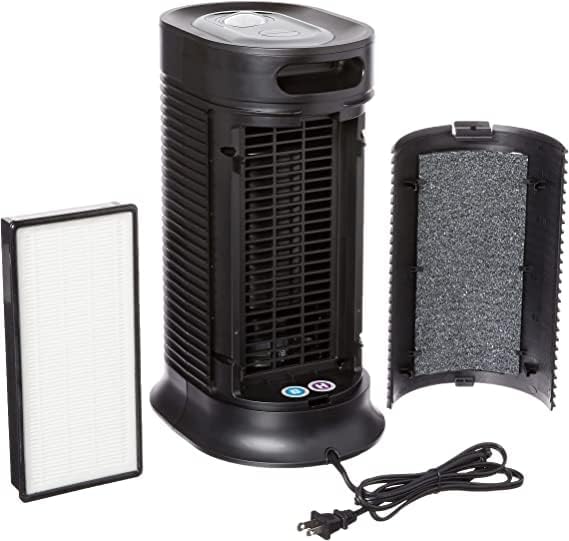
Image: The Honeywell HPA060 Air Purifier with its front panel removed, displaying the internal HEPA filter and the activated carbon pre-filter.
Setup
1. Placement
Place the air purifier on a firm, level surface. For optimal performance, position the unit in an area with good air circulation, ideally near an inlet or doorway where dust and allergens are likely to enter the room. Avoid placing it directly against walls or furniture that might obstruct airflow.

Image: The Honeywell HPA060 Air Purifier positioned in a room, demonstrating suitable placement for effective air purification.
2. Filter Installation
Your air purifier comes with filters pre-installed. Before first use, ensure all packaging materials are removed from the filters. To access the filters:
- Press the release button on the top rear of the unit to open the front grille.
- Remove the pre-filter and HEPA filter.
- Remove any plastic packaging from the filters.
- Reinsert the HEPA filter first, followed by the pre-filter.
- Close the front grille until it clicks securely into place.

Image: A detailed cutaway view of the Honeywell HPA060 Air Purifier, illustrating the internal components including the fan and the multi-layered filtration system.
Operating Instructions
The control panel is located on the top of the unit. It features a back-lit manual control knob and indicator lights.

Image: Close-up of the Honeywell HPA060 Air Purifier's control panel, showing the manual control knob and various settings.
1. Power On/Off
Press the Power button (usually a circular button with a vertical line and dot) to turn the unit on or off.
2. Cleaning Levels
The unit offers three cleaning levels. Rotate the manual control knob to select your desired setting:
- Sleep/Low: Quiet operation for nighttime use.
- General/Medium: Standard cleaning for everyday use.
- Max/High: Maximum air purification for faster cleaning.
3. Oscillation
This model features an oscillation function to distribute purified air more widely. Press the oscillation button (often indicated by a circular arrow icon) to activate or deactivate this feature.
4. Timer
Set the timer to automatically turn off the air purifier after a specified duration (e.g., 2, 4, or 8 hours). Press the timer button (clock icon) repeatedly to cycle through the available settings.
Maintenance
1. Filter Check/Reset Light
The air purifier is equipped with a filter check/reset light. When this light illuminates, it indicates that the filters may need cleaning or replacement. After cleaning or replacing the filters, press and hold the "Reset" button until the light turns off to reset the filter monitor.
2. Cleaning the Pre-Filter
The activated carbon pre-filter is washable. It is recommended to clean the pre-filter regularly to maintain optimal performance. Gently vacuum the pre-filter to remove large particles or hand wash it with mild soap and water. Ensure it is completely dry before reinserting.
3. Replacing the HEPA Filter
The Certified Honeywell HEPA Filter is not washable and should be replaced periodically, typically every 6-12 months depending on usage and air quality. Always use Genuine Honeywell replacement filters for optimal performance.
Troubleshooting
| Problem | Possible Cause | Solution |
|---|---|---|
| Unit does not turn on | Not plugged in; Power outage; Front grille not securely closed. | Ensure unit is plugged into a working outlet; Check circuit breaker; Close front grille until it clicks. |
| Reduced airflow or poor purification | Clogged filters. | Clean or replace filters as indicated by the filter check light. |
| Unusual noise | Obstruction in fan; Unit not on a level surface. | Unplug and check for obstructions; Place on a stable, level surface. |
Specifications
- Model Number: HPA060
- Brand: Honeywell
- Color: Black
- Product Dimensions: 9.88"D x 12.99"W x 17.52"H
- Item Weight: 9.3 pounds
- Recommended Room Size: Up to 75 sq ft (air changes 4.8x/hour) or 360 ft² (air changes 1x/hour)
- Filter Type: HEPA Filter (captures 99.97% of 0.3 microns and larger), Activated Carbon Pre-Filter
- Contaminant Filtration: Dust, pollen, pet dander, dust-mite debris, smoke
- Controller Type: Button Control / Manual Control Knob
- Special Feature: Manual, ENERGY STAR Qualified
- UPC: 809394440870, 929262006028, 092926200619, 092926200602
Warranty and Support
This Honeywell Air Purifier comes with a 5-year limited warranty. For warranty claims, technical support, or to purchase genuine replacement filters, please refer to the contact information provided in your product packaging or visit the official Honeywell website.
Manufactured by Helen of Troy.