
1. Introduction
This manual provides essential instructions for the safe and efficient operation of your Panasonic KX-TG6823 Cordless DECT Telephone System. This system includes multiple handsets and a base unit, offering features such as an integrated answering machine, caller ID, and advanced call management functions. Please read this manual thoroughly before using your new telephone system.
2. Package Contents
Verify that your package contains the following items:
- Cordless phone with 3 handsets
- Base unit
- Power adapter for the base unit
- Telephone line cord
- Rechargeable AAA batteries (2 per handset)
- User manual (this document)
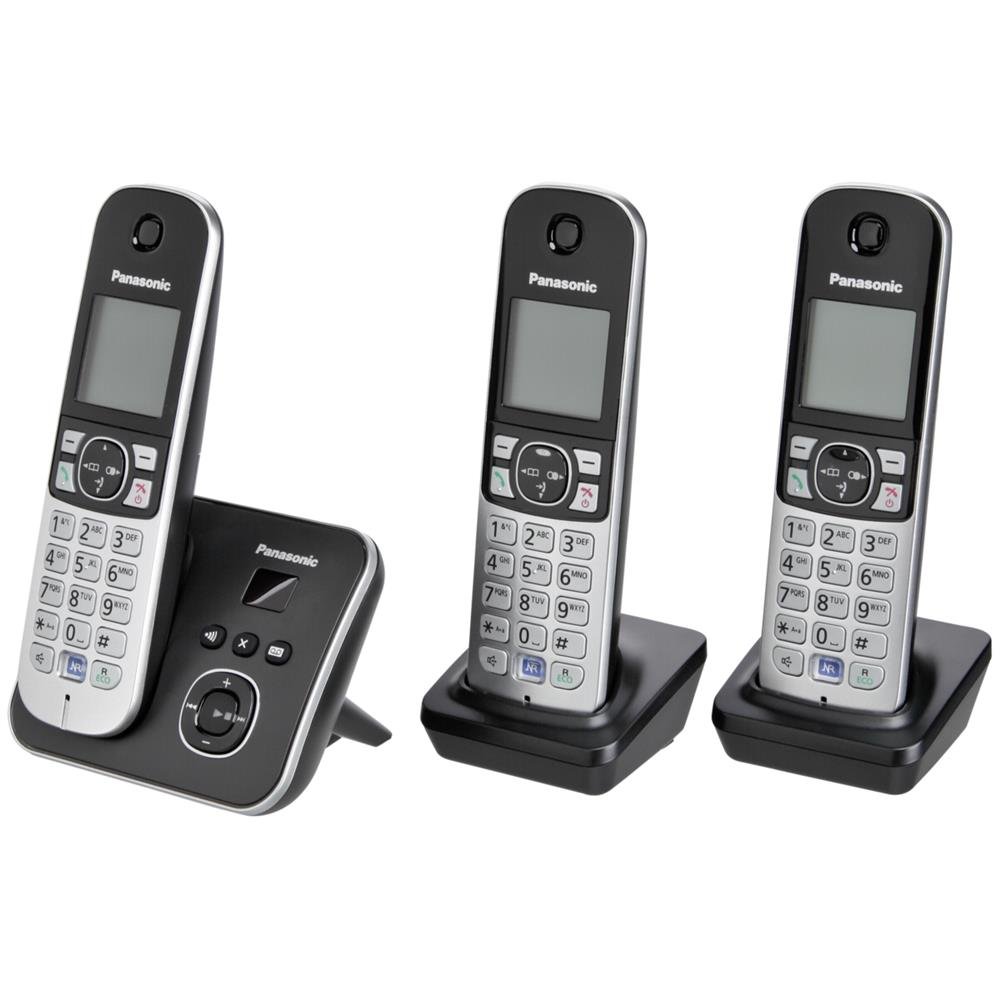
Image: The Panasonic KX-TG6823 cordless phone system, showing the base unit and three handsets.
3. Setup
3.1. Battery Installation
- Open the battery compartment cover on the back of each handset.
- Insert the two AAA rechargeable batteries, observing the correct polarity (+ and -).
- Close the battery compartment cover securely.
- Place each handset on its respective charger or the base unit to charge for at least 7 hours before initial use.
3.2. Base Unit Connection
- Connect the power adapter to the base unit and plug it into a standard electrical outlet.
- Connect one end of the telephone line cord to the base unit and the other end to your telephone wall jack.
3.3. Handset Registration
Handsets are typically pre-registered to the base unit. If a handset displays "Unregistered" or you purchase an additional handset, follow these steps:
- On the base unit, press and hold the LOCATOR/INTERCOM button for approximately 5 seconds until the registration tone sounds.
- On the handset, press the MENU button, then navigate to Initial Setting > Registration > Register Handset.
- Enter the system PIN (default is 0000) and press OK.
- Once registered, the handset will display its assigned number.
3.4. Date and Time Setting
Setting the correct date and time is important for the answering machine and caller ID functions.
- Press MENU on any handset.
- Navigate to Initial Setting > Date & Time.
- Enter the current date and time using the keypad.
- Press SAVE or OK to confirm.
4. Operating Instructions
4.1. Making and Receiving Calls
- To make a call: Press the TALK button, then dial the number. Alternatively, dial the number first, then press TALK.
- To receive a call: Press the TALK button when the phone rings.
- To end a call: Press the END button or place the handset back on the base unit/charger.
- Speakerphone: During a call, press the SPEAKERPHONE button to activate hands-free mode.

Image: A close-up view of the Panasonic KX-TG6823 handset, highlighting its large graphic display and keypad for easy operation.
4.2. Answering Machine
The integrated answering machine can record messages when you are unavailable.
- Activating/Deactivating: Press the ANSWER ON/OFF button on the base unit.
- Playing messages: Press the PLAY button on the base unit or navigate to Answering Machine > Play Messages on a handset.
- Recording your greeting: Navigate to Answering Machine > Greeting > Record Greeting on a handset.
4.3. Caller ID
The phone displays the caller's number and name (if available and subscribed to Caller ID service).
- Viewing Caller List: Press the CALLER ID button or navigate to Caller List on a handset.
- Calling back: Select an entry from the Caller List and press TALK.
4.4. Noise Reduction
During a call, press the dedicated Noise Reduction button on the handset to reduce background noise for clearer conversations.
4.5. Smart Button Functions
The Smart Button offers quick access to various features:
- Answering calls: Press the Smart Button to answer an incoming call.
- Snooze alarm: When the alarm sounds, press the Smart Button to activate the snooze function.
4.6. Night Mode and Call Blocking
- Night Mode: Configure specific times when the handset will not ring, allowing for undisturbed sleep. Calls will still be recorded by the answering machine.
- Call Blocking: Block unwanted numbers by adding them to a call block list. This feature helps prevent nuisance calls.
5. Maintenance
- Cleaning: Wipe the phone and base unit with a soft, dry cloth. Avoid using abrasive cleaners or solvents.
- Battery Care: Use only the specified rechargeable AAA batteries. Replace batteries when their performance significantly degrades. Do not dispose of batteries in fire.
- Environmental Conditions: Avoid exposing the phone to direct sunlight, excessive moisture, or extreme temperatures.
6. Troubleshooting
6.1. No Dial Tone
- Ensure the telephone line cord is securely connected to both the base unit and the wall jack.
- Check if other phones on the same line are working.
6.2. Handset Not Charging
- Verify the handset is correctly seated in the charger or base unit.
- Ensure the power adapter for the base unit/charger is plugged in.
- Check the battery contacts on the handset and charger for cleanliness.
6.3. Poor Call Quality / Static
- Move closer to the base unit.
- Avoid placing the base unit near other electronic devices that may cause interference (e.g., microwaves, Wi-Fi routers).
- Ensure the noise reduction feature is activated if needed.
6.4. Answering Machine Not Recording
- Check if the answering machine is turned ON.
- Ensure there is sufficient recording capacity available.
- Verify the date and time are set correctly.
7. Specifications
| Feature | Specification |
|---|---|
| Brand | Panasonic |
| Model Number | KX-TG6823GB |
| Telephone Type | Cordless DECT |
| Answering System Type | Digital |
| Recording Capacity | 5 Minutes |
| Display | Large 4.5 cm (1.8 Inch) Graphics Display |
| Caller ID | Yes |
| Conference Call Capability | 3-way |
| Multiline Operation | Multi-Line Operation |
| Phone Talk Time | 6 Hours |
| Phone Standby Time | 170 Hours |
| Power Source | Battery Powered (2x AAA per handset) |
| Item Weight | 2.2 Pounds (total package) |
| Item Dimensions (L x W x H) | 9.33 x 6.14 x 4.84 inches |
8. Warranty and Support
Your Panasonic KX-TG6823 telephone system is covered by a limited warranty. For specific warranty terms and conditions, please refer to the warranty card included in your original packaging or visit the official Panasonic support website. For technical assistance, troubleshooting, or service inquiries, please contact Panasonic customer support.
You can find more information and support resources on the official Panasonic website: www.panasonic.com


