Introduction
This manual provides comprehensive instructions for the operation and maintenance of your Casio G-Shock GD-350-1B watch. Designed for durability and functionality, this timepiece is equipped with advanced features to support various activities and environments.
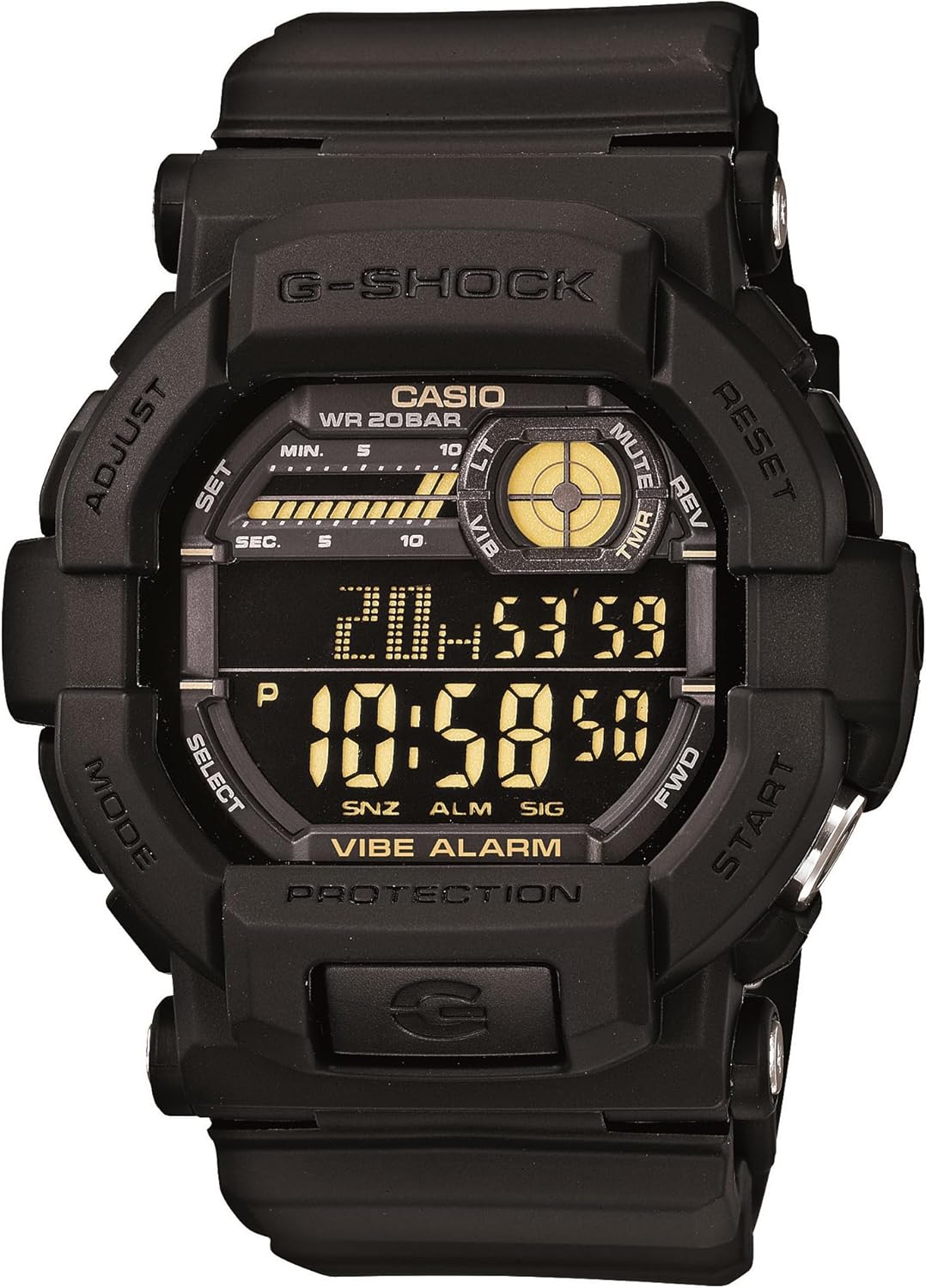
Figure 1: Front view of the Casio G-Shock GD-350-1B watch, displaying its digital interface and robust design.
The GD-350-1B is engineered for demanding conditions, featuring a large, easily identifiable timer button for quick operation, even under stress. It offers versatile alert options, including vibration and a tone-plus-LED flash, ensuring you are notified without disturbing others. The watch's shock-absorbing design enhances vibration perception on the wrist, and its high-luminance LED backlight can be configured for various durations, with an Auto Light feature for convenient reading in low light.
Key Features
- Silent Vibration Alerts: Ideal for covert missions or loud environments, choose between vibration or LED+tone alerts for timers and alarms.
- Shock Resistant & 200M Water Resistance: Built tough with G-SHOCK’s legendary durability, ready for rugged conditions and underwater use.
- Dedicated Timer Button: Large and easy-to-identify button allows quick activation, even under stress or while wearing gloves.
- Super Illuminator LED Backlight: High-luminance backlight with auto-light and adjustable duration ensures excellent visibility in darkness.
- Extended 5-Year Battery Life: Powered by a CR2032 battery for long-term reliability without frequent replacements.
- World Time: Displays current time in major cities and specific areas around the world.
- Multiple Alarms: Set up to five independent daily alarms.
- 1/100 Second Stopwatch: Precise timing for various activities.
- Countdown Timer: Set a countdown from a specified time.
Initial Setup
Battery Installation (If Required)
The Casio G-Shock GD-350-1B uses one CR2032 battery. While typically pre-installed, if replacement is needed, carefully remove the four screws on the back plate to access the battery compartment. Ensure proper polarity when inserting the new battery.
Setting the Time and Date
- In Timekeeping Mode, press and hold the ADJUST button (top-left) until the city code starts to flash.
- Use the FORWARD (top-right) and REVERSE (bottom-right) buttons to select your desired city code (time zone).
- Press the MODE button (bottom-left) to cycle through the settings: DST (Daylight Saving Time), 12/24-hour format, Seconds, Hour, Minute, Year, Month, Day.
- Use the FORWARD and REVERSE buttons to adjust each setting.
- Once all settings are correct, press the ADJUST button to exit the setting mode.
Operating Instructions
Navigating Modes
Press the MODE button (bottom-left) to cycle through the watch's different modes: Timekeeping, World Time, Alarm, Stopwatch, and Countdown Timer.
Timekeeping Mode
This is the default mode, displaying the current time, day of the week, and date. The small circular display at the top-right indicates the Vibe Alarm status and other indicators.
World Time Mode
In World Time Mode, you can view the current time in 48 cities (31 time zones) around the globe. Use the FORWARD (top-right) or REVERSE (bottom-right) buttons to scroll through city codes.
Alarm Mode
The watch features 5 independent daily alarms (AL1 to AL5) and an hourly time signal (SIG). To set an alarm:
- In Alarm Mode, use the FORWARD or REVERSE buttons to select the alarm number (AL1-AL5) or SIG.
- Press and hold the ADJUST button until the hour setting flashes.
- Use the FORWARD or REVERSE buttons to set the hour and minute.
- Press the ADJUST button to save.
- To toggle an alarm ON/OFF, press the START button (bottom-right) while the alarm is selected.
You can choose between a tone or vibration alert for alarms. To switch: In Alarm Mode, press and hold the START button for about 2 seconds to toggle between tone and vibration. The "VIBE ALARM" indicator will appear on the display when vibration is active.
Stopwatch Mode
The stopwatch measures elapsed time, split times, and two finishes. It has a capacity of 23 hours, 59 minutes, 59.99 seconds.
- Press START to begin/stop timing.
- Press RESET (top-right) to reset to zero.
Countdown Timer Mode
The countdown timer can be set from 1 minute to 24 hours. A dedicated large button (bottom-right, labeled START) provides quick access to the timer function.
- In Countdown Timer Mode, press and hold ADJUST until the hour setting flashes.
- Use FORWARD or REVERSE to set the desired countdown time.
- Press ADJUST to save.
- Press START to begin/pause the countdown.
- When the countdown reaches zero, the watch will alert you with your selected alert type (tone or vibration).
Quick Timer Start: From Timekeeping Mode, press the large START button (bottom-right) to instantly start the countdown timer with its last set value.
Backlight (Super Illuminator LED)
Press the LIGHT button (bottom-center, below the display) to illuminate the display. The high-luminance LED can be configured to light for one, three, or five seconds.
Auto Light Feature: The Auto Light feature causes the face to illuminate whenever the watch is tilted towards the face for reading in low-light conditions. This feature can be enabled or disabled in the watch's settings.
Video: Overview of the Casio Men's GD350-1B G Shock Black Watch, demonstrating its features and design.
Maintenance
Battery Replacement
The GD-350-1B is designed for an extended 5-year battery life using a CR2032 battery. When the display dims or functions become erratic, it may be time to replace the battery. It is recommended to have battery replacement performed by a qualified watch technician to ensure water resistance integrity.
Cleaning
Regularly clean your watch with a soft, damp cloth to remove dirt and grime. For stubborn dirt, a mild soap solution can be used, followed by rinsing with clean water and thorough drying. Avoid using harsh chemicals or abrasive materials.
Water Resistance (200M WR)
Your G-Shock GD-350-1B is water resistant to 200 meters (20 BAR), making it suitable for swimming, showering, and recreational diving. Do not operate buttons while the watch is submerged in water to prevent water ingress. After exposure to saltwater, rinse the watch thoroughly with fresh water and dry it completely.
Troubleshooting
- Blank or Dim Display: Check battery level. Replace the CR2032 battery if low.
- Buttons Unresponsive: Ensure the watch is not in a locked mode (if applicable, though this model doesn't have a specific lock). Try resetting the watch by pressing all four buttons simultaneously (refer to full manual for specific reset procedures if needed).
- Incorrect Time/Date: Re-enter Timekeeping Mode and adjust settings as per "Initial Setup" section. Ensure correct time zone and DST settings.
- Vibration/Tone Alert Not Working: Verify that the alarm is set to ON and the desired alert type (vibration or tone) is selected in Alarm Mode.
- Auto Light Not Activating: Check if the Auto Light feature is enabled in the watch settings. Ensure sufficient tilt angle for activation.
For persistent issues, please refer to the full Casio G-Shock GD-350-1B detailed manual or contact Casio customer support.
Specifications
| Feature | Detail |
|---|---|
| Model Number | GD-350-1BCR |
| Dimensions | 1 x 1 x 1 inches |
| Weight | 2.43 ounces |
| Water Resistance | 200M (20 BAR) |
| Battery Type | CR2032 (included) |
| Battery Life | Approx. 5 years |
| Display Type | Digital |
| Backlight | Super Illuminator LED |
| Special Features | Vibration Alarm, Shock Resistant, Dedicated Timer Button, World Time, Multiple Alarms, Stopwatch, Countdown Timer |
Warranty and Support
This Casio G-Shock watch is covered by a manufacturer's warranty. For detailed warranty information, service, or technical support, please refer to the warranty card included with your product or visit the official Casio website. Keep your purchase receipt as proof of purchase.
For further assistance, you may contact Casio customer service through their official channels.


