
Introduction
This manual provides essential instructions for the setup, operation, maintenance, and troubleshooting of your Panasonic KX-TG6821 cordless phone with an integrated answering machine. Please read this manual thoroughly before using the device to ensure proper functionality and to prevent damage.
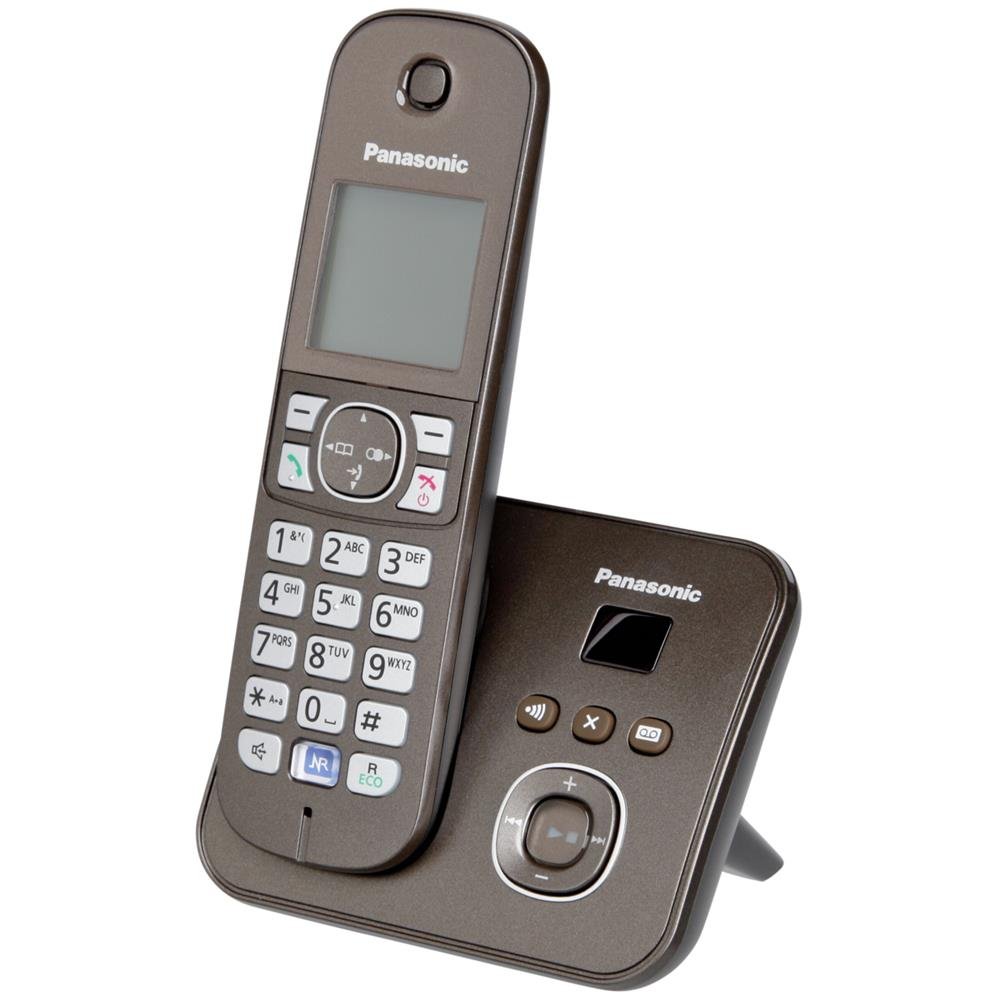
Image: The Panasonic KX-TG6821 cordless phone system, featuring the base unit and a handset.
Setup
1. Unpacking and Component Check
Carefully remove all components from the packaging. Ensure the following items are present:
- Cordless Handset
- Base Unit with Answering Machine
- AC Power Adapter for Base Unit
- Telephone Line Cord
- Rechargeable AAA Batteries (2x)
- Handset Cover
2. Battery Installation
- Remove the handset cover by sliding it downwards.
- Insert the two supplied AAA rechargeable batteries, observing the correct polarity (+ and -).
- Replace the handset cover.

Image: A close-up view of the Panasonic KX-TG6821 handset, showing the keypad and screen.
3. Base Unit Connection
- Connect the AC power adapter to the base unit and plug it into a standard electrical outlet.
- Connect the telephone line cord to the base unit and then to your telephone wall jack.
4. Initial Battery Charge
Place the handset on the base unit. The handset will begin charging. For optimal battery performance, allow the handset to charge for at least 7 hours before its first use.

Image: The Panasonic KX-TG6821 handset correctly placed in its charging base unit.
Operating Instructions
1. Making and Receiving Calls
- To Make a Call: Lift the handset from the base or press the TALK button. Dial the desired phone number.
- To Receive a Call: When the phone rings, lift the handset or press the TALK button.
- To End a Call: Place the handset back on the base unit or press the END button.
2. Using the Answering Machine
The integrated digital answering machine has a recording capacity of 17 minutes.
- Activating/Deactivating: Press the ANSWER ON/OFF button on the base unit.
- Playing Messages: Press the PLAY button on the base unit or access the answering machine menu from the handset.
- Recording Your Greeting: Follow the instructions in the handset menu under 'Answering Machine Settings'.
3. Phonebook Function
The phonebook can store up to 120 entries.
- Adding an Entry: Navigate to the 'Phonebook' menu on the handset, select 'Add New Entry', and follow the prompts to enter the name and number.
- Dialing from Phonebook: Press the PHONEBOOK button, scroll to the desired entry, and press TALK.
4. Caller ID
When a call is received, the caller's information (if available and subscribed to Caller ID service) will be displayed on the handset screen.
- Viewing Call Log: Press the CALL LOG button to view a list of recent incoming calls.
5. Speakerphone
During a call, press the SPEAKERPHONE button to activate the hands-free function. Press it again to return to handset mode.

Image: A person holding and using a cordless phone handset.
Maintenance
1. Cleaning
Wipe the handset and base unit with a soft, damp cloth. Do not use abrasive cleaners, solvents, or strong chemicals, as these can damage the surfaces.
2. Battery Care
- Always use the supplied rechargeable AAA batteries.
- If the phone will not be used for an extended period, remove the batteries from the handset.
- Dispose of old batteries according to local regulations.
3. Storage
Store the phone in a cool, dry place away from direct sunlight and extreme temperatures.
Troubleshooting
| Problem | Possible Cause | Solution |
|---|---|---|
| No dial tone | Telephone line cord is disconnected. | Ensure the telephone line cord is securely connected to the base unit and the wall jack. |
| Handset not charging | Handset not properly seated on the base unit; dirty charging contacts. | Reseat the handset. Clean the charging contacts on both the handset and base unit with a dry cloth. |
| Poor sound quality | Handset is too far from the base unit; interference. | Move closer to the base unit. Avoid placing the base unit near other electronic devices. |
| Answering machine not recording | Answering machine is off; memory is full. | Ensure the answering machine is turned on. Delete old messages to free up memory. |
Specifications
- Brand: Panasonic
- Model Number: KX-TG6821GA
- Color: Brown Mocca
- Phone Type: Cordless
- Batteries: 2 AAA rechargeable (included)
- Material: Metal
- Power Source: Battery Powered
- Dialer Type: Single Keypad
- Dimensions (L x W x H): 18.7 x 13.1 x 9.8 cm
- Answering System Type: Digital
- Item Weight: 280 Grams
- Compatible Devices: PSTN, VoIP
- Talk Time: 5 Hours
- Recording Capacity: 17 Minutes
- Conference Call Capacity: Basic
- Multi-line Operation: Yes
- Standby Time: 170 Hours
- Caller ID: Yes
Warranty and Support
For warranty information, please refer to the warranty card included with your product or visit the official Panasonic website. For technical support, product registration, or to find service centers, please visit the Panasonic support page or contact their customer service directly.
Official Panasonic Website: www.panasonic.com