1. Introduction
This manual provides detailed instructions for the safe and efficient operation of your Majestic AH239K Portable 2.1 Multimedia Audio System. Please read this manual thoroughly before using the device and retain it for future reference.
The Majestic AH239K is a versatile portable audio system featuring an internal rechargeable battery, two side speakers, and a front subwoofer. It includes AUX, USB, and SD card inputs for various audio sources, two microphone inputs, and comes with one microphone and a remote control. Enjoy FM PLL radio with 50 preset stations and an LED display for clear function visualization.
2. Safety Information
- Power Source: Use only the specified power adapter for charging. Ensure the voltage is compatible.
- Water and Moisture: Do not expose the device to rain, moisture, or immerse it in water.
- Ventilation: Ensure proper ventilation. Do not block any ventilation openings.
- Heat: Keep the device away from heat sources such as radiators, heat registers, stoves, or other apparatus that produce heat.
- Cleaning: Unplug the device before cleaning. Use a dry, soft cloth. Do not use liquid cleaners or aerosol cleaners.
- Servicing: Do not attempt to service this product yourself. Refer all servicing to qualified service personnel.
- Battery Safety: The device contains a rechargeable battery. Do not expose to excessive heat or direct sunlight. Dispose of batteries according to local regulations.
3. Package Contents
Please check that all items are present:
- Majestic AH239K Micro Hi-Fi System
- 1 x Microphone
- 1 x Remote Control
- User Manual (this document)
- Power Adapter (may vary by region)
4. Product Overview
Familiarize yourself with the components and controls of your Majestic AH239K system.

Figure 4.1: Front view of the Majestic AH239K Micro Hi-Fi System, showing the main speaker, LED display, control knobs, and microphone inputs. The included microphone is positioned next to the unit.

Figure 4.2: Side view of the Majestic AH239K, highlighting one of the two side speakers.

Figure 4.3: Rear view of the Majestic AH239K, displaying the battery compartment cover and additional ports.
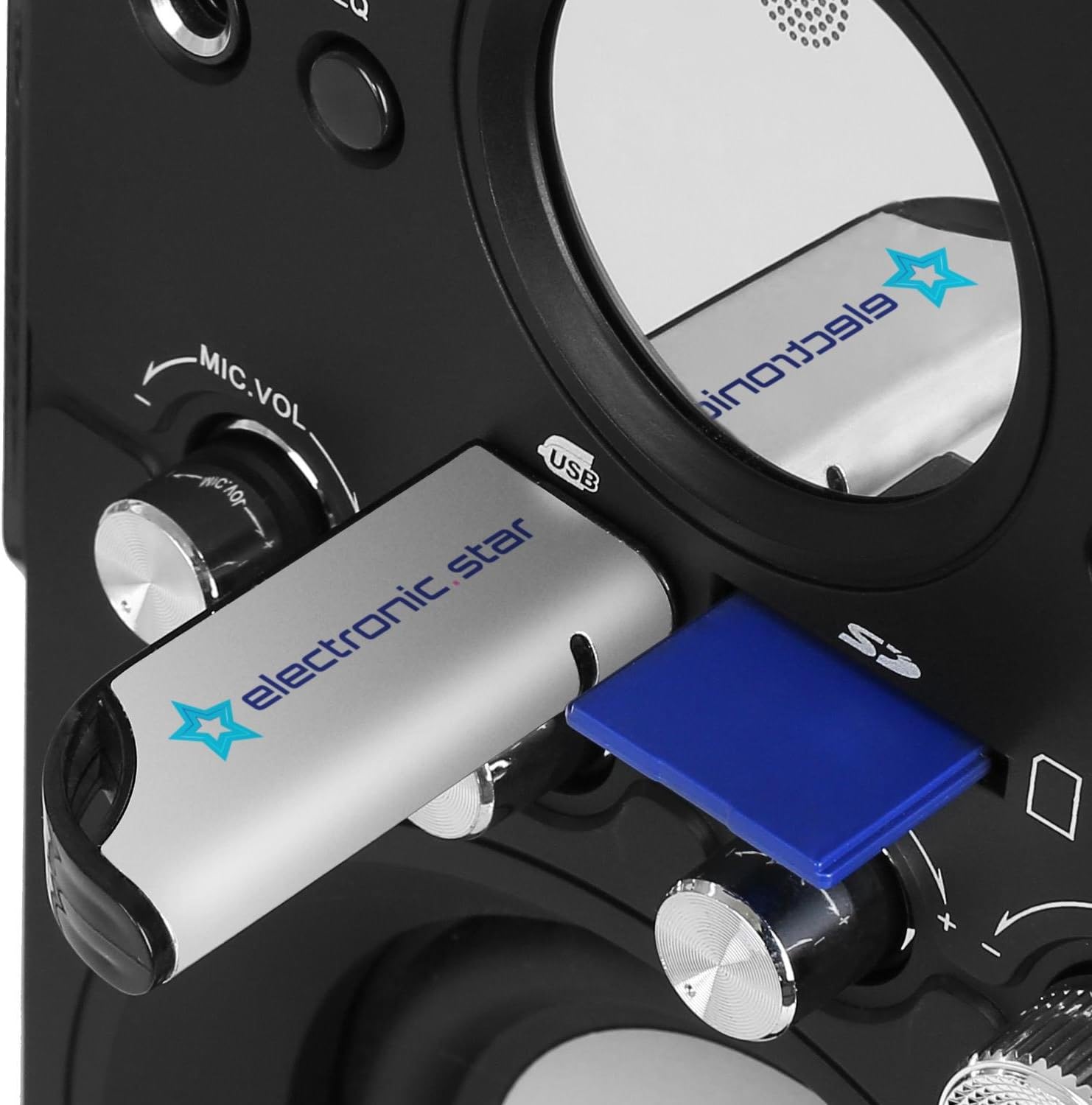
Figure 4.4: Close-up view of the USB port and SD card slot, located on the front panel for easy access.

Figure 4.5: The included remote control, featuring power, mode, EQ, playback, volume, mute, and number buttons.
Front Panel Controls:
- MIC1 / MIC2: Microphone input jacks.
- MODE: Button to switch between input sources (FM, AUX, USB, SD).
- EQ: Equalizer preset button.
- Play/Pause (►/‖): Play or pause audio playback.
- Previous (◀◀): Skip to the previous track/station.
- Next (►►): Skip to the next track/station.
- MIC.VOL: Microphone volume control knob.
- BASS: Bass level adjustment knob.
- TREBLE: Treble level adjustment knob.
- VOLUME: Master volume control knob.
- USB Port: For connecting USB flash drives.
- SD Card Slot: For inserting SD memory cards.
- LED Display: Shows current mode, track number, frequency, etc.
5. Setup
5.1. Charging the Battery
- Connect the power adapter to the DC IN port on the rear of the unit.
- Plug the power adapter into a suitable wall outlet.
- The LED display will indicate charging status. Allow sufficient time for a full charge before first use (typically 3-4 hours).
5.2. Powering On/Off
- To power on the unit, rotate the VOLUME knob clockwise until it clicks and the LED display illuminates.
- To power off, rotate the VOLUME knob counter-clockwise until it clicks and the LED display turns off.
5.3. Connecting the Microphone
- Insert the microphone cable into either the MIC1 or MIC2 jack on the front panel.
- Ensure the microphone is switched to the 'ON' position if it has a power switch.
6. Operating Instructions
6.1. Selecting Input Mode
Press the MODE button repeatedly to cycle through available input sources: FM Radio, AUX, USB, and SD. The current mode will be displayed on the LED screen.
6.2. USB/SD Card Playback
- Insert a USB flash drive into the USB port or an SD card into the SD card slot.
- The system will automatically switch to USB or SD mode and begin playing compatible audio files (e.g., MP3). If not, press the MODE button to select the correct source.
- Use the Play/Pause, Previous, and Next buttons to control playback.
6.3. FM Radio Operation
- Switch to FM mode using the MODE button.
- To auto-scan and save stations: Press and hold the Play/Pause button. The system will scan for available FM stations and save them as presets.
- To manually tune or select presets: Use the Previous and Next buttons to navigate through saved stations or fine-tune the frequency.
6.4. AUX Input
- Connect an external audio device (e.g., smartphone, tablet, CD player) to the AUX IN port using a 3.5mm audio cable (not included).
- Switch to AUX mode using the MODE button.
- Control playback from your connected external device.
6.5. Microphone Use
- Once the microphone is connected (as per Section 5.3), adjust the microphone volume using the MIC.VOL knob.
- Adjust the master volume using the VOLUME knob.
6.6. Using the Remote Control
The remote control provides convenient access to various functions:
- Power Button: Turns the unit on or off.
- MODE: Switches input sources.
- EQ: Cycles through equalizer presets.
- Playback Controls: Play/Pause, Previous, Next.
- VOL+ / VOL-: Adjusts the master volume.
- Mute: Mutes or unmutes the audio.
- Number Buttons (0-9): For direct track selection in USB/SD mode or direct station selection in FM mode.
7. Maintenance
7.1. Cleaning
- Always unplug the device from the power source before cleaning.
- Use a soft, dry cloth to wipe the exterior surfaces.
- Do not use abrasive cleaners, waxes, or solvents as they may damage the finish.
7.2. Battery Care
- To prolong battery life, avoid fully discharging the battery frequently.
- If the unit will not be used for an extended period, charge it periodically (e.g., every 3 months) to maintain battery health.
8. Troubleshooting
| Problem | Possible Cause | Solution |
|---|---|---|
| No power | Battery is discharged; Power adapter not connected; Unit is off. | Charge the battery; Connect the power adapter; Turn the VOLUME knob clockwise to power on. |
| No sound | Volume is too low; Mute function is active; Incorrect input mode selected; External device not playing. | Increase VOLUME; Press Mute on remote; Select correct MODE; Ensure external device is playing. |
| Microphone not working | Microphone not connected properly; MIC.VOL is too low; Microphone is off. | Ensure microphone is fully plugged in; Increase MIC.VOL; Switch microphone to 'ON'. |
| USB/SD playback issues | Incorrect file format; USB/SD card not inserted correctly; Corrupted files. | Ensure files are MP3 format; Re-insert USB/SD card; Try a different USB/SD card or files. |
| Remote control not working | Battery is dead or inserted incorrectly; Obstruction between remote and unit; Remote too far. | Replace remote battery; Remove obstructions; Operate remote within range. |
9. Specifications
- Model Number: 100239_BK
- Brand: Majestic
- Product Dimensions (L x W x H): 14.5 x 16.2 x 26.5 cm
- Product Weight: 2.5 kg
- Connectivity Technology: AUX, USB
- Connector Type: Auxiliary, USB
- Compatible Devices: USB, SD, CD players, MP3 players
- Number of Channels: 2.1 (Two side speakers, one front subwoofer)
- Color: Black
- UPC: 8000191808050
10. Warranty and Support
This product is covered by a standard manufacturer's warranty. For specific warranty terms and conditions, please refer to the warranty card included with your purchase or contact your retailer.
For technical support or service inquiries, please contact the Majestic customer service department through your point of purchase or visit the official Majestic website for contact information.


