
1. Introduction
This manual provides detailed instructions for the safe and effective operation of the Lutron FC-2500A Frequency Counter. The FC-2500A is a precision instrument designed for accurate frequency measurement in various industrial and scientific applications. Please read this manual thoroughly before using the device to ensure proper functionality and to prevent damage.
2. Safety Information
To ensure safe operation and to avoid personal injury or damage to the instrument, please observe the following safety precautions:
- Always read and understand all instructions before operating the device.
- Do not operate the device in wet or damp conditions.
- Ensure proper battery installation and replacement. Use only the specified battery type.
- Avoid exposing the device to extreme temperatures, direct sunlight, or strong vibrations.
- Do not attempt to open or modify the device. Refer all servicing to qualified personnel.
3. Product Overview
3.1 Description
The Lutron FC-2500A is a versatile frequency counter manufactured by Lutron Electronic Enterprise Co., Ltd., a recognized leader in test and measurement instruments. This device is engineered for precise frequency measurements across a broad range, making it suitable for various professional applications.
3.2 Key Features
- Weight: Approximately 340 g (0.75 lb) including batteries.
- Dimensions: 173 x 80 x 35 mm (6.8 x 3.1 x 1.4 inches).
- Wide frequency measurement range.
- Multiple input channels for different frequency ranges.
- Adjustable gate time and sensitivity.
- Data hold, record, and recall functions.
- Relative measurement and resolution adjustment capabilities.
3.3 Components
The standard package for the Lutron FC-2500A Frequency Counter includes:
- 1 x FC-2500A Frequency Counter unit.
- User Manual (this document).
Note: Additional accessories such as probes, antennas, and batteries may be sold separately.
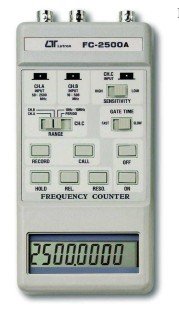
Figure 1: Front panel of the Lutron FC-2500A Frequency Counter. This image displays the front panel of the FC-2500A, highlighting the digital display, BNC input connectors for different frequency ranges (CHA, CHB, CH.C), and various control buttons for range selection, sensitivity, gate time, record, call, hold, relative measurement, resolution, and power (ON/OFF).
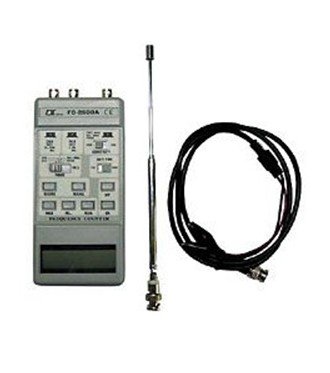
Figure 2: Lutron FC-2500A Frequency Counter with accessories. This image shows the FC-2500A unit alongside its typical accessories, including a telescopic antenna for signal reception and a BNC coaxial cable for direct signal input.
4. Setup
4.1 Battery Installation
The FC-2500A requires four (4) 1.5V AA batteries for operation. To install or replace batteries:
- Locate the battery compartment cover on the back of the unit.
- Slide or unclip the cover to open the compartment.
- Insert four AA batteries, ensuring correct polarity (+ and - terminals match the markings inside the compartment).
- Replace the battery compartment cover securely.
Note: Batteries are not included with the device.
4.2 Connecting Probes or Antenna
Connect the appropriate probe, antenna, or BNC cable to the input jacks (CHA, CHB, CH.C) on the top of the unit. Select the input based on the frequency range and signal type you intend to measure.
- CHA Input: Typically for higher frequency ranges (e.g., 50 MHz to 2.5 GHz).
- CHB Input: Typically for mid-range frequencies (e.g., 10 MHz to 100 MHz).
- CH.C Input: Typically for lower frequencies or specific applications.
5. Operating Instructions
5.1 Power On/Off
Press the 'ON' button to power on the device. The LCD will illuminate and display a reading. To power off the device, press the 'OFF' button.
5.2 Input and Range Selection
- Select the appropriate input channel (CHA, CHB, or CH.C) using the dedicated input selection buttons, corresponding to the expected frequency range of your signal.
- Use the 'RANGE' buttons to fine-tune the measurement range for optimal accuracy.
5.3 Sensitivity Adjustment
Adjust the 'SENSITIVITY' switch (HIGH/LOW) to optimize signal reception. Use 'HIGH' for weaker signals and 'LOW' for stronger signals to prevent false triggering or unstable readings.
5.4 Gate Time Selection
Select 'FAST' or 'SLOW' gate time using the 'GATE TIME' switch. A longer gate time ('SLOW') generally provides higher resolution and accuracy but takes longer to update the display. 'FAST' provides quicker updates with potentially lower resolution.
5.5 Taking Measurements
Once the input, range, sensitivity, and gate time are configured, the frequency of the input signal will be displayed on the LCD. Ensure the probe or antenna is correctly positioned to receive the signal.
5.6 Special Functions
- HOLD: Press the 'HOLD' button to freeze the current reading on the display. Press again to release.
- RECORD/CALL: Use the 'RECORD' button to store readings in memory. Press 'CALL' to recall stored data.
- REL (Relative Measurement): Press 'REL' to measure the difference between the current reading and a stored reference value.
- RESO. (Resolution): Adjust the display resolution using the 'RESO.' button to show more or fewer decimal places.
6. Maintenance
6.1 Cleaning
Clean the device with a soft, dry cloth. Do not use abrasive cleaners, solvents, or harsh chemicals, as these can damage the casing or internal components.
6.2 Battery Replacement
Replace the batteries when the low battery indicator appears on the display or when the device does not power on. Always replace all four batteries simultaneously with new ones of the same type.
6.3 Storage
When not in use for extended periods, remove the batteries to prevent leakage. Store the device in a cool, dry place away from direct sunlight, extreme temperatures, and high humidity.
7. Troubleshooting
If you encounter issues with your FC-2500A, refer to the following common troubleshooting steps:
- Device not powering on: Check battery installation and ensure batteries are not depleted. Replace with fresh batteries if necessary.
- Inaccurate or unstable readings: Verify correct input connection, range selection, and sensitivity settings. Ensure the signal source is stable and within the device's measurement capabilities. Check for strong electromagnetic interference.
- No display: Check power and battery status. If the display is dim, batteries may be low.
- Buttons unresponsive: Ensure the device is powered on. If still unresponsive, try replacing batteries or restarting the device.
If the problem persists after attempting these steps, contact customer support or a qualified service technician.
8. Specifications
The following table details the technical specifications for the Lutron FC-2500A Frequency Counter:
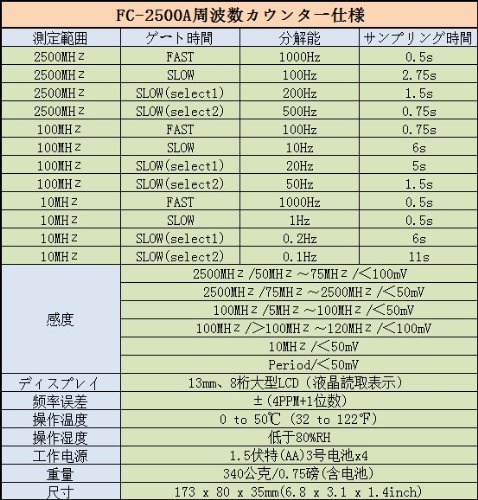
Figure 3: Technical Specifications for Lutron FC-2500A. This image presents a comprehensive table of technical specifications for the FC-2500A. Key details include measurement ranges up to 2500 MHz, various gate time settings (FAST, SLOW), corresponding resolutions (e.g., 100Hz, 10Hz, 1Hz), sampling times, sensitivity levels (e.g., <50mV, <100mV), an 8-digit LCD display, frequency error of ±(4PPM+1 digit), operating temperature of 0 to 50°C, operating humidity below 80% RH, power supply of 4x AA 1.5V batteries, weight of 340g, and dimensions of 173 x 80 x 35mm.
| Parameter | Specification |
|---|---|
| Model Number | FC-2500A |
| Measurement Range | Up to 2500 MHz |
| Display | 8-digit LCD |
| Frequency Error | ±(4 PPM + 1 digit) |
| Operating Temperature | 0 to 50°C (32 to 122°F) |
| Operating Humidity | Less than 80% RH |
| Power Supply | 4 x 1.5V AA batteries |
| Weight | 340 g (0.75 lb) including battery |
| Dimensions (H x W x D) | 173 x 80 x 35 mm (6.8 x 3.1 x 1.4 inches) |
| Included Components | 1 X Frequency Counter |
| Country of Origin | Taiwan |
9. Warranty and Support
For warranty information, technical support, or service inquiries regarding your Lutron FC-2500A Frequency Counter, please refer to the official Lutron website or contact your authorized local distributor. Keep your purchase receipt and product serial number handy for any warranty claims or support requests.


