
Product Overview
The Lutron Diva 600 watt 3-way pre-set rocker/slide dimmer features a large paddle rocker switch and a smaller sliding dimmer switch for precise control over your lighting. This white-finished switch is meant for use with incandescent light bulbs and can be installed in as little as 15 minutes. It matches a number of existing decorator-style switches.

Figure 1: Front view of the Lutron Diva DVCL-153PR-WH Dimmer Switch, showing the large rocker paddle and the smaller dimming slider.
Important Safety Information
Please read and understand all instructions before installing. Improper installation can lead to serious injury or death. Always consult a qualified electrician if you are unsure about any part of the installation process.
- TURN OFF POWER: Before beginning any electrical work, always turn off power at the circuit breaker or fuse box. Verify power is off using a voltage tester.
- GROUNDING: This device requires a ground connection. Ensure your electrical box is properly grounded.
- INDOOR USE ONLY: This dimmer is designed for indoor use in dry locations only.
- COMPATIBILITY: Ensure the dimmer's wattage rating matches or exceeds the total wattage of the connected light bulbs. This model is designed for CFL/LED and incandescent/halogen bulbs.
- DO NOT PAINT: Do not paint the dimmer or wall plate.
What's in the Box
Your Lutron Diva DVCL-153PR-WH Dimmer package should contain the following items:
- One (1) Lutron Diva DVCL-153PR-WH Dimmer Switch
- Wire connectors (wire caps)
- Installation Guide / Instructions

Figure 2: Back view of the dimmer switch, showing the pre-attached wiring leads (black, red, red with white stripe, and green ground wire).
Installation Guide
Before You Begin
- Turn off power at the circuit breaker or fuse box for the light switch you are replacing.
- Remove the existing wall plate and switch.
- Carefully identify the wires in the wall box: hot (line), load (to light), ground, and traveler (if 3-way).
Wiring Instructions
The Lutron Diva dimmer comes with pre-stripped wires for easy connection. Use the provided wire connectors to secure connections.
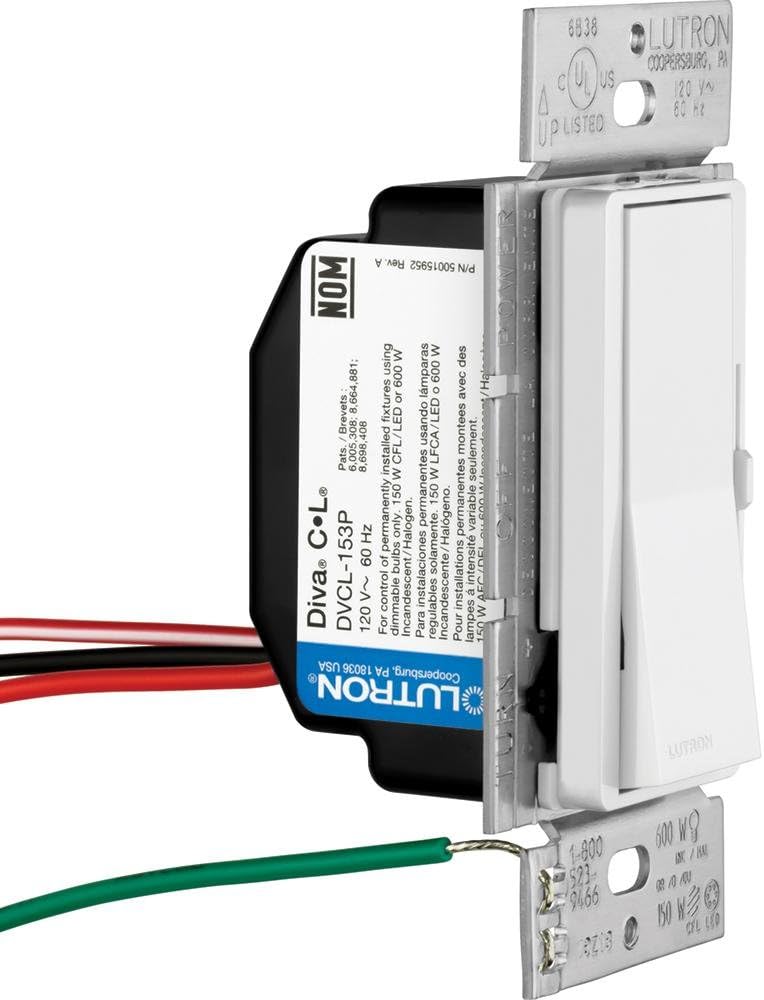
Figure 3: Angled view of the dimmer switch, highlighting the wiring connections.
- Ground Wire: Connect the green wire from the dimmer to the bare copper or green ground wire in the wall box.
- Hot (Line) Wire: Connect one of the black wires from the dimmer to the hot (line) wire from the circuit breaker.
- Load (to Light) Wire: Connect the other black wire from the dimmer to the load wire that goes to the light fixture.
- 3-Way Wiring (if applicable): If installing in a 3-way application, connect the red wire from the dimmer to one of the traveler wires. Connect the red/white stripe wire from the dimmer to the other traveler wire. Ensure the common wire from the other 3-way switch is connected correctly.
- Cap Unused Wires: If not using the 3-way functionality, cap off the red and red/white stripe wires individually with wire connectors.
Completing Installation
- Carefully push all wires back into the wall box.
- Mount the dimmer switch into the wall box using the provided screws.
- Attach the decorative wall plate.
- Restore power at the circuit breaker or fuse box.
- Test the dimmer functionality.
Operating Your Dimmer
The Lutron Diva dimmer offers intuitive control over your lighting:
- On/Off Control: Press the large paddle rocker switch to turn the lights on or off.
- Dimming Control: Use the small slider on the right side of the paddle to adjust the light level. Slide up to brighten and down to dim.
- Adjusting Low-End Trim (for CFL/LED): For optimal performance with CFL or LED bulbs, this dimmer features an adjustable low-end trim. Refer to the detailed instructions included with your dimmer for specific steps on how to set the minimum light level to prevent flickering or premature turn-off.
Maintenance
Your Lutron Diva dimmer switch requires minimal maintenance to ensure long-lasting performance:
- Cleaning: To clean the dimmer and wall plate, wipe with a soft, damp cloth. Do not use abrasive cleaners, solvents, or harsh chemicals, as these can damage the finish.
- No User-Serviceable Parts: There are no user-serviceable parts inside the dimmer. Do not attempt to disassemble or repair the unit.
Troubleshooting
If you experience issues with your Lutron Diva dimmer, try the following common solutions:
| Problem | Possible Cause / Solution |
|---|---|
| Lights do not turn on or off. |
|
| Lights flicker or do not dim smoothly. |
|
| Dimmer is warm to the touch. | It is normal for dimmers to feel warm during operation. If it feels excessively hot or emits a burning smell, turn off power immediately and consult an electrician. |
| Dimmer does not respond. |
|
Technical Specifications
| Specification | Detail |
|---|---|
| Brand | Lutron |
| Model Number | DVCL-153PR-WH |
| Operation Mode | Manual |
| Operating Voltage | 120 Volts |
| Wattage | 600 watts (Incandescent/Halogen), 150 watts (CFL/LED) |
| Circuit Type | Single-pole or 3-way |
| Mounting Type | Wall Mount |
| Actuator Type | Push Button |
| Contact Type | Normally Open |
| Connector Type | Screw Terminals |
| Item Dimensions (L x W x H) | 1.6 x 2.1 x 4.25 inches |
| Item Weight | 2.24 ounces |
| Material | Metal |
| International Protection Rating | IP54 |
Warranty and Support
Lutron products are designed for reliability and performance. For specific warranty information, please refer to the warranty card included with your product or visit the official Lutron website. For technical support, troubleshooting assistance, or to inquire about replacement parts, please contact Lutron Customer Service directly. Contact details can typically be found on the product packaging or on the Lutron website.
Online Resources: For additional support, wiring diagrams, and FAQs, visit the Lutron support section on their official website.