
1. Introduction
This manual provides instructions for the safe and effective use of your Master Airbrush Portable Airbrush Spray Booth Kit, Model MAS B400DC. This portable spray booth is designed to extract paint overspray and fumes, creating a cleaner and safer work environment for various airbrushing and painting projects. It is suitable for hobbyists and professionals working on models, arts, crafts, cakes, and ceramics.
The kit includes a 25-watt exhaust fan, a revolving turntable, and a 2-layer high-density fiberglass filter. Its foldable design allows for easy storage and portability.

Image 1.1: The Master Airbrush Portable Spray Booth Kit, showing the main unit with the fan, filter, and turntable.
2. Safety Information
Read all safety warnings and instructions before operating this product. Failure to follow these instructions may result in electric shock, fire, or serious injury.
- Ventilation: Always operate the spray booth in a well-ventilated area. While the booth extracts fumes, additional room ventilation is recommended, especially when using solvent-based paints or materials with strong odors.
- Flammable Materials: Do not use the spray booth with highly flammable or explosive materials. Ensure adequate airflow to prevent the buildup of flammable vapors.
- Electrical Safety: Ensure the power adapter is connected to a grounded outlet. Do not operate the unit with a damaged cord or plug. Keep the power cord away from heat, oil, sharp edges, or moving parts.
- Eye and Respiratory Protection: Always wear appropriate eye protection (safety glasses) and respiratory protection (respirator mask) when airbrushing, even with the spray booth in operation.
- Keep Clear: Keep hands, hair, and loose clothing away from the fan and moving parts during operation.
- Children and Pets: Keep children and pets away from the work area and the spray booth during operation.
- Cleaning: Disconnect power before cleaning or performing maintenance. Use only mild cleaning agents; avoid harsh chemicals that could damage the plastic components.
3. Package Contents
Verify that all items are present in your package:
- Portable Airbrush Spray Booth Unit with integrated fan
- Revolving Turntable (7.5 inch diameter)
- 2-Layer High-Density Fiberglass Filter
- 110V AC Power Adapter (for 12V DC motor)
- Integrated Carrying Handle
4. Setup Instructions
Follow these steps to set up your Master Airbrush Spray Booth:
- Unpack the Unit: Carefully remove all components from the packaging.
- Unfold the Booth: The unit folds into a compact suitcase shape for storage. Gently unfold the side panels and top cover to form the booth enclosure. Ensure all panels are securely locked into place to create a stable work area.
- Install the Filter: Locate the filter slot at the rear of the booth, in front of the fan. Insert the 2-layer high-density fiberglass filter into this slot. Ensure it sits snugly to maximize filtration efficiency.
- Place the Turntable: Position the revolving turntable on the base of the booth. This allows for easy rotation of your project during painting.
- Connect Power: Plug the 110V AC adapter into a standard electrical outlet, then connect the DC plug to the power input on the spray booth unit.
- Optional Extension Hose (Sold Separately): If you have purchased an extension hose, attach it to the exhaust port on the rear of the fan unit. Direct the hose out a window or into a dedicated ventilation system to vent fumes away from your workspace.
- Combining Units (Sold Separately): For a larger work area or enhanced ventilation, two Master Airbrush spray booths can be combined. Refer to the instructions provided with the additional unit for proper connection.

Image 4.1: The spray booth unfolded, highlighting its dimensions and its compact folded form with a handle.

Image 4.2: Detail of the 2-layer high-density fiberglass filter, showing its construction and placement within the booth.

Image 4.3: Two spray booths connected side-by-side to create an expanded painting area, with exhaust hoses visible.
5. Operating Instructions
Operating your spray booth is straightforward:
- Power On: Once the unit is set up and plugged in, press the lighted ON/OFF switch located on the side of the fan unit to turn on the exhaust fan. The fan will begin to draw air through the filter.
- Place Your Project: Place the item you wish to airbrush or paint onto the revolving turntable inside the booth.
- Begin Airbrushing: Start your airbrushing or painting work. The fan will extract overspray and fumes, directing them through the filter.
- Utilize the Turntable: Rotate the turntable as needed to access all sides of your project without having to touch or move the item directly.
- Power Off: When finished, press the ON/OFF switch to turn off the fan. Allow the fan to run for a few minutes after painting to clear any remaining airborne particles.
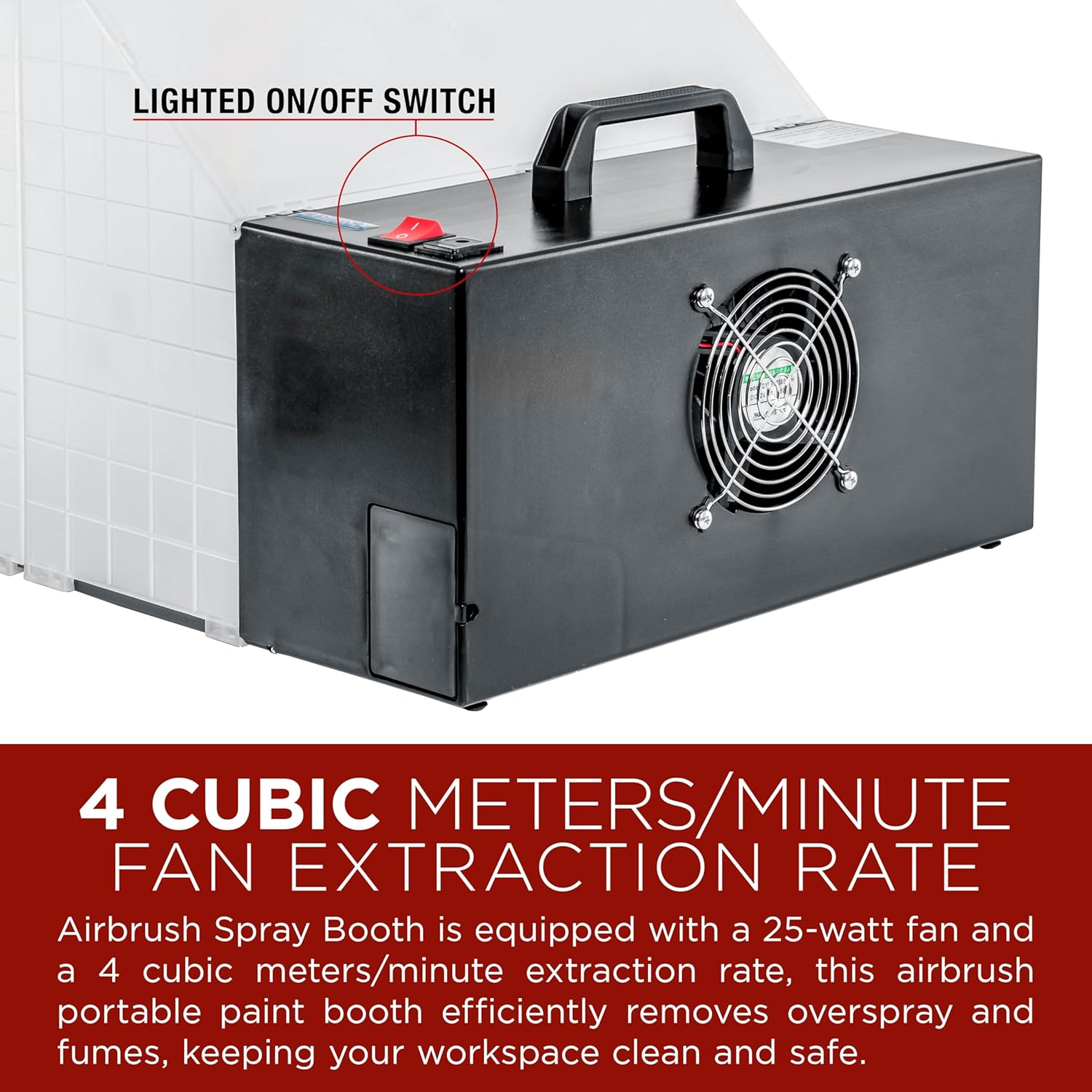
Image 5.1: The lighted ON/OFF switch and the 25-watt exhaust fan, indicating the fan's operation.
Recommended Use: This spray booth is ideal for various applications including:
- Model painting
- Art and craft projects
- Cake decorating with edible airbrush colors
- Nail art
- T-shirt painting

Image 5.2: Examples of projects suitable for the spray booth, such as painting a shoe, decorating cakes, and applying nail art.
Video 5.3: Official product video demonstrating the Master Airbrush Portable Hobby Airbrush Spray Booth in use. This video shows the booth's features and how it functions during airbrushing tasks.
6. Maintenance
Regular maintenance ensures optimal performance and longevity of your spray booth.
- Filter Replacement: The 2-layer high-density fiberglass filter will accumulate overspray over time, reducing airflow and filtration efficiency. Replace the filter regularly, depending on usage and the types of materials sprayed. Replacement filters are available from Master Airbrush.
- Cleaning the Booth: Disconnect the power adapter before cleaning. Wipe down the interior surfaces of the booth with a damp cloth. For stubborn paint residue, use a mild cleaner compatible with plastic surfaces. Avoid abrasive cleaners or solvents that could damage the booth material.
- Fan Cleaning: Periodically inspect the fan blades for dust or paint buildup. If necessary, carefully clean the blades with a soft brush or cloth after ensuring the unit is unplugged.
7. Troubleshooting
Refer to this section for common issues and their solutions.
| Problem | Possible Cause | Solution |
|---|---|---|
| Fan does not turn on. | No power, faulty power adapter, or switch issue. | Ensure the power adapter is securely plugged into both the outlet and the booth. Check the ON/OFF switch. Test the outlet with another device. If the issue persists, contact support. |
| Poor air extraction or weak airflow. | Clogged filter, obstructed fan, or improper setup. | Check and replace the fiberglass filter if it appears clogged with paint. Ensure the fan intake/exhaust is not blocked. Verify the booth panels are fully extended and sealed. |
| Excessive noise during operation. | Fan obstruction or normal operating noise. | Check for any foreign objects obstructing the fan blades. A certain level of noise is normal for exhaust fans (approximately 47 dB). If the noise is unusual or excessive, contact support. |
| Turntable does not rotate smoothly. | Debris under the turntable or excessive weight. | Remove the turntable and clean any debris from the base. Ensure the weight of the item being painted does not exceed the turntable's capacity. |
8. Specifications
| Feature | Detail |
|---|---|
| Model Number | MAS B400DC |
| Brand | Master Airbrush |
| Dimensions (Unfolded) | 16.5" Wide x 19" Deep x 13.5" High |
| Dimensions (Folded) | 16.5" Wide x 6" Deep x 8" High (approximate) |
| Weight | 8.5 lbs |
| Fan Wattage | 25 Watts |
| Air Flow Capacity | 4 Cubic Meters Per Minute |
| Filter Type | 2-Layer High-Density Fiberglass |
| Turntable Diameter | 7.5 inches |
| Power Source | Corded Electric (12V DC motor with 110V AC adapter) |
| Material | Plastic |
| Control Method | Push Button (ON/OFF switch) |
| Indoor/Outdoor Usage | Indoor |
9. Warranty and Support
For warranty information, technical support, or to purchase replacement parts (such as filters or an extension hose), please contact Master Airbrush customer service or the authorized seller from whom you purchased the product. Keep your purchase receipt as proof of purchase.
Manufacturer: Master Airbrush
Seller: TCP Global Corp
Visit the Master Airbrush Store for additional products and information.