
1. Introduction
The Pantone GPC105 Reference Library Complete is an essential tool for professionals working with color in various applications, including graphic design, print, packaging, web, and video. This library provides a comprehensive collection of Pantone's color communication tools, ensuring accurate color specification and reproduction across different media and manufacturing processes. This manual will guide you through the components of the library, their proper use, and maintenance.
2. Product Components
The Pantone GPC105 Reference Library includes a full collection of Pantone PLUS SERIES fan guides and chips books, housed in a dedicated storage and display case. The complete set comprises the following items:
- FORMULA GUIDE Solid Coated: Guide for solid spot colors on coated paper.
- FORMULA GUIDE Solid Uncoated: Guide for solid spot colors on uncoated paper.
- COLOR BRIDGE Coated: Guide showing solid Pantone Colors alongside their closest CMYK process color equivalents on coated paper, with sRGB and HTML values.
- COLOR BRIDGE Uncoated: Guide showing solid Pantone Colors alongside their closest CMYK process color equivalents on uncoated paper, with sRGB and HTML values.
- CMYK Coated: Guide for CMYK process colors on coated paper.
- CMYK Uncoated: Guide for CMYK process colors on uncoated paper.
- PREMIUM METALLICS Coated: Guide for premium metallic spot colors on coated paper.
- PASTELS & NEONS Coated & Uncoated: Guide for pastel and neon spot colors on both coated and uncoated paper.
- METALLIC FORMULA GUIDE Coated: Guide for metallic spot colors on coated paper.
- SOLID CHIPS Coated: Tear-out chips of solid spot colors on coated paper.
- SOLID CHIPS Uncoated: Tear-out chips of solid spot colors on uncoated paper.
- PASTELS & NEONS CHIPS Coated & Uncoated: Tear-out chips of pastel and neon spot colors on both coated and uncoated paper.
- PREMIUM METALLICS CHIPS Coated: Tear-out chips of premium metallic spot colors on coated paper.
- METALLIC CHIPS Coated: Tear-out chips of metallic spot colors on coated paper.
- PANTONE REFERENCE LIBRARY case: Storage and display case for all guides and chip books.
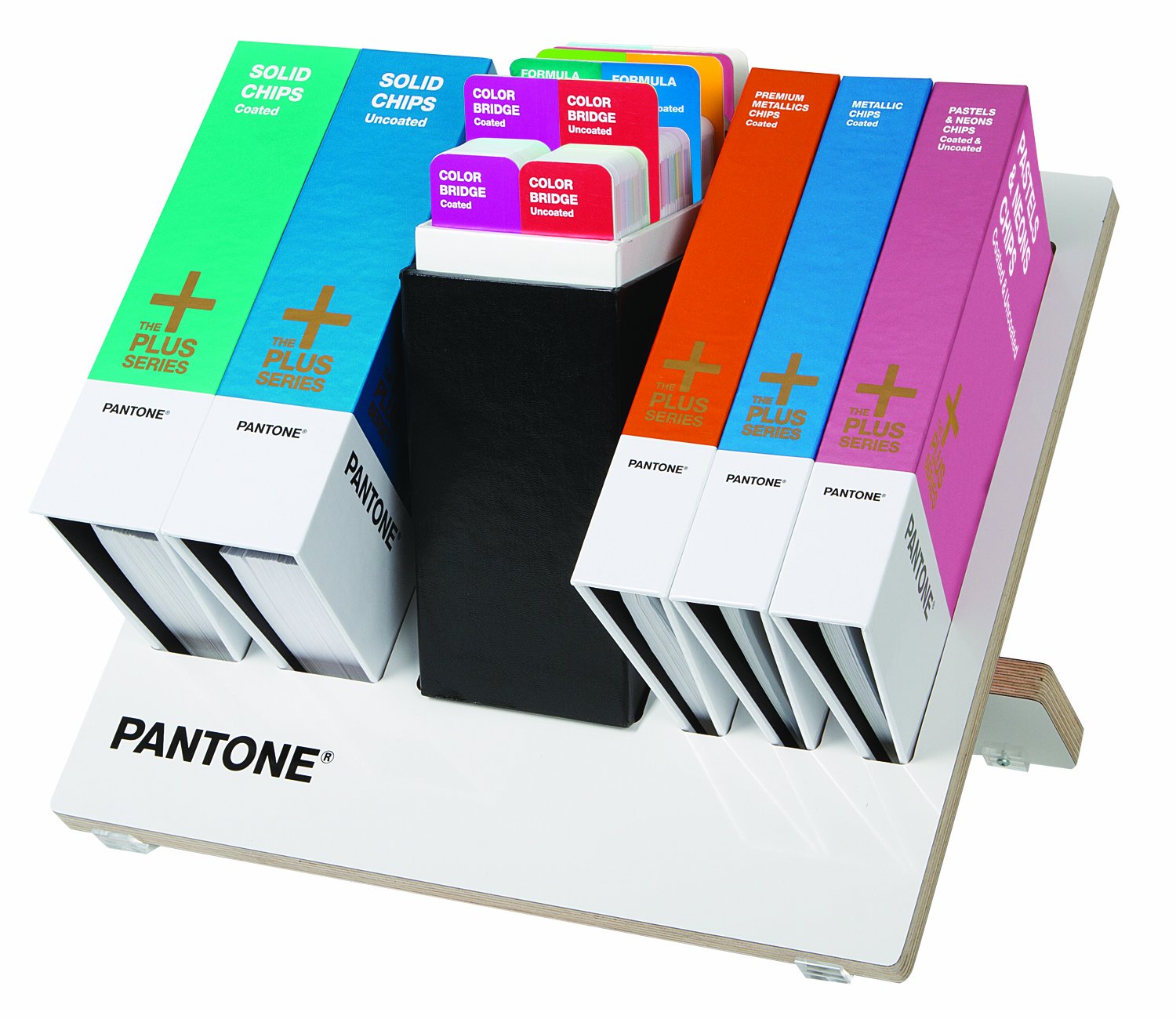
Image 1: The Pantone GPC105 Reference Library Complete, showcasing the collection of color guides and chip books within its dedicated storage case.
3. Setup and Organization
Upon receiving your Pantone Reference Library, unpack all components carefully. The included storage and display case is designed to keep your guides and chip books organized and easily accessible. Arrange the guides and chip books within the case according to your preference, typically by type (e.g., Formula Guides together, Chip Books together) or by paper stock (Coated/Uncoated). This systematic arrangement facilitates efficient color selection and reference.
4. Using the Pantone Guides
Pantone guides are fan-style books containing a spectrum of colors. Each color is identified by a unique Pantone number or name. When using the guides:
- Lighting Conditions: Always evaluate colors under controlled lighting conditions, such as D50 (daylight 5000K) for print applications, to ensure accurate perception.
- Color Selection: Fan through the guides to visually select desired colors. Note the Pantone number for specification.
- Coated vs. Uncoated: Use the "Coated" guides for projects printed on glossy or coated paper stocks, and "Uncoated" guides for projects on matte or uncoated paper stocks. Colors appear differently on these surfaces.
- COLOR BRIDGE Guides: These guides are crucial for understanding how a solid Pantone spot color translates to CMYK process printing. They also provide sRGB and HTML values for digital applications.
- Specialty Colors: Utilize the METALLICS, PREMIUM METALLICS, PASTELS, and NEONS guides for specialized color effects.
5. Using the Pantone Chip Books
Pantone chip books contain tear-out color chips, which are useful for communicating color to clients, vendors, or production teams. Each chip has the Pantone color number printed on it.
- Color Communication: Attach a color chip to artwork, proofs, or design briefs to provide a physical color reference.
- Quality Control: Use chips to compare against printed samples or manufactured products to ensure color accuracy.
- Replacement Chips: Each chip book contains multiple chips for each color, allowing for repeated use.
6. PANTONE COLOR MANAGER Software
The Pantone GPC105 Reference Library includes a free download of PANTONE COLOR MANAGER Software upon product registration. This software allows you to update Pantone Colors within popular design applications.
- Registration: Register your product on the official Pantone website to access the software download.
- Installation: Follow the on-screen instructions to install the software on your computer.
- Integration: The software integrates with design programs like Adobe Creative Suite, enabling you to use the latest Pantone libraries directly within your digital workflow.
- Updates: Regularly check for software updates to ensure your digital color libraries are current with the physical guides.
7. Care and Maintenance
Proper care ensures the longevity and accuracy of your Pantone Reference Library:
- Storage: Always store guides and chip books in the provided case, away from direct sunlight, excessive heat, or humidity. These conditions can cause colors to fade or shift over time.
- Handling: Handle guides by their edges to avoid transferring oils or dirt from your hands onto the color swatches.
- Cleaning: If necessary, gently wipe the covers of the guides with a soft, dry cloth. Avoid using liquids or abrasive cleaners on the color pages.
- Replacement: Pantone recommends replacing guides every 12-18 months, or sooner if they are heavily used, to ensure color accuracy due to natural fading and handling wear.
8. Specifications
| Feature | Detail |
|---|---|
| Manufacturer | Pantone |
| Part Number | GPC105 |
| Item Weight | 26 pounds |
| Product Dimensions | 21 x 18.5 x 11 inches |
| Item Model Number | GPC105 |
| Finish | Metallic (refers to some guides included) |
| Item Package Quantity | 1 (complete library set) |
| Batteries Required | No |
| Date First Available | March 1, 2013 |
9. Support and Warranty
For product support, technical assistance, or inquiries regarding your Pantone GPC105 Reference Library, please visit the official Pantone website or contact their customer service department. Specific warranty information is typically provided at the time of purchase or can be found on the Pantone website. Ensure you register your product to access all available support and software benefits.
Note: Pantone is the only internationally recognized color communication system. You can specify PANTONE Colors with confidence even if your manufacturing is half a world away.