
Introduction
This manual provides essential information for the installation, operation, and maintenance of the Riello 550SE Control Box, Model 3001168. This control box is designed for use with Riello Gulliver BG1 series burners, managing the ignition and flame detection processes. Proper installation and adherence to safety guidelines are crucial for optimal performance and safety.
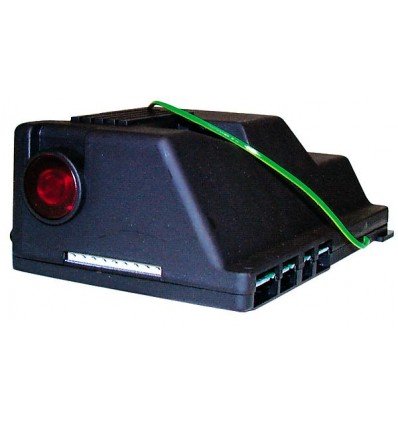
Image 1: Riello 550SE Control Box, Model 3001168. This image displays the front view of the control box, highlighting its compact design and connection points.
Safety Information
Always ensure that installation and maintenance are performed by qualified personnel. Disconnect power before servicing. Refer to local regulations and safety standards.
Setup and Installation
The Riello 550SE Control Box is designed for integration into Riello Gulliver BG1 burner systems. Installation should only be carried out by a qualified technician.
Wiring Considerations
Important: Wiring modifications may be necessary for certain burner models. Always consult the specific wiring diagrams provided with your burner and the control box. Ensure all connections are secure and correctly polarized.
- Power Disconnection: Ensure the main power supply to the burner system is completely disconnected before beginning any installation work.
- Mounting: Securely mount the control box in the designated location within the burner assembly, ensuring it is protected from excessive heat, moisture, and vibration.
- Electrical Connections: Connect the control box to the burner's electrical system according to the provided wiring diagrams. Pay close attention to connections for the ignition transformer, flame sensor (IRD cell), motor, and pre-ventilation fan.
- Flame Sensor (IRD Cell): Connect the IRD flame sensor. Ensure it is correctly positioned to detect the flame during operation.
- Pre-ventilation: Verify the pre-ventilation settings and connections, typically set to 5 seconds as per product specifications.
- Final Checks: After all connections are made, double-check all wiring against the diagrams. Ensure no loose connections or exposed wires.
Operating Instructions
The Riello 550SE Control Box operates automatically as part of the burner's sequence. Once correctly installed and powered, it manages the burner's startup and shutdown cycles.
- Power On: Restore power to the burner system. The control box will initiate its internal self-check.
- Pre-ventilation Phase: The control box will activate the burner's fan for a pre-ventilation period (e.g., 5 seconds) to clear any residual gases from the combustion chamber.
- Ignition Phase: After pre-ventilation, the ignition transformer will be activated, and fuel will be supplied to the burner.
- Flame Detection: The IRD flame sensor continuously monitors for flame presence. Upon successful ignition, the control box maintains fuel supply and ignition until the burner is signaled to shut down.
- Shutdown: When the burner receives a shutdown signal, the control box terminates fuel supply and ignition.
Note: If a flame is not detected within the specified safety time, the control box will enter a lockout state, requiring a manual reset.
Maintenance
Regular maintenance ensures the longevity and reliable operation of the control box and the entire burner system. Maintenance should be performed by qualified personnel.
- Annual Inspection: Have the control box and burner system inspected annually by a qualified technician.
- Cleaning: Keep the control box free from dust and debris. Use a soft, dry cloth for cleaning. Do not use liquid cleaners.
- Connection Checks: Periodically check all electrical connections for tightness and signs of corrosion.
- Flame Sensor Check: Ensure the IRD flame sensor is clean and correctly positioned. A dirty sensor can lead to nuisance lockouts.
Troubleshooting
This section outlines common issues and potential solutions. For complex problems, contact a qualified service technician.
| Problem | Possible Cause | Solution |
|---|---|---|
| Burner fails to ignite (lockout) | No fuel supply, faulty ignition, dirty flame sensor, incorrect wiring. | Check fuel supply. Verify ignition transformer and electrodes. Clean or replace IRD flame sensor. Inspect wiring connections. |
| Burner ignites then immediately shuts down | Flame not detected by IRD sensor, unstable flame. | Clean or reposition IRD flame sensor. Check burner settings for stable flame. |
| Control box does not power on | No power supply, internal fault. | Check main power supply and circuit breaker. Consult a technician if power is present but unit remains off. |
To reset the control box after a lockout, press the reset button (if available on your burner model) or cycle the main power to the burner system off and on after addressing the underlying issue.
Specifications
| Feature | Detail |
|---|---|
| Manufacturer | Riello |
| Model Number | 3001168/RI |
| ASIN | B00BLMLCW6 |
| Flame Detection | IRD Cell |
| Pre-ventilation Time | 5 seconds |
| Compatibility | Riello Gulliver BG1 Burners |
Warranty and Support
Information regarding product warranty and specific support contacts is not available in the provided product details. Please refer to your purchase documentation or contact your Riello distributor for warranty terms and technical support.


