
GEWA EQS-10EXB Tool Stand Attachment Arms Instruction Manual
Model: EQS-10EXB
1. Introduction
The GEWA EQS-10EXB Attachment Arms are designed to expand the functionality of your EQS-10 device stand. These arms provide a stable and secure platform for additional devices and accessories, enhancing your musical workspace with increased flexibility and ergonomic placement options. They are lightweight yet constructed for durability and easy installation.
2. Safety Information
- Ensure all components are securely fastened before placing any equipment on the attachment arms.
- Do not exceed the weight capacity of the attachment arms or the main stand. Overloading can lead to instability and damage.
- Keep hands and fingers clear of moving parts during installation to prevent pinching.
- Regularly inspect the attachment arms and the main stand for any signs of wear, damage, or loose connections.
- Use only with the compatible GEWA EQS-10 device stand.
3. Package Contents
Verify that all items are present in the package:
- GEWA EQS-10EXB Attachment Arms (set)
- Necessary mounting hardware (if applicable, refer to specific product packaging)
Note: The EQS-10 device stand is sold separately and is required for use with these attachment arms.
4. Setup and Installation
Follow these steps to properly attach the EQS-10EXB arms to your GEWA EQS-10 device stand:
- Prepare the Stand: Ensure your GEWA EQS-10 device stand is set up on a stable, level surface.
- Identify Attachment Points: Locate the designated attachment points on your EQS-10 device stand where the EQS-10EXB arms are intended to connect. These are typically pre-drilled holes or mounting brackets.
- Position the Arms: Align the attachment arms with the mounting points on the stand. The arms are designed for easy integration, providing a height of 26 cm for ergonomic device placement.
- Secure the Arms: Using the provided hardware (if any, or hardware from your EQS-10 stand's accessory kit), securely fasten the attachment arms to the stand. Ensure all screws or clamps are tightened firmly to prevent movement.
- Verify Stability: Gently test the installed arms for stability before placing any equipment on them. They should be rigid and show no signs of wobbling.
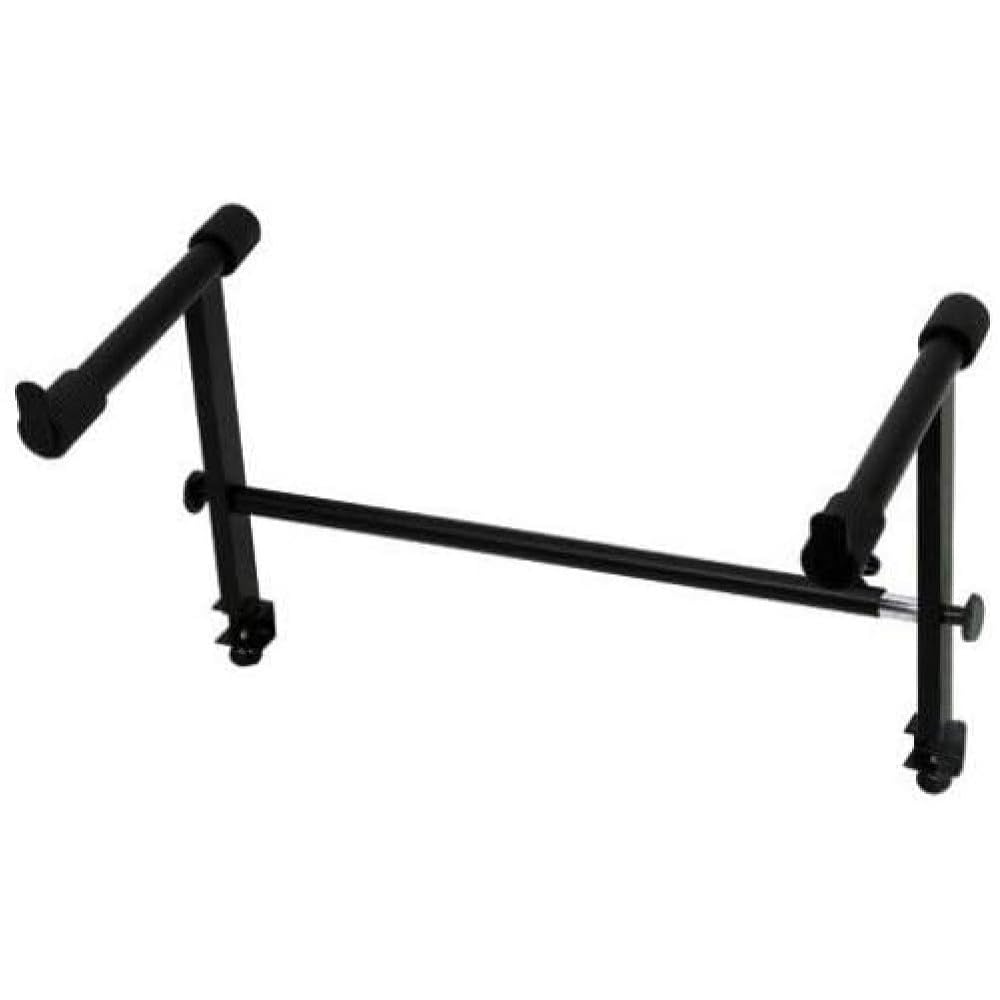
Image: The GEWA EQS-10EXB Attachment Arms, designed for integration with the EQS-10 device stand. These arms provide additional support surfaces for musical equipment.
5. Operating Instructions
Once installed, the GEWA EQS-10EXB Attachment Arms provide a stable platform for your devices:
- Placement of Devices: Carefully place your additional electrical devices or accessories onto the support surface of the attachment arms. The arms offer a generous support depth of 30 cm.
- Ergonomic Positioning: Utilize the 26 cm height of the arms to position your devices at an optimal ergonomic level, reducing strain during use.
- Cable Management: Route any necessary cables neatly to avoid entanglement and ensure a tidy workspace.
6. Maintenance
To ensure the longevity and proper function of your attachment arms:
- Cleaning: Wipe the arms with a soft, dry cloth to remove dust. For stubborn dirt, use a slightly damp cloth and mild soap, then dry thoroughly. Avoid abrasive cleaners or solvents.
- Inspection: Periodically check all connections and fasteners to ensure they remain tight. Re-tighten if necessary.
- Storage: If disassembling for storage, keep all components and hardware together in a safe place.
7. Troubleshooting
If you encounter issues with your GEWA EQS-10EXB Attachment Arms, consider the following:
- Arms are wobbly: Ensure all mounting hardware is securely tightened. Check that the main EQS-10 stand is stable and on a level surface.
- Difficulty attaching: Verify that you are attempting to attach the arms to a compatible GEWA EQS-10 device stand. Review the installation steps to ensure correct alignment.
- Damage to arms: If the arms appear bent or damaged, discontinue use immediately and contact GEWA customer support for assistance.
8. Specifications
| Feature | Detail |
|---|---|
| Model Number | 900578 |
| Item Weight | 1.5 kg (3.3 lbs) |
| Package Dimensions | 56 x 42 x 6.5 cm |
| Material Type | Legierter Stahl (Alloy Steel) |
| Height | 26 cm |
| Support Depth | 30 cm |
| Color | Black |
| Assembly Required | No (refers to the arms themselves, assembly to stand is required) |
9. Warranty and Support
For information regarding warranty coverage, terms, and conditions, please refer to the official GEWA website or the documentation provided with your original purchase. For technical support or assistance with your GEWA EQS-10EXB Attachment Arms, please contact GEWA customer service through their official channels.
You can typically find contact information on the manufacturer's website: www.gewamusic.com