
1. Introduction
This manual provides comprehensive instructions for the proper use, setup, operation, and maintenance of your Intermec 2M USB-A to USB Mini-B Cable, Model 321-611-102. Please read this manual thoroughly before using the product to ensure optimal performance and longevity.
2. Product Overview
The Intermec 2M USB-A to USB Mini-B Cable is designed for connecting devices with a USB Mini-B port to a host device with a standard USB-A port. This cable facilitates both data transfer and power supply, adhering to ROHS compliance standards.
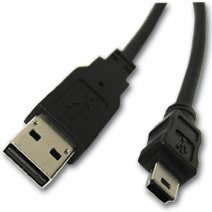
Image 1: The Intermec 2M USB-A to USB Mini-B Cable. The image displays the two distinct connectors: a rectangular USB-A connector on one end and a smaller, trapezoidal USB Mini-B connector on the other end, both black in color.
Key Features:
- Connector Type: USB-A Male to USB Mini-B Male
- Cable Length: 2 meters (approximately 6.56 feet)
- Functionality: Supports data transfer and device charging
- Compliance: ROHS compliant
3. Setup
To set up the Intermec USB-A to USB Mini-B Cable, follow these steps:
- Identify Connectors: Locate the standard rectangular USB-A connector and the smaller, trapezoidal USB Mini-B connector on the cable.
- Connect to Host Device: Insert the USB-A connector into an available USB-A port on your computer, hub, or power adapter. Ensure the connector is oriented correctly to avoid damage.
- Connect to Peripheral Device: Insert the USB Mini-B connector into the corresponding USB Mini-B port on your peripheral device (e.g., camera, MP3 player, GPS device). Ensure the connector is oriented correctly.
- Verify Connection: Once both ends are connected, your host device should recognize the peripheral device. If connecting for charging, ensure the device indicates it is receiving power.
4. Operating Instructions
This cable is designed for straightforward plug-and-play operation. No special drivers are typically required for basic functionality, though your peripheral device may require its own specific drivers.
Data Transfer:
- Connect the cable as described in the Setup section.
- Once the peripheral device is recognized by the host, you can access its storage or functions as per the device's operating system or software.
- Always safely eject or disconnect the peripheral device from your host system before physically unplugging the cable to prevent data corruption.
Charging:
- Connect the USB-A end to a powered USB port (e.g., computer, wall adapter).
- Connect the USB Mini-B end to your device.
- Monitor your device's charging indicator to confirm it is receiving power.
5. Maintenance
Proper care will extend the life of your cable.
- Storage: Store the cable in a cool, dry place away from direct sunlight and extreme temperatures. Avoid tightly coiling or bending the cable sharply, which can damage internal wires.
- Cleaning: Use a soft, dry cloth to clean the cable and connectors. Do not use liquid cleaners or solvents.
- Handling: Always grasp the connector housing when plugging or unplugging the cable. Do not pull on the cable itself, as this can strain the connections and lead to damage.
- Inspection: Periodically inspect the cable for any signs of wear, fraying, or damage to the insulation or connectors. Discontinue use if damage is observed.
6. Troubleshooting
If you encounter issues with your Intermec USB cable, consider the following:
- Device Not Recognized:
- Ensure both ends of the cable are securely connected.
- Try connecting to a different USB port on your host device.
- Test the cable with a different peripheral device, or test your peripheral device with a different known-good cable.
- Restart your host device and the peripheral device.
- Slow Data Transfer:
- Ensure you are using a USB 2.0 compatible port on your host device for optimal speeds (this cable is USB 2.0 standard).
- Avoid connecting through unpowered or overloaded USB hubs.
- Device Not Charging:
- Verify the USB-A port or power adapter provides sufficient power. Some devices require more power than a standard computer USB port can supply.
- Check the charging indicator on your device.
- Physical Damage: If the cable shows signs of physical damage (fraying, bent connectors), discontinue use immediately to prevent potential electrical hazards or damage to connected devices.
7. Specifications
| Feature | Specification |
|---|---|
| Model Number | 321-611-102 |
| Brand | Intermec |
| Cable Type | USB |
| Connector Type | USB-A to USB Mini-B |
| Connector Gender | Male-to-Male |
| Length | 2 meters |
| Shape | Round |
| Compliance | ROHS |
| Package Dimensions | 3 x 2.5 x 1 inches |
| Item Weight | 2.4 ounces |
| Manufacturer | Intermec Technologies Corporation |
| Date First Available | March 9, 2017 |
8. Warranty and Support
For information regarding product warranty, technical support, or service, please refer to the official Intermec website or contact Intermec customer service directly. Warranty terms and conditions may vary by region and product. Please retain your proof of purchase for warranty claims.
Manufacturer: Intermec Technologies Corporation
Website: www.intermec.com (Please note: This is a placeholder URL. Refer to your product packaging or official documentation for the correct support website.)


