
1. Product Overview
The DUALSHOCK 4 Wireless Controller is designed for the PlayStation 4 system, offering an enhanced gaming experience with precise controls and innovative features.
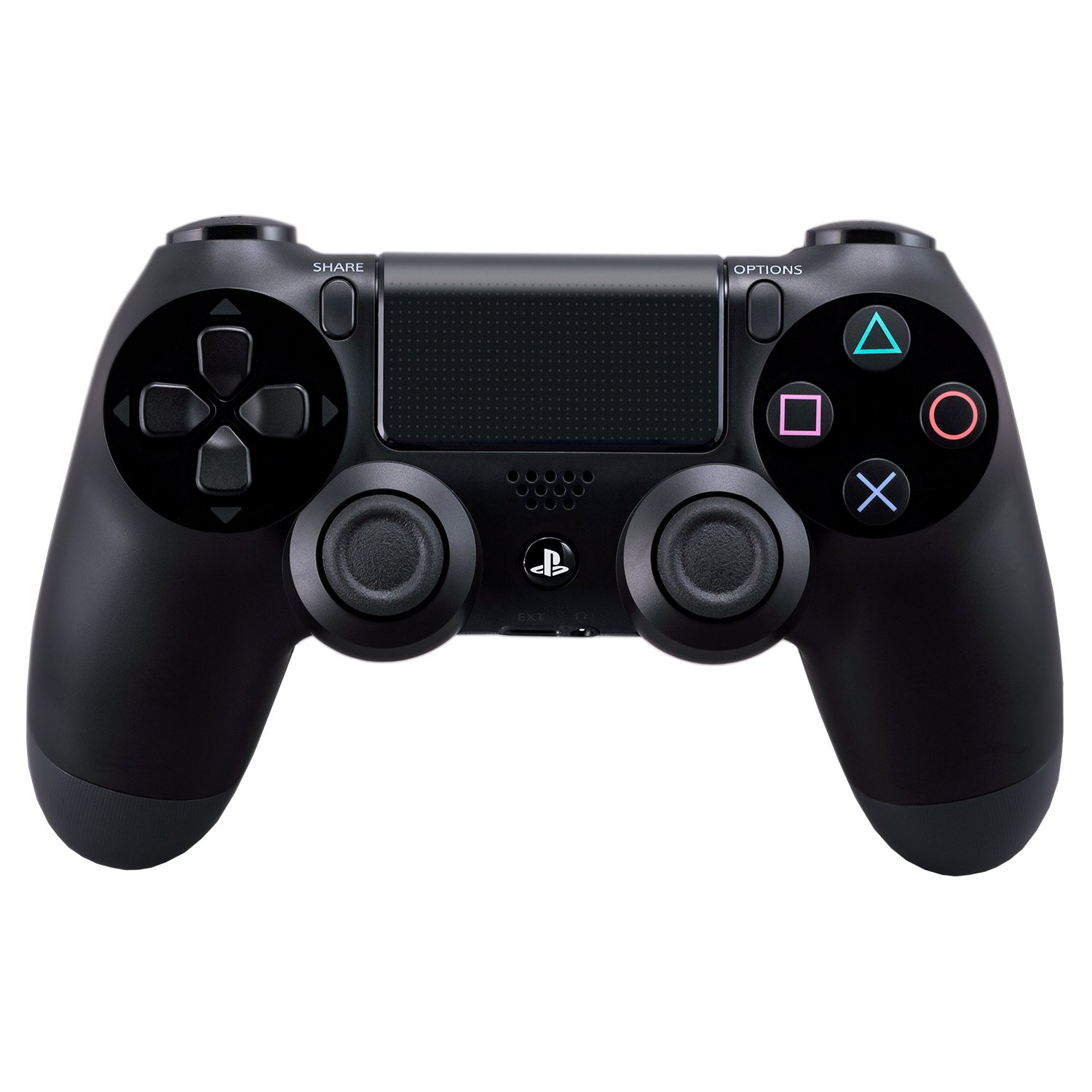
Front view of the DUALSHOCK 4 Wireless Controller, showcasing the analog sticks, D-pad, action buttons, touch pad, and PlayStation button.
Key Features:
- Precision Control: Enhanced analog sticks and trigger buttons provide absolute control for all games.
- Sharing Capabilities: The Share button allows for easy uploading of gameplay videos and screenshots, or live-streaming.
- New Ways to Play: Features like the touch pad, integrated light bar, and built-in speaker offer immersive interaction.
- Personal Audio: A 3.5mm audio jack provides a private audio solution for gamers.
- Efficient Charging: Rechargeable via the PlayStation 4 system (even on standby) or any standard micro-USB charger.
2. Setup
Initial Pairing with PlayStation 4:
- Connect the DUALSHOCK 4 controller to your PlayStation 4 system using a micro-USB cable.
- Press the PlayStation button (PS button) located in the center of the controller.
- The controller will automatically pair with your system. Once paired, you can disconnect the USB cable for wireless use.
Charging the Controller:
The DUALSHOCK 4 controller contains a built-in rechargeable battery. To charge:
- Connect the controller to your PlayStation 4 system using a micro-USB cable. The system can charge the controller even when in standby mode.
- Alternatively, use a standard micro-USB charger (not included with all models) to charge the controller via a wall outlet.
The light bar on the controller will slowly blink orange while charging and turn off when fully charged.
3. Operating Instructions
Basic Controls:
- Analog Sticks: Use for precise movement and camera control.
- D-Pad (Directional Pad): For menu navigation and specific in-game actions.
- Action Buttons (Triangle, Circle, Cross, Square): Perform various in-game actions.
- Shoulder Buttons (L1, R1) & Trigger Buttons (L2, R2): Used for aiming, firing, and other contextual actions.

Angled view of the DUALSHOCK 4 Wireless Controller, highlighting the shoulder buttons (L1, R1, L2, R2) and the light bar.
Special Features:
- Share Button: Press to access sharing options, including uploading screenshots and video clips, or starting a live broadcast.
- Touch Pad: A multi-touch, clickable surface that offers new gameplay possibilities and navigation.
- Integrated Light Bar: Changes color to reflect in-game actions, player health, or to identify players in multiplayer.
- Built-in Speaker: Provides additional audio cues directly from the controller, enhancing immersion.
- 3.5mm Audio Jack: Connect a headset for private audio and voice chat.
Official Product Videos:
PS4 Dualshock 4 Controller Tech
This video provides an overview of the technical aspects and features of the DUALSHOCK 4 Controller.
DualShock 4 Controllers
This video demonstrates various DUALSHOCK 4 Controllers, highlighting their design and functionality.
4. Maintenance
Battery Care:
- Avoid fully depleting the battery frequently to prolong its lifespan.
- Charge the controller regularly, even if not in constant use.
- The controller uses a lithium-ion battery. Do not attempt to replace it yourself. Contact PlayStation support for battery service.
Cleaning:
- Use a soft, dry cloth to clean the controller.
- Avoid using harsh chemicals or abrasive materials.
5. Troubleshooting
Controller Not Connecting/Pairing:
- Ensure the controller is charged.
- Connect the controller directly to the PS4 with a USB cable and press the PS button to re-establish connection.
- If issues persist, try resetting the controller: Locate the small reset button on the back of the controller (near the L2 shoulder button). Use a thin object (like a straightened paperclip) to press and hold the button for 3-5 seconds. Then, reconnect the controller via USB.
Short Battery Life:
- Reduce the brightness of the light bar in the PS4 settings.
- Disable the built-in speaker if not needed.
- Ensure the controller is fully charged before use.
6. Specifications
| Feature | Detail |
|---|---|
| Model Number | 10037 |
| ASIN | B00BGA9X9W |
| Product Dimensions | 2.5 x 6.75 x 7.25 inches |
| Item Weight | 11.8 ounces |
| Manufacturer | Sony PlayStation |
| Batteries | 2 AAA batteries required (internal rechargeable battery, likely refers to initial setup or older model info) |
| Connectivity | Wireless (Bluetooth), Micro-USB |
| Audio Output | Built-in speaker, 3.5mm stereo headset jack |
7. Warranty and Support
Warranty Information:
This PlayStation DUALSHOCK 4 Wireless Controller comes with a standard manufacturer's warranty. Please refer to the warranty card included in the original packaging or visit the official PlayStation website for detailed terms and conditions.
Customer Support:
For technical assistance, troubleshooting, or service inquiries, please contact PlayStation Customer Support:
- Website: Visit playstation.com/support
- Phone: Check the PlayStation support website for regional contact numbers.