
1. Introduction
This manual provides instructions for the proper use and maintenance of your Samsung HM1300 Bluetooth Headset. Please read this manual carefully before using the device to ensure safe and optimal performance. The HM1300 is designed for hands-free communication, offering clear audio and convenient connectivity.
2. Package Contents
Verify that your product package contains the following items:
- Samsung HM1300 Bluetooth Headset
- AC Charger
- Interchangeable Soft Gel Ear Tips (Small, Medium, Large)
- Ear Hook
- User Manual (this document)
3. Product Overview
Familiarize yourself with the components of your Samsung HM1300 Bluetooth Headset.
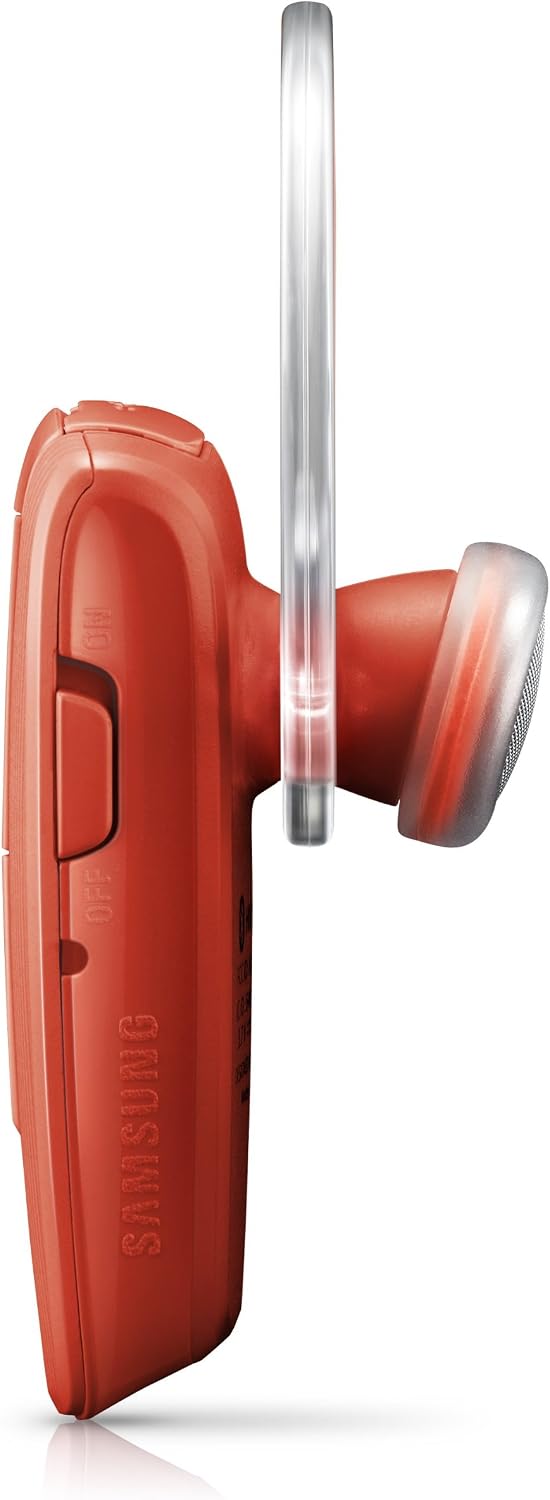


Key components include:
- Power Switch: Located on the side for turning the headset ON or OFF.
- Volume Buttons: Adjust call and media volume.
- Multi-function Button (MFB): Used for answering/ending calls, pairing, and voice commands.
- Microphone: Captures your voice during calls.
- LED Indicator: Displays status such as power, charging, and pairing mode.
- Charging Port: For connecting the AC charger.
- Ear Tip: Delivers audio to your ear.
- Ear Hook: Provides secure fit over the ear.
4. Setup
4.1. Charging the Headset
Before using your HM1300 headset for the first time, it is recommended to fully charge the battery.
- Connect the AC charger to the charging port on the headset.
- Plug the charger into a standard wall outlet.
- The LED indicator will illuminate, typically red, to show that the headset is charging.
- Once fully charged (approximately 2 hours), the LED indicator will change color, typically blue or turn off.
- Disconnect the charger from the headset and the power outlet.
Note: A full charge provides up to 8 hours of talk time and 300 hours of standby time.
4.2. Pairing with a Device (Simple Pairing)
The HM1300 features Simple Pairing technology for easy connection to your Bluetooth-enabled device.
- Ensure the headset is turned OFF.
- Turn ON the Bluetooth feature on your smartphone or other device.
- Press and hold the Multi-function Button (MFB) on the headset until the LED indicator flashes blue and red alternately, indicating pairing mode.
- On your device, search for Bluetooth devices. Select "HM1300" from the list of available devices.
- The headset will automatically pair. No passcode is typically required.
- Once paired, the LED indicator will flash blue periodically.
4.3. Multipoint Technology (Connecting to Two Devices)
The HM1300 can be paired with two different Bluetooth devices simultaneously.
- Pair the headset with the first device following the "Simple Pairing" instructions above.
- Turn OFF the Bluetooth function on the first device.
- Put the HM1300 headset back into pairing mode (LED flashes blue and red).
- Pair the headset with the second device.
- Turn ON the Bluetooth function on the first device. The headset will automatically connect to both devices.
Note: While connected to two devices, only one device can be actively used for calls or media at a time. The headset will prioritize incoming calls.
5. Operating the Headset
5.1. Power On/Off
- Power On: Slide the power switch to the "ON" position. The LED indicator will flash blue.
- Power Off: Slide the power switch to the "OFF" position. The LED indicator will turn off.
5.2. Making and Receiving Calls
- Answering a Call: When a call comes in, press the Multi-function Button (MFB) once.
- Ending a Call: During a call, press the MFB once.
- Rejecting a Call: When a call comes in, press and hold the MFB for approximately 2 seconds.
- Making a Call: Dial the number on your phone. The call will automatically transfer to the headset if connected.
- Redialing Last Number: In standby mode, double-press the MFB.
5.3. Adjusting Volume
Use the volume buttons on the side of the headset to increase or decrease the call or media volume.
5.4. Voice Commands
The HM1300 supports voice commands for hands-free control.
- In standby mode, press the MFB once. You will hear a prompt, "Please say a command."
- Speak your command clearly, such as "Call home" or "Redial."
- The headset will attempt to execute the command through your connected device.
6. Maintenance
Proper care ensures the longevity of your Samsung HM1300 Bluetooth Headset.
- Cleaning: Wipe the headset with a soft, dry cloth. Do not use harsh chemicals or abrasive cleaners.
- Storage: Store the headset in a cool, dry place away from extreme temperatures and direct sunlight.
- Battery Care: Avoid fully discharging the battery for extended periods. Charge regularly, even if not in frequent use, to maintain battery health.
- Water Exposure: The headset is not waterproof. Avoid exposure to moisture, rain, or liquids.
7. Troubleshooting
If you encounter issues with your HM1300 headset, refer to the following common solutions:
| Problem | Solution |
|---|---|
| Headset does not turn on. | Ensure the battery is charged. Connect the charger and try again. |
| Cannot pair with device. |
|
| No audio or poor audio quality. |
|
| Battery drains quickly. |
|
8. Specifications
| Feature | Detail |
|---|---|
| Model Name | HM1300 Bluetooth Headset |
| Model Number | BHM1300NRACSTA |
| Brand | Samsung |
| Bluetooth Version | 3.0 |
| Connectivity Technology | Wireless (Bluetooth) |
| Talk Time | Up to 8 Hours |
| Standby Time | Up to 300 Hours |
| Weight | 0.35 oz (approximately 0.2 Pounds) |
| Ear Placement | In Ear |
| Form Factor | One-Ear |
| Control Type | Media Control |
| Control Method | Push Button |
| Additional Features | Microphone Included, Simple Pairing, Multipoint Technology |
| Compatible Devices | Smartphones, Tablets, Laptops, Desktops |
9. Warranty and Support
The Samsung HM1300 Bluetooth Headset comes with a manufacturer's warranty. For specific warranty details and duration, please refer to the documentation included with your purchase or visit the official Samsung support website.
Warranty Description: Samsung HM1300 hands-free Bluetooth headset with noise reduction and echo cancellation.
For technical support, troubleshooting assistance, or to inquire about replacement parts, please contact Samsung customer service or visit their official support portal. You can find contact information on the Samsung website or in your product packaging.
Important: Only accept genuine Samsung products. Authentic Samsung products feature a holographic sticker on the packaging. If this sticker is absent, removed, or the packaging appears tampered with, report it to your reseller immediately.


