
Jensen CD-490
JENSEN CD-490 Portable Stereo CD Player with AM/FM Radio and Aux Line-in Instruction Manual
Introduction
The JENSEN CD-490 is a portable stereo CD player equipped with an AM/FM stereo radio and an auxiliary line-in. It features a top-loading CD player with an LED track display, skip/search/repeat functions, and programmable memory. The unit includes a telescopic antenna for radio reception, a foldable carrying handle for portability, and a stereo headphone jack. An auxiliary input allows connection of external audio devices such as MP3 players.
Important Safety Information
WARNING: This product contains chemicals known to the State of California to cause cancer and birth defects or other reproductive harm.
Always follow basic safety precautions when using electrical appliances to reduce the risk of fire, electric shock, and personal injury. Keep this manual for future reference.
What's Included
- JENSEN CD-490 Portable Stereo CD Player with AM/FM Radio
- AC Power Cord
- Owner's Manual
Product Overview
Familiarize yourself with the controls and features of your JENSEN CD-490 unit.
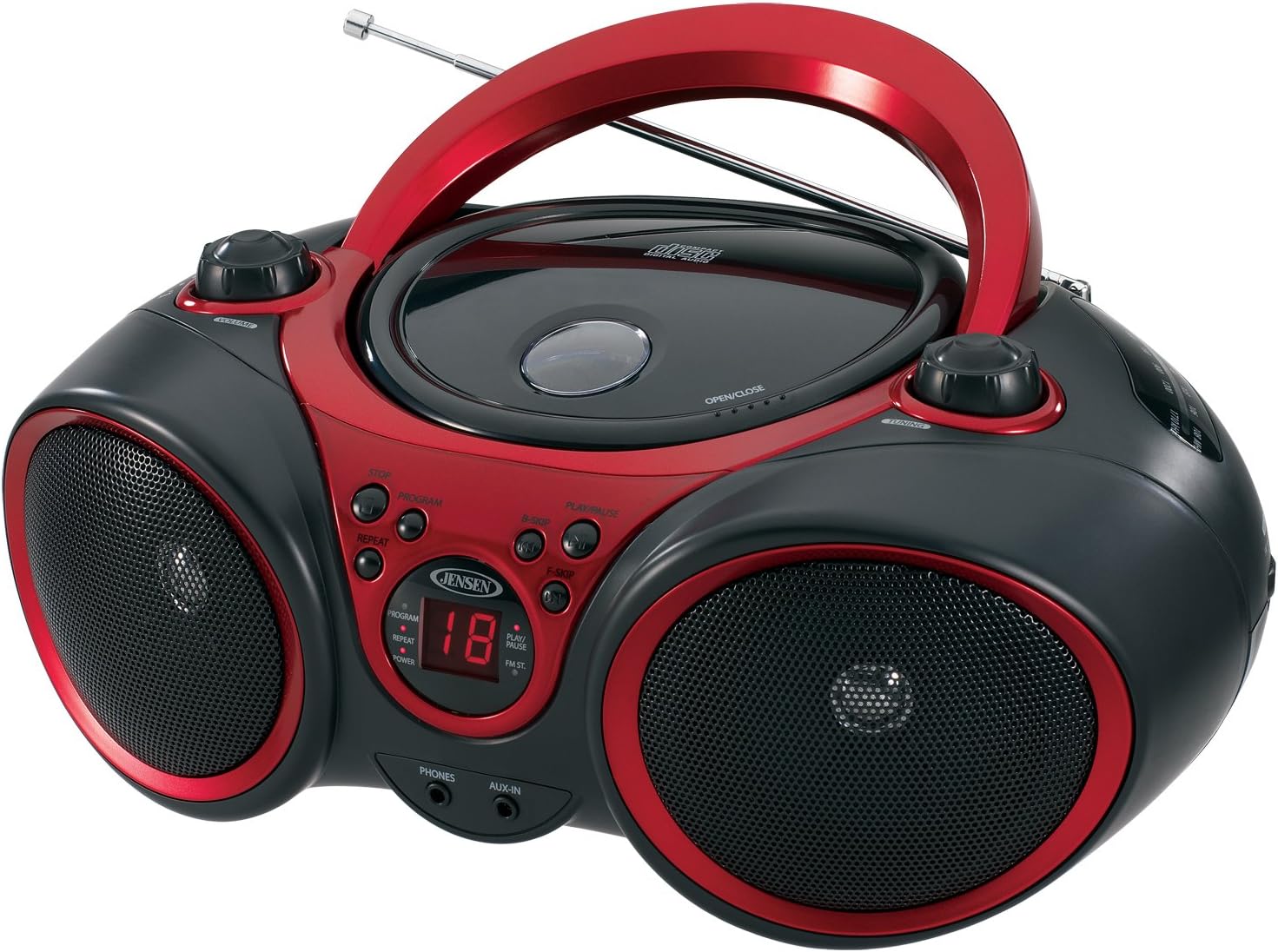
Image: Front view of the JENSEN CD-490 unit, showing the CD compartment, speakers, control buttons, and display.
Front Panel Controls:
- VOLUME Knob: Adjusts the audio output level.
- STOP Button: Stops CD playback.
- PROGRAM Button: Used for programming CD tracks.
- REPEAT Button: Repeats the current track or all tracks.
- B-SKIP Button: Skips backward through CD tracks.
- PLAY/PAUSE Button: Starts or pauses CD playback.
- F-SKIP Button: Skips forward through CD tracks.
- LED Display: Shows CD track number and function indicators (PROGRAM, REPEAT, POWER, PLAY/PAUSE, FM ST).
- PHONES Jack: For connecting stereo headphones.
- AUX-IN Jack: For connecting external audio devices.
Top Panel Controls:
- CD Compartment: Top-loading area for compact discs.
- OPEN/CLOSE Latch: Releases the CD compartment lid.
- TUNING Knob: Adjusts AM/FM radio frequency.
Side Panel Controls:
- FUNCTION Switch: Selects between RADIO, CD/AUX IN, and OFF modes.
- AM/FM Band Selector: Selects between AM and FM radio bands.
Rear Panel Features:
- AC Power Input: For connecting the AC power cord.
- Battery Compartment: Holds 8 'C' (UM-2) batteries for portable operation.
- Telescopic Antenna: Extendable antenna for FM radio reception.
Setup
Powering the Unit:
The CD-490 can be powered by either AC power or batteries.
AC Power:
- Ensure the unit is in the OFF position using the FUNCTION switch.
- Connect the AC power cord to the AC power input on the rear of the unit.
- Plug the other end of the AC power cord into a standard AC 120V/60Hz wall outlet.
Battery Power:
- Ensure the unit is in the OFF position.
- Open the battery compartment cover located on the bottom of the unit.
- Insert 8 'C' (UM-2) size batteries (not included), ensuring correct polarity (+/-).
- Close the battery compartment cover securely.
Antenna Setup:
For optimal FM radio reception, fully extend the telescopic antenna. For AM reception, the unit has a built-in antenna, so no adjustment is typically needed.
Operating the CD Player
The CD-490 supports standard audio CDs and CD-R/RW discs.
- Set the FUNCTION switch to the 'CD/AUX IN' position.
- Press the 'OPEN/CLOSE' latch to open the CD compartment lid.
- Place an audio CD into the compartment with the label side facing up.
- Close the CD compartment lid firmly until it clicks. The LED display will show the total number of tracks on the CD.
- Press the 'PLAY/PAUSE' button to begin playback. The current track number will appear on the LED display.
- Adjust the 'VOLUME' knob to your desired listening level.
- To pause playback, press the 'PLAY/PAUSE' button. Press it again to resume.
- To skip to the next track, press the 'F-SKIP' button. To go back to the beginning of the current track or the previous track, press the 'B-SKIP' button.
- To stop playback, press the 'STOP' button.
Repeat Function:
- During playback, press the 'REPEAT' button once to repeat the current track. The 'REPEAT' indicator will light up.
- Press the 'REPEAT' button a second time to repeat all tracks on the CD. The 'REPEAT' indicator will flash.
- Press the 'REPEAT' button a third time to cancel the repeat function.
Programmed Playback:
- In STOP mode, press the 'PROGRAM' button. The 'PROGRAM' indicator will light up and '00' will flash on the display.
- Use the 'F-SKIP' or 'B-SKIP' buttons to select your desired track.
- Press the 'PROGRAM' button again to confirm the track. The display will show the next program number.
- Repeat steps 2 and 3 to program up to 20 tracks.
- After programming, press the 'PLAY/PAUSE' button to start programmed playback.
- To cancel programmed playback, press the 'STOP' button twice.
Operating the AM/FM Radio
- Set the FUNCTION switch to the 'RADIO' position.
- Select either 'AM' or 'FM' using the AM/FM band selector switch.
- Extend the telescopic antenna for FM reception. Adjust its position for best reception.
- Rotate the 'TUNING' knob to select your desired radio station.
- Adjust the 'VOLUME' knob to your desired listening level.
Using the Auxiliary Input
The AUX-IN jack allows you to connect an external audio device (e.g., MP3 player, smartphone) to play through the CD-490's speakers.
- Set the FUNCTION switch to the 'CD/AUX IN' position.
- Connect one end of a 3.5mm audio cable (not included) to the AUX-IN jack on the front of the CD-490.
- Connect the other end of the audio cable to the headphone jack or line-out jack of your external audio device.
- Turn on your external audio device and start playback.
- Adjust the volume on both your external device and the CD-490's 'VOLUME' knob for optimal sound.
Maintenance and Care
- Keep the unit away from direct sunlight, heat sources, and excessive dust or moisture.
- Clean the unit with a soft, dry cloth. Do not use abrasive cleaners or solvents.
- To clean the CD lens, use a commercially available CD lens cleaner.
- If using batteries, remove them if the unit will not be used for an extended period to prevent leakage.
Troubleshooting
| Problem | Possible Cause | Solution |
|---|---|---|
| No power | AC cord not connected; Batteries depleted or incorrectly inserted. | Check AC cord connection; Replace batteries or ensure correct polarity. |
| CD does not play / 'NO DISC' error | CD inserted incorrectly; CD is dirty or scratched; Unit in wrong function mode. | Re-insert CD with label side up; Clean or replace CD; Set FUNCTION switch to 'CD/AUX IN'. |
| Poor radio reception | Antenna not extended/adjusted; Weak signal. | Extend and adjust FM telescopic antenna; Reposition the unit for better signal. |
| No sound from AUX-IN | Audio cable not connected; Volume too low on external device or unit. | Ensure audio cable is securely connected; Increase volume on both devices. |
Specifications
- Model: CD-490
- Power Source: AC 120V/60Hz or 8 x 'C' (UM-2) batteries (not included)
- Output Power: 2 x 1.5W RMS
- CD Compatibility: CD, CD-R/RW
- Radio Bands: AM/FM Stereo
- Connectivity: Auxiliary Input Jack, Stereo Headphone Jack
- Dimensions (L x W x H): 12.7 x 9.1 x 5.8 inches
- Weight: 3.4 pounds
- Manufacturer: Spectra Merchandising International, Inc.
- First Available: May 14, 2003
Warranty and Support
Specific warranty information and customer support contact details are typically provided with your product packaging or on the manufacturer's official website. Please refer to those resources for the most accurate and up-to-date information.
Product Video
Watch this official product video for a visual overview of the JENSEN CD-490 Stereo.
Video: An overview of the JENSEN CD-490 Portable Stereo CD Player, highlighting its features and design.
Related documentsCD-490


Ask a question about this manual
Ask about setup, troubleshooting, compatibility, parts, safety, or missing instructions. Manuals+ will review the question and use this page’s manual context to help answer it.