
1. Introduction
This manual provides essential information for the proper installation, operation, and maintenance of the Red Lion Controls TMPCNM04 Quick Disconnect Mini TC Probe Connector Type T Female. This connector is designed for reliable and efficient connection of Type T thermocouple probes in various industrial and scientific applications.
Please read this manual thoroughly before using the product to ensure safe and optimal performance.
2. Product Overview
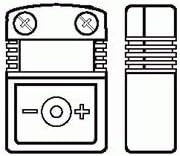
Figure 1: Front and side view of the TMPCNM04 Quick Disconnect Mini TC Probe Connector. The front view clearly shows the screw terminals for wire connection and polarity markings (-O+). The side view illustrates the compact, rectangular profile of the connector.
The TMPCNM04 is a miniature quick-disconnect connector specifically designed for Type T thermocouples. It features screw terminals for secure wire attachment and clear polarity markings to ensure correct wiring.
3. Setup and Installation
Proper installation is crucial for accurate temperature measurements. Follow these steps carefully:
- Prepare Thermocouple Wires: Ensure the Type T thermocouple wires are stripped to the appropriate length (typically 5-7mm) to expose the conductors.
- Identify Polarity: Observe the polarity markings on the connector (-O+). For Type T thermocouples, the positive wire (copper) connects to the '+' terminal, and the negative wire (constantan) connects to the '-' terminal. Incorrect polarity will result in inaccurate readings.
- Connect Wires: Loosen the screw terminals on the connector. Insert the stripped thermocouple wires into the corresponding terminals. Ensure no stray wire strands are present that could cause short circuits.
- Secure Wires: Tighten the screw terminals firmly to secure the wires. Do not overtighten, as this can damage the wires or the connector. Gently tug on the wires to confirm they are securely fastened.
- Connect to Mating Device: Once wired, the TMPCNM04 connector can be plugged into a compatible Type T mini thermocouple jack or panel mount. Ensure a firm, secure connection.
Important: Always ensure power is off to the system before making or breaking electrical connections.
4. Operating Considerations
The TMPCNM04 connector is a passive component designed to facilitate the connection of thermocouple probes. Its operation primarily involves maintaining a stable and low-resistance electrical path for the thermocouple signal.
- Environmental Conditions: Ensure the connector is used within its specified temperature and humidity ranges to prevent degradation of performance.
- Secure Connection: Periodically check that the connector remains firmly seated in its mating jack to prevent intermittent readings.
- Cable Management: Avoid excessive strain or sharp bends on the thermocouple wires connected to the connector, as this can lead to wire fatigue or damage.
5. Maintenance
The TMPCNM04 connector requires minimal maintenance. Regular inspection can help ensure its longevity and reliable performance.
- Cleaning: If necessary, gently wipe the exterior of the connector with a clean, dry, lint-free cloth. Do not use abrasive cleaners or solvents.
- Connection Integrity: Periodically inspect the screw terminals to ensure wires remain securely fastened and free from corrosion.
- Physical Damage: Check for any signs of physical damage, such as cracks, bends, or deformation, which could affect performance. Replace the connector if damage is observed.
6. Troubleshooting
If you experience issues with your thermocouple connection, consider the following common troubleshooting steps:
- No Reading or Erratic Reading:
- Check wire polarity: Ensure the positive and negative thermocouple wires are connected to the correct terminals.
- Verify wire connections: Confirm that the wires are securely tightened in the screw terminals and not loose.
- Inspect for damaged wires: Look for breaks, kinks, or frayed insulation on the thermocouple wires.
- Check mating connection: Ensure the connector is fully seated in its mating jack.
- Incorrect Temperature Reading:
- Confirm thermocouple type: Ensure you are using a Type T thermocouple with this Type T connector. Using a different type will result in incorrect readings.
- Check for external interference: Ensure the thermocouple wires are not running parallel to high-voltage lines or other sources of electrical noise.
If problems persist after performing these checks, consult a qualified technician or contact Red Lion Controls support.
7. Specifications
| Attribute | Value |
|---|---|
| Model Number | TMPCNM04 |
| Brand | Red Lion Controls |
| Connector Type | Quick Disconnect Mini TC Probe Connector |
| Thermocouple Type | Type T |
| Gender | Female |
| UPC | 723707436995 |
| ASIN | B00BC973JE |
8. Warranty and Support
For detailed warranty information and technical support, please refer to the official Red Lion Controls website or contact their customer service directly. Warranty terms and conditions may vary based on region and purchase date.
It is recommended to register your product with Red Lion Controls, if applicable, to receive updates and support notifications.