1. Introduction
Thank you for choosing the Tenergy TN190 Universal Smart Charger. This charger is designed to efficiently and safely charge various NiMH rechargeable batteries, including AA, AAA, C, D, and 9V sizes. Please read this manual thoroughly before use to ensure proper operation and to maximize the lifespan of your batteries and charger.
2. Safety Instructions
- Use this charger only for NiMH rechargeable batteries. Attempting to charge other battery types (e.g., Alkaline, Lithium-ion, NiCd) may cause explosion, rupture, or leakage, leading to personal injury or property damage.
- Do not disassemble, modify, or short-circuit the charger.
- Do not expose the charger to rain, moisture, or extreme temperatures.
- Keep the charger away from children and pets.
- Ensure proper ventilation during charging. Do not cover the charger.
- Unplug the charger from the power outlet when not in use.
- If the charger or batteries become excessively hot during charging, discontinue use immediately and contact support.
3. Product Features and Components
The Tenergy TN190 charger offers intelligent charging with individual channel monitoring and a clear LCD display. It also includes a discharge function and a USB output port.
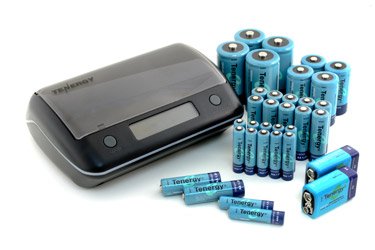
Image 1: Overview of the Tenergy TN190 Universal Smart Charger. Key components include the LCD screen, Power Input, USB Outlet, Open Button, and Discharge Button.
- Universal Compatibility: Charges AA, AAA, C, D, and 9V NiMH batteries.
- Individual Charging Channels: Each battery slot is monitored independently.
- LCD Screen: Displays charging status, battery capacity, and other indicators.
- Discharge Function: Helps to recondition batteries and reduce memory effect.
- USB Output: Allows charging of external USB-powered devices.
- Safety Features: Over-charge protection, short-circuit protection, and bad battery detection.
4. Setup
- Unpack: Carefully remove the charger and any accessories from the packaging.
- Power Connection: Connect the provided AC adapter to the charger's power input port (refer to Image 1). Plug the other end of the AC adapter into a standard wall outlet (100-240V AC, 50/60Hz).
- Initial Check: The LCD screen should illuminate briefly, indicating the charger is powered on and ready for use.
5. Operating Instructions
5.1 Inserting Batteries
- Press the 'Open Button' (refer to Image 1) to open the charger lid.
- Insert NiMH rechargeable batteries into the appropriate slots, ensuring correct polarity (+ and -). The charger supports AA, AAA, C, D, and 9V batteries.
- Close the charger lid securely.
5.2 Charging Process
- Once batteries are inserted, the charger will automatically detect the battery type and begin charging.
- The LCD screen will display the charging status for each individual battery.
- Charging time varies depending on battery capacity and discharge level.
- When a battery is fully charged, the LCD indicator for that slot will show 'FULL'.
5.3 Discharge Function
The discharge function can help to reduce the memory effect in NiMH batteries and optimize their performance. It is recommended to discharge batteries periodically before recharging.
- Insert the batteries you wish to discharge into the charger.
- Press the 'Discharge Button' (refer to Image 1). The LCD screen will indicate 'DISCHARGE'.
- Once the discharge cycle is complete, the charger will automatically switch to charging mode.
5.4 USB Output
The charger features a USB outlet (refer to Image 1) that can provide power to external USB-powered devices (e.g., smartphones, MP3 players).
- Connect your USB device to the USB outlet on the side of the charger using a compatible USB cable.
- The USB function indicator on the LCD screen will illuminate.
- Note: The USB output may be affected if the charger is simultaneously charging multiple high-capacity batteries.
5.5 LCD Indicators Explained
The LCD screen provides real-time information about the charging process.
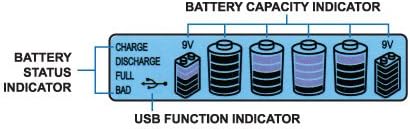
Image 2: Detailed view of the LCD screen indicators, showing Battery Status and Battery Capacity.
- Charge: Indicates that the battery is currently being charged.
- Discharge: Indicates that the battery is currently being discharged.
- Full: Indicates that the battery is fully charged.
- Bad: Indicates a faulty or non-rechargeable battery. Remove immediately.
- Battery Capacity Indicator: Bars on the screen show the approximate charge level of each battery.
- USB Function Indicator: Illuminates when the USB output is active.
6. Maintenance
- Cleaning: Disconnect the charger from power before cleaning. Use a soft, dry cloth to wipe the exterior. Do not use liquid cleaners or solvents.
- Storage: Store the charger in a cool, dry place away from direct sunlight and extreme temperatures.
- Battery Care: For optimal battery life, avoid fully discharging NiMH batteries frequently unless using the discharge function for reconditioning.
7. Troubleshooting
- Charger not powering on: Ensure the AC adapter is securely connected to both the charger and a working wall outlet.
- Battery not charging (LCD shows 'BAD'): The battery may be faulty, non-rechargeable, or inserted with incorrect polarity. Remove the battery and try a known good rechargeable battery.
- Batteries getting hot during charging: Some warmth is normal, but excessive heat indicates a problem. Discontinue charging immediately. This could be due to faulty batteries or improper ventilation.
- USB output not working: Ensure the charger is powered on. Try a different USB cable or device. The USB output may be temporarily disabled if the charger is under heavy load from battery charging.
8. Specifications
| Brand | Tenergy |
| Model Number | 96018 (TN190) |
| Compatible Battery Types | NiMH (AA, AAA, C, D, 9V) |
| Input Voltage | AC 100-240V, 50/60Hz |
| Output Voltage (Charging) | Varies by battery type |
| USB Output | DC 5V |
| ASIN | B00BC4QHTQ |
| UPC | 844949013758 |
9. Warranty Information
Tenergy products are covered by a manufacturer's warranty against defects in materials and workmanship. Please refer to the warranty card included with your product or visit the official Tenergy website for detailed warranty terms and conditions. Keep your purchase receipt as proof of purchase for warranty claims.
10. Support
If you encounter any issues or have questions regarding your Tenergy TN190 Universal Smart Charger that are not addressed in this manual, please contact Tenergy customer support. You can typically find contact information on the official Tenergy website or on the product packaging.
Tenergy Official Website: Visit Tenergy Store on Amazon


