
Metrica 60210
Metrica 60210 Sclerometer for Concrete User Manual
Model: 60210
1. Introduction
This manual provides essential information for the proper use, maintenance, and care of your Metrica 60210 Sclerometer for concrete. The Metrica 60210 is a professional instrument designed for measuring the rebound hardness of concrete, providing an indication of its compressive strength. Please read this manual thoroughly before operating the device to ensure accurate results and prolong the life of your instrument.
2. Product Overview and Components
The Metrica 60210 Sclerometer is a robust, handheld device. It is supplied in a hard case for protection and easy transport.
2.1 Included Components
- 1 x Metrica 60210 Sclerometer
- 1 x Hard Case
2.2 Device Illustration
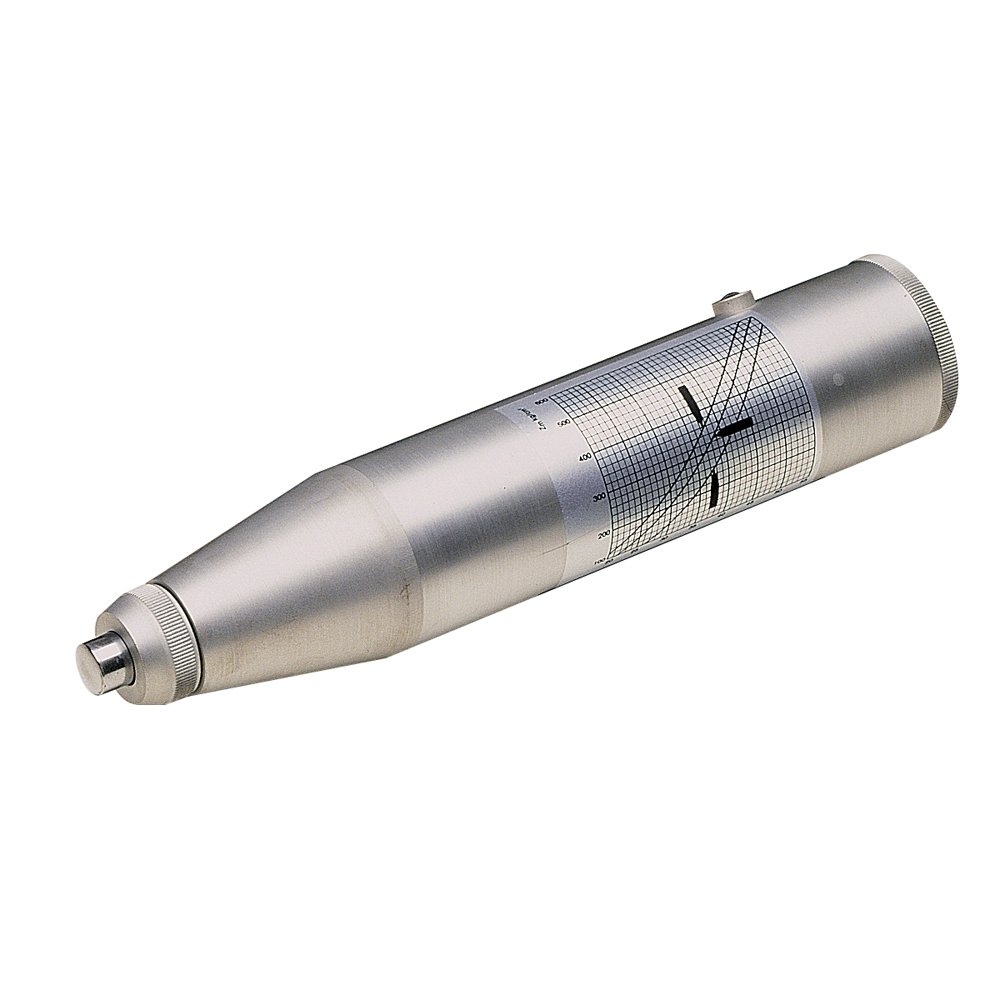
Figure 1: The Metrica 60210 Sclerometer. This image displays the silver-colored, cylindrical device with a conical end, featuring a visible scale on its side for reading measurements. The impact plunger is visible at the tip.
3. Setup
The Metrica 60210 Sclerometer is a mechanical device that requires minimal setup.
- Carefully remove the sclerometer from its hard case.
- Inspect the device for any visible damage or loose parts before use.
- Ensure the plunger mechanism moves freely when pressed.
4. Operating Instructions
The sclerometer operates on the principle of rebound hardness. When the plunger is pressed against a concrete surface, an internal mass impacts the surface, and the rebound distance is measured on a scale.
4.1 Preparing the Test Surface
- The concrete surface to be tested should be smooth, clean, and dry. Remove any loose particles, plaster, or paint.
- Avoid testing on rough or porous surfaces as this can lead to inaccurate readings.
- If the surface is textured, grind a small area smooth for testing.
4.2 Performing a Test
- Hold the sclerometer firmly with both hands, perpendicular to the test surface.
- Slowly and steadily press the plunger against the concrete surface. The internal mass will be released and impact the surface.
- After the impact, the rebound hammer will lock, and a reading will be indicated on the scale.
- Read the rebound number directly from the scale, which is calibrated in kg/cm².
- Record the reading. For reliable results, take at least 9-12 readings within a test area, ensuring each test point is at least 25mm (1 inch) apart.
- Calculate the average of the readings to determine the rebound number for that area.
4.3 Interpreting Results
The rebound number obtained from the sclerometer is an indicator of the surface hardness of the concrete. Higher rebound numbers generally correspond to higher concrete compressive strength. Consult relevant industry standards (e.g., ASTM C805) and calibration charts for accurate correlation between rebound numbers and concrete strength for specific concrete mixes.
5. Maintenance and Care
Proper maintenance ensures the longevity and accuracy of your sclerometer.
- Cleaning: After each use, wipe the sclerometer clean with a soft, dry cloth. Do not use abrasive cleaners or solvents.
- Storage: Always store the sclerometer in its hard case when not in use. Store in a dry environment, away from extreme temperatures and direct sunlight.
- Inspection: Periodically inspect the plunger and other moving parts for wear or damage. Ensure the rebound mechanism operates smoothly.
- Calibration: For critical applications, regular calibration against a certified test anvil is recommended to ensure accuracy. Refer to professional calibration services if needed.
6. Troubleshooting
If you encounter issues with your sclerometer, consider the following:
| Problem | Possible Cause | Solution |
|---|---|---|
| Inconsistent Readings | Uneven test surface; improper perpendicularity; device not clean. | Ensure surface is smooth and clean. Hold device strictly perpendicular. Clean the plunger mechanism. |
| Plunger not rebounding | Internal mechanism jammed or damaged; excessive dirt. | Gently clean the plunger area. If issue persists, do not force; contact support. |
| Readings seem too low/high | Device out of calibration; incorrect test procedure. | Verify test procedure. Consider professional calibration. |
For issues not listed here or if troubleshooting steps do not resolve the problem, please contact Metrica customer support.
7. Specifications
| Attribute | Detail |
|---|---|
| Brand | Metrica |
| Model Number | 60210 |
| Measurement Scale | kg/cm² |
| Item Weight | 3.09 pounds |
| Package Dimensions | 12.99 x 6.77 x 2.44 inches |
| Included Components | Hard Case |
| Batteries Required? | No |
| Origin | Made in Italy |
8. Warranty and Support
For information regarding warranty coverage, technical support, or service, please refer to the official Metrica website or contact their customer service department directly.
Metrica Official Website: www.metrica.it (Note: This is a placeholder link as no specific support link was provided in the product data. Please refer to the manufacturer's official documentation for precise contact information.)
Related documents60210


Ask a question about this manual
Ask about setup, troubleshooting, compatibility, parts, safety, or missing instructions. Manuals+ will review the question and use this page’s manual context to help answer it.