Important Safety Instructions
Read all instructions carefully before using the appliance. Keep this manual for future reference. Improper use can result in electric shock, fire, or injury to persons.
- Do not operate the oven if the door is damaged, or if the oven is malfunctioning.
- Ensure proper ventilation around the appliance.
- Do not heat sealed containers, as they may explode.
- Always use microwave-safe cookware.
- Supervise children closely when the appliance is in use.
- Do not attempt to service or repair the appliance yourself. Contact qualified service personnel.
- Unplug the appliance from the power outlet when not in use and before cleaning.
Product Overview
The Whirlpool Magicook 20BMC is a 20-liter convection microwave oven designed for versatile cooking. It features a touch panel for easy operation and a 245mm recessed turntable.
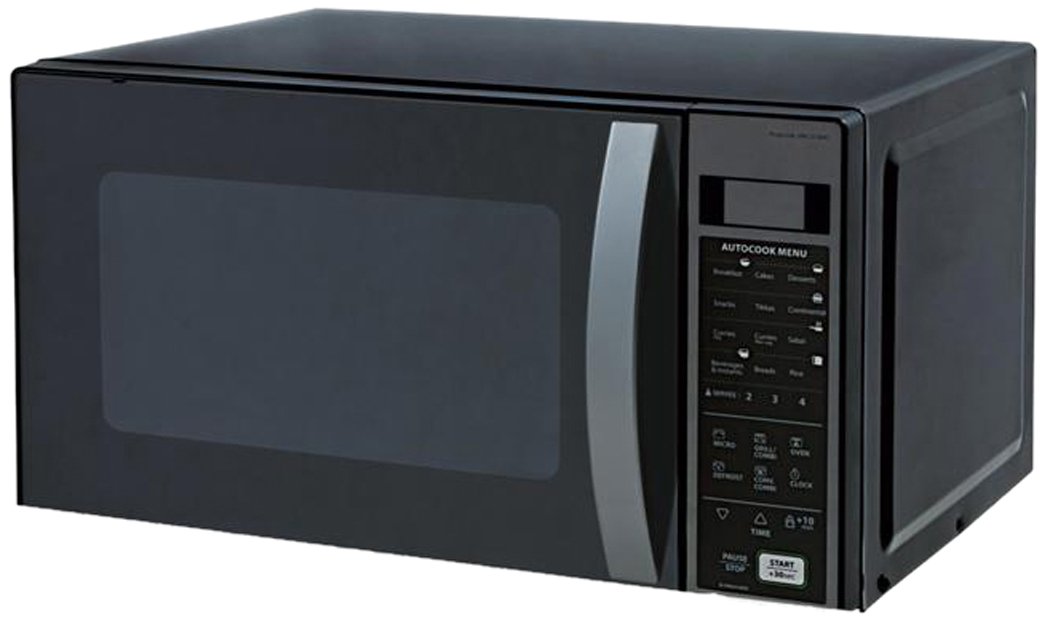
Figure 1: Front view of the Whirlpool 20 L Convection Microwave Oven Magicook 20BMC. This image shows the appliance's exterior, including the control panel and the side swing door.
Key Components:
- Oven Cavity: The interior space where food is cooked.
- Turntable: A rotating glass tray that ensures even cooking. (Included Component)
- Control Panel: Touch-sensitive interface for selecting functions and settings.
- Door: Side swing door for access to the oven cavity.
- Grill Rack: For grilling functions (may be included or sold separately).
Setup and Installation
Unpacking:
- Remove all packaging materials from the oven cavity and accessories.
- Inspect the oven for any damage. Do not operate if damaged.
Placement:
- Place the oven on a flat, stable surface strong enough to support its weight (approximately 15.8 kg).
- Ensure adequate clearance around the oven for ventilation (minimum 10 cm at the back, 20 cm at the sides, and 30 cm above).
- Do not block ventilation openings.
- This appliance is designed for wall mount installation.
Electrical Connection:
- Plug the oven into a grounded electrical outlet.
- Ensure the voltage and frequency match the specifications on the rating label.
Operating Instructions
The Whirlpool Magicook 20BMC offers various cooking modes and features through its touch panel interface.
Basic Microwave Cooking:
- Place food in a microwave-safe container on the turntable.
- Close the oven door.
- Select the desired power level (400W, 550W, or 700W) using the touch panel.
- Set the cooking time.
- Press Start.
Grill Function:
Use the grill function for browning and crisping food. A grill rack may be required.
- Place food on the grill rack.
- Select the Grill mode.
- Set the desired grilling time.
- Press Start.
Convection Function:
The convection mode allows for baking and roasting, similar to a conventional oven. Ideal for items like pizza, Swiss rolls, and cakes.
- Preheat the oven to the desired temperature (if required by recipe).
- Place food in a heat-resistant dish.
- Select the Convection mode.
- Set the temperature and cooking time.
- Press Start.
Combination Cooking Modes:
This oven offers various combination modes for optimized cooking results:
- Grill + Convection: Combines grilling and convection heat.
- Microwave + Grill: Combines microwave cooking with grilling.
- Microwave + Convection: Combines microwave cooking with convection heat.
Refer to the specific combination cooking section in the full manual for detailed instructions on setting times and power levels for each mode.
Auto Cook Menus:
The oven includes 118 auto cook recipe menus. Select the desired menu from the touch panel, enter the food weight (if prompted), and press Start. The oven will automatically set the cooking time and power level.
Auto Reheat:
Use the auto-reheat function to quickly warm up food. Place the food in the oven, select the auto-reheat option, and press Start.
Auto Defrost:
The auto defrost system allows for efficient thawing of frozen foods. Select the defrost function, enter the weight of the food, and the oven will calculate the appropriate defrosting time.
Multi-stage Cooking:
This feature allows you to program multiple cooking stages (e.g., defrost, then microwave) in a single sequence. Consult the full manual for detailed programming steps.
Keep Warm Function:
The oven can keep food warm inside the cavity for a set duration after cooking is complete. Select the 'Keep Warm' function and set the desired time.
Care and Maintenance
Cleaning the Exterior:
- Wipe the exterior with a soft, damp cloth.
- Do not use abrasive cleaners or harsh chemicals.
Cleaning the Interior:
- Clean the oven cavity regularly with a mild detergent and a soft cloth.
- For stubborn food spills, place a bowl of water with lemon juice inside and microwave for a few minutes to loosen residue.
- Remove and wash the turntable and turntable support in warm, soapy water.
Door Seal:
- Keep the door seal clean to ensure proper closure and efficient operation.
Troubleshooting
Before contacting service, review the following common issues and solutions:
| Problem | Possible Cause | Solution |
|---|---|---|
| Oven does not start. | Power cord unplugged; door not closed properly; fuse blown. | Check power connection; ensure door is securely latched; check household fuse/circuit breaker. |
| Food not cooking evenly. | Food not stirred or rotated; turntable not rotating. | Stir or rotate food during cooking; ensure turntable is correctly placed and not obstructed. |
| Excessive steam inside oven. | High moisture content in food. | This is normal for some foods; wipe interior after use. |
| Oven light not working. | Bulb needs replacement. | Contact authorized service for bulb replacement. |
Specifications
| Feature | Detail |
|---|---|
| Brand | Whirlpool |
| Model | Magicook 20BMC |
| Capacity | 20 Litres |
| Oven Cooking Mode | Convection |
| Wattage (Microwave) | 700 Watts |
| Energy Consumption | 800 Watts |
| Power Levels | 400W, 550W, 700W |
| Special Features | Touch Panel, Auto Defrost, Multi-stage cooking, Combi cooking, Auto Reheat, Keep Warm |
| Auto Cook Menus | 118 |
| Turntable Size | 245mm |
| Installation Type | Wall Mount |
| Door Orientation | Left |
| Material | Metal (Inner Material Type: metal) |
| Item Dimensions (LxWxH) | 35.3 x 45.5 x 26.4 Centimeters |
| Item Weight | 15 kg 800 g |
| Included Components | Turntable |
Warranty and Support
This Whirlpool appliance comes with a manufacturer's warranty.
- Warranty Period: 2 years on magnetron.
- For warranty claims or technical support, please contact Whirlpool customer service. Refer to the official Whirlpool website or your purchase documentation for contact details.


