
1. Introduction
This manual provides detailed instructions for the Eltako MFZ12PMD-UC Multifunction Electronic Time Relay. This device is a versatile power MOSFET-based time relay with 18 selectable functions, designed for controlling lighting and other electrical loads up to 400W, with expansion capabilities up to 3600W. It features automatic lamp recognition, low standby loss, and electronic overload protection, making it suitable for various applications in electrical installations.
2. Safety Warnings
WARNING: Electrical work must be performed exclusively by qualified electricians or under their supervision and guidance. Failure to comply may result in serious injury, electric shock, fire, or damage to property. Always disconnect power before installation or maintenance.
3. Product Features
- Fully electronic multifunction time relay with 18 selectable functions.
- Power MOSFET technology with high switching capacity up to 400W.
- Expandable up to 3600W with LUD12-230V power additives on X1 and X2 connections.
- Automatic lamp recognition for various load types.
- Extremely low standby loss of only 0.3W.
- Adjustable minimum and maximum brightness, with soft ON/OFF for dimming functions.
- Compatible with dimmable energy-saving lamps and 230V LED lamps (performance depends on lamp electronics).
- Universal control voltage inputs (local and centralized) 8-230V UC, galvanically isolated from the 230V supply.
- Zero-crossing switching for enhanced lamp protection and extended lifespan.
- Electronic automatic overload and over-temperature protection.
- Function and time settings are entered via two buttons (MODE and SET) and displayed numerically on an integrated LCD screen.
4. Setup and Installation
The Eltako MFZ12PMD-UC is designed for series installation within an electrical distribution board. Due to the inherent risks associated with electrical installations, it is mandatory that installation is carried out by a qualified electrician in accordance with all local and national electrical codes and regulations.
4.1. Wiring Diagram
Refer to the detailed wiring diagram printed on the side of the device and consult the comprehensive electrical schematics provided with the product packaging for precise connection instructions.
- Connect the main power supply (L-N 230V~) to the designated terminals.
- Connect the electrical load (e.g., lamps) to the X1 and X2 terminals.
- Connect control inputs (+A1, -A2, +E1, -E2, +F1) for universal control voltage (8-230V UC) as required by the chosen function and your specific application.
- Ensure all terminal connections are secure and properly tightened to prevent loose contacts.
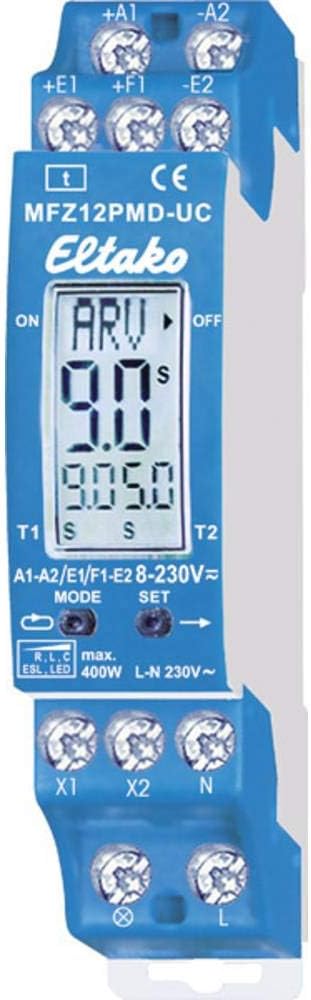
Image Description: A close-up view of the Eltako MFZ12PMD-UC relay, showing the blue housing, screw terminals for electrical connections (+A1, -A2, +E1, -E2, +F1, X1, X2, N, L), and the integrated LCD display. The display shows 'ARV' and '9.0S', indicating function and time settings. The device also has 'MODE' and 'SET' buttons visible below the display.
5. Operating Instructions
The MFZ12PMD-UC offers 18 distinct functions, which are selected and configured using the MODE and SET buttons in conjunction with the integrated LCD screen.
5.1. Function Selection
- Press the MODE button repeatedly to cycle through the 18 available functions. Each function will be indicated on the LCD display.
- Once the desired function is displayed, press the SET button to confirm your selection.
5.2. Time Setting
- After selecting a function that requires a time setting (e.g., delay ON, delay OFF), use the SET button to adjust the time value. The LCD will show the current time setting, typically in seconds (S).
- Continue pressing SET to increment the time, or hold it down for faster adjustment.
- Refer to the specific function descriptions in the complete product documentation for detailed timing parameters and ranges.
5.3. Dimming Functions
For functions involving dimming, the minimum and maximum brightness levels can be adjusted. If the minimum brightness is not set to 0, the connected lamp will dim to the set percentage rather than switching off completely. This feature allows for customized lighting control.
6. Maintenance
The Eltako MFZ12PMD-UC is designed to be a maintenance-free device under normal operating conditions. To ensure optimal performance and longevity, adhere to the following guidelines:
- Ensure the operating environment is clean, dry, and within the specified temperature and humidity ranges.
- Periodically, a qualified electrician should check terminal connections for tightness to prevent potential issues from loose wiring.
- Do not expose the device to excessive moisture, corrosive substances, or extreme temperatures.
- Cleaning should only be performed with a dry, soft cloth. Do not use liquid cleaners, solvents, or abrasive materials.
7. Troubleshooting
If the device is not functioning as expected, consider the following troubleshooting steps:
- No Power: Verify that the main power supply to the device is active and all connections to terminals N and L are secure.
- Load Not Responding: Check that the connected load (e.g., lamp) is functional and correctly wired to terminals X1/X2. Ensure the selected function is appropriate for the load type.
- Incorrect Timing/Function: Re-check the function selection and time settings using the MODE and SET buttons. Refer to the full product manual for specific function details and their corresponding settings.
- Overload/Overheating: The device features electronic protection. If it has shut down, reduce the connected load or ensure adequate ventilation around the device. Allow the unit to cool down before attempting operation again.
- Dimming Issues: Confirm that the connected lamps are explicitly rated as dimmable. Review the minimum and maximum brightness settings.
IMPORTANT: For any persistent issues, complex electrical problems, or if you are unsure about any step, consult a qualified electrician. Do not attempt unauthorized repairs or modifications to the device.
8. Technical Specifications
| Specification | Value |
|---|---|
| Brand | Eltako |
| Model Number | MFZ12PMD-UC |
| Product Dimensions (L x W x H) | 0.02 x 0.09 x 0.07 cm |
| Item Weight | 80 g |
| Power (Max. Load) | 400 Watts |
| Max. Load with Power Additives | 3600 Watts (with LUD12-230V) |
| Mounting Type | Screw Terminals |
| Universal Control Voltage | 8-230V UC |
| Standby Loss | 0.3 W |
| Manufacturer | Eltako |
| Discontinued by Manufacturer | No |
9. Warranty and Support
For detailed warranty information, please refer to the documentation provided with your purchase or contact your authorized Eltako retailer. Eltako products are manufactured to high standards for reliability and performance.
For technical support, product inquiries, or further assistance, please visit the official Eltako website or contact their customer service department directly. Always provide your product model number (MFZ12PMD-UC) when seeking support.

Image Description: The Eltako company logo, featuring the word "Eltako" in white script on a blue background, alongside the slogan "THE HOME OF INNOVATION." in blue text. This logo represents the brand's commitment to innovation in electrical technology.


