
Introduction
Welcome to your new Cherub WST-620 Flip Tuner. This manual provides instructions for the proper setup, operation, and maintenance of your device. Please read it thoroughly before use. The WST-620 is a versatile clip-on tuner designed for various musical instruments, featuring an ultra-large LCD with orientation-sensing technology for optimal viewing.
Key Features
- Supports Guitar, Bass, Violin, Ukulele, and Chromatic Tuning.
- Display changes color to indicate when you are in tune.
- Ultra-large LCD with innovative orientation-sensing technology that automatically flips the display.
- Allows clipping on the front or back of the headstock for both left and right-handed instruments.
Package Contents
- Cherub WST-620 Flip Tuner
- CR2032 Battery (pre-installed or included)
- User Manual (this document)
Parts Identification
Familiarize yourself with the components of your WST-620 tuner.
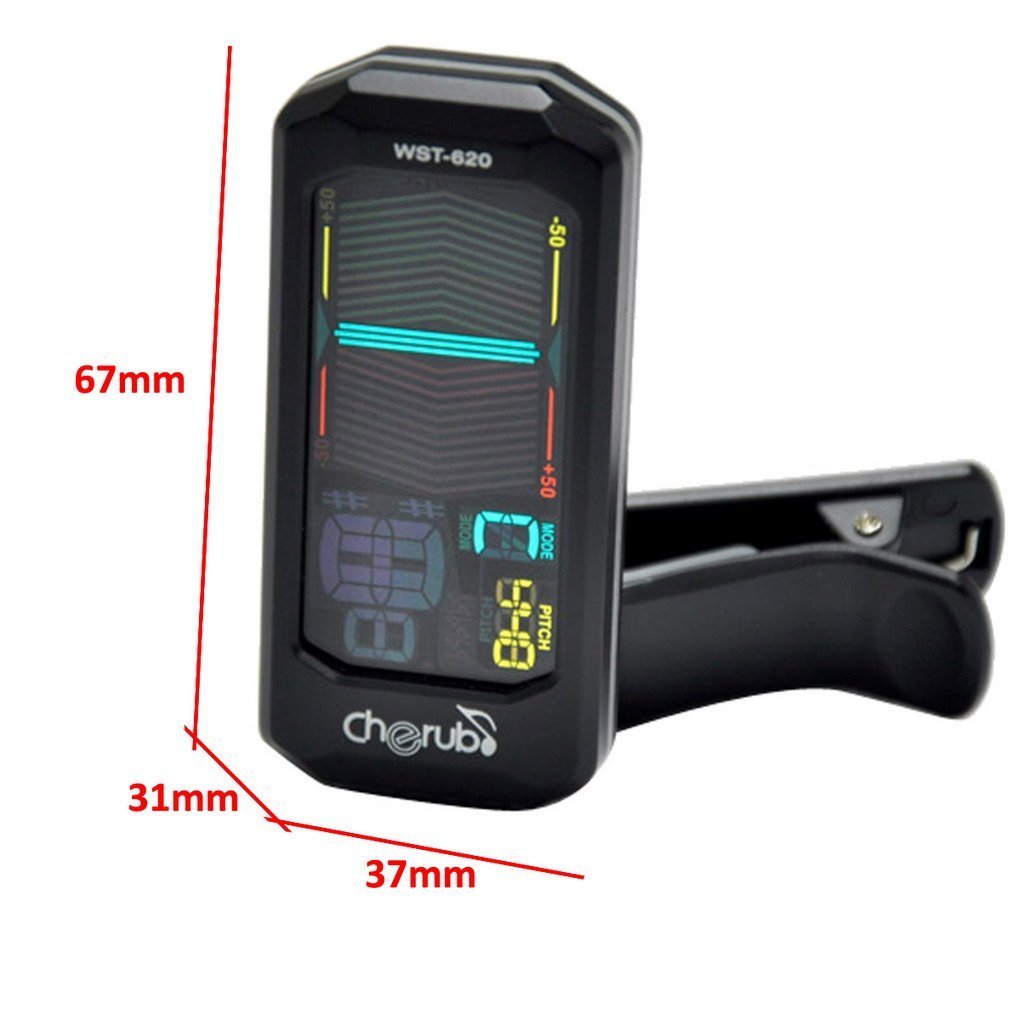
Image: Front view of the Cherub WST-620 Flip Tuner with dimensions (67mm height, 37mm width, 31mm depth).

Image: Front view of the Cherub WST-620 Flip Tuner, showing the LCD display with tuning indicators and pitch setting.

Image: Rear view of the Cherub WST-620 Flip Tuner, highlighting the power/mode button, pitch button, flat button, and battery compartment.

Image: Side view of the Cherub WST-620 Flip Tuner, showing the adjustable clip mechanism.

Image: The Cherub WST-620 Flip Tuner attached to an instrument, demonstrating its flexible viewing angle.
Setup
1. Battery Installation
The WST-620 uses one CR2032 battery. If the display does not light up or is dim, replace the battery.
- Locate the battery compartment on the back of the tuner.
- Use a coin or small screwdriver to twist the battery cover counter-clockwise to open.
- Insert a new CR2032 battery with the positive (+) side facing up.
- Replace the battery cover and twist clockwise to secure.
2. Attaching the Tuner
The WST-620 features a flexible clip and an orientation-sensing display.
- Open the clip and attach it firmly to the headstock of your instrument.
- Adjust the angle of the tuner for optimal viewing. The display will automatically orient itself.
Operating Instructions
1. Power On/Off
Press and hold the POWER/MODE button (located on the back) for 2 seconds to turn the tuner on or off.
2. Selecting Tuning Mode
While the tuner is on, short press the POWER/MODE button to cycle through the available tuning modes:
- C (Chromatic): Tunes all notes.
- G (Guitar): Tunes standard guitar notes (E, A, D, G, B, E).
- B (Bass): Tunes standard bass notes (E, A, D, G).
- V (Violin): Tunes standard violin notes (G, D, A, E).
- U (Ukulele): Tunes standard ukulele notes (G, C, E, A).
3. Setting Pitch (A4 Calibration)
The default A4 pitch is 440Hz. To adjust:
- Short press the PITCH button to enter pitch calibration mode.
- Press the PITCH button repeatedly to adjust the A4 frequency from 430Hz to 450Hz.
- The setting will be saved automatically after a few seconds of inactivity.
4. Flat Tuning (Guitar/Bass Mode)
In Guitar or Bass mode, you can set flat tuning:
- Short press the FLAT button to cycle through ♭, ♭♭, ♭♭♭, ♭♭♭♭, or no flat.
- This allows for tuning down by semitones.
5. Tuning Your Instrument
Once the tuner is on and the correct mode is selected:
- Pluck a single string on your instrument.
- The display will show the note name and a meter indicating pitch accuracy.
- Flat: If the needle is to the left and the display is red, the note is flat. Tighten the string.
- Sharp: If the needle is to the right and the display is red, the note is sharp. Loosen the string.
- In Tune: When the note is in tune, the needle will be in the center, and the display will turn green.
Maintenance
1. Battery Replacement
Refer to the "Battery Installation" section under Setup for instructions on replacing the CR2032 battery.
2. Cleaning
Wipe the tuner with a soft, dry cloth. Do not use liquid cleaners or solvents, as they may damage the finish or internal components.
3. Storage
If the tuner will not be used for an extended period, remove the battery to prevent leakage and store the device in a cool, dry place.
Troubleshooting
| Problem | Possible Cause | Solution |
|---|---|---|
| Tuner does not power on. | Dead or incorrectly installed battery. | Replace the CR2032 battery, ensuring correct polarity (+ side up). |
| Display is dim or flickering. | Low battery power. | Replace the CR2032 battery. |
| Tuner does not detect notes accurately. | Incorrect tuning mode selected; weak vibration from instrument; noisy environment. | Ensure the correct tuning mode (C, G, B, V, U) is selected. Pluck strings firmly. Tune in a quiet environment. Ensure tuner is securely clipped. |
| Display does not flip automatically. | Rare sensor malfunction. | Try turning the tuner off and on again. If the issue persists, contact support. |
Specifications
- Model: WST-620
- Tuning Modes: Chromatic, Guitar, Bass, Violin, Ukulele
- A4 Frequency: 430-450Hz (adjustable)
- Detection Method: Vibration (Clip)
- Tuning Range: A0 (27.5Hz) - C8 (4186Hz)
- Power: 3V (CR2032 Lithium Battery)
- Dimensions: 12.7 x 7.62 x 5.08 cm (approx. 67 x 37 x 31 mm for the tuner unit)
- Weight: 45.4 g
Warranty and Support
Cherub products are designed for reliability and performance. For warranty information or technical support, please refer to the official Cherub website or contact your local dealer. Keep your purchase receipt as proof of purchase.
For further assistance, please visit: www.cherubtechnology.com