Introduction
Thank you for choosing Duracell Activair Hearing Aid Batteries Size 10. These batteries are designed to provide reliable and long-lasting power for your hearing aid devices. This manual contains important information regarding the proper use, maintenance, and disposal of your batteries to ensure optimal performance and safety.
Setup and Preparation
Duracell Activair Hearing Aid Batteries feature an EasyTab for convenient handling and insertion. Follow these steps to prepare your battery for use:
- Remove from Packaging: Carefully remove a single battery from its protective packaging. The packaging is designed to protect the batteries until use.
- Activate the Battery: Locate the yellow EasyTab on the battery. This tab seals air holes, keeping the battery inactive until ready for use. Peel off the EasyTab completely.
- Allow for Air Activation: After removing the tab, allow the battery to sit exposed to air for approximately 1-2 minutes before inserting it into your hearing aid. This allows the zinc-air chemistry to fully activate, ensuring maximum battery life.

Image: Duracell Activair Hearing Aid Batteries Size 10 in their protective packaging, showing the yellow EasyTab.
Operating Instructions
Once the battery is activated, it is ready for insertion into your hearing aid device.
- Open Battery Compartment: Gently open the battery compartment of your hearing aid. Refer to your hearing aid's specific manual for instructions if needed.
- Insert Battery: Using the EasyTab, carefully insert the battery into the compartment with the correct polarity (usually indicated by a '+' sign on the battery and in the compartment). The EasyTab helps guide the battery into place without touching the battery surface directly.
- Close Compartment: Once the battery is securely in place, close the battery compartment. Your hearing aid should now power on.
- Battery Life: Duracell Activair batteries are designed for long-lasting performance. Actual battery life will vary depending on the hearing aid model, usage patterns, and environmental conditions. When the battery is nearing depletion, some hearing aids may provide an audible low battery warning.
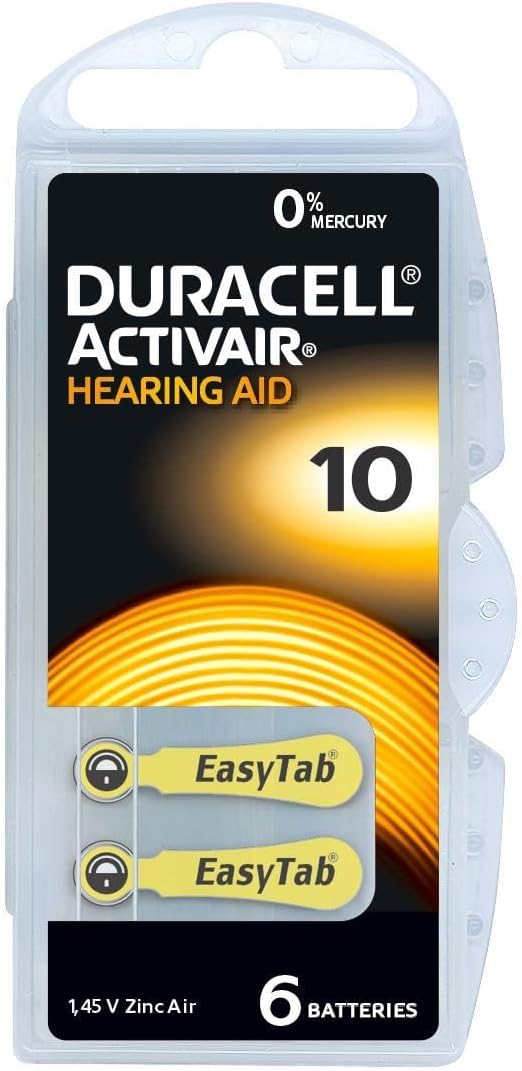
Image: A single Duracell Activair Hearing Aid Battery Size 10, highlighting the EasyTab for easy handling.
Maintenance and Storage
Proper maintenance and storage can extend the life and performance of your batteries.
- Storage: Store unused batteries in their original, unopened packaging at room temperature (approximately 20-25°C or 68-77°F) in a dry place. Avoid extreme temperatures, direct sunlight, and high humidity.
- Keep Tabs On: Do not remove the EasyTab from unused batteries, as this will activate them and shorten their shelf life.
- Handling: Avoid touching the battery surface with bare hands, as oils and moisture can affect performance. Use the EasyTab for handling whenever possible.
- Disposal: Dispose of used batteries responsibly according to local regulations. Many communities have recycling programs for batteries. Do not dispose of batteries in fire, as they may explode.
- Safety: Keep batteries out of reach of children and pets. If swallowed, seek immediate medical attention.
Troubleshooting
If you experience issues with your Duracell Activair Hearing Aid Batteries, consider the following:
- Hearing Aid Not Turning On:
- Ensure the battery's EasyTab has been completely removed and the battery has had 1-2 minutes to activate.
- Check that the battery is inserted with the correct polarity.
- Verify the battery compartment is fully closed.
- Try a new battery to rule out a depleted or faulty battery.
- Short Battery Life:
- Ensure the EasyTab was removed just prior to use, and the battery was not activated prematurely.
- High volume settings or frequent use of wireless streaming features on your hearing aid can consume battery power more quickly.
- Extreme temperatures (hot or cold) can affect battery performance and life.
- Check the expiration date on the battery packaging.
- Intermittent Performance:
- Clean the battery contacts in your hearing aid with a dry cotton swab to remove any debris or corrosion.
- Ensure the battery is seated firmly in the compartment.
If problems persist, consult your hearing aid professional or contact Duracell customer support.
Specifications
| Feature | Detail |
|---|---|
| Battery Type | Zinc-Air |
| Size | 10 |
| Voltage | 1.45 Volts |
| Mercury Content | 0% Mercury |
| Model Number | 50536221 |
| Recommended Use | Hearing Aid Devices |
Warranty and Support
Duracell stands behind the quality of its products. For information regarding warranty coverage, product support, or to report any issues, please visit the official Duracell website or contact their customer service department. Keep your purchase receipt as proof of purchase.
Online Support: www.duracell.com/en-us/contact-us/


