
Introduction
Thank you for purchasing the Ivation Oversized 24-Inch LED Digital Wall Clock. This manual provides essential information for setting up, operating, and maintaining your new clock. Please read these instructions carefully before use to ensure proper functionality and longevity of the product.

Figure 1: Ivation Oversized 24-Inch LED Digital Wall Clock.
Package Contents
Verify that all items are present in your package:
- Ivation Oversized 24-Inch LED Digital Wall Clock
- Remote Control
- 10-foot AC Power Adapter
- Mounting Hardware (screws and wall anchors)
- Instruction Manual

Figure 2: Included accessories: remote control, power adapter, and mounting hardware.
Product Overview
The Ivation Oversized LED Digital Wall Clock features a large display for enhanced visibility and an aluminum frame for durability. It includes an AM/PM indicator and jumbo 3.25-inch digits.

Figure 3: Front view with key dimensions and display indicators.
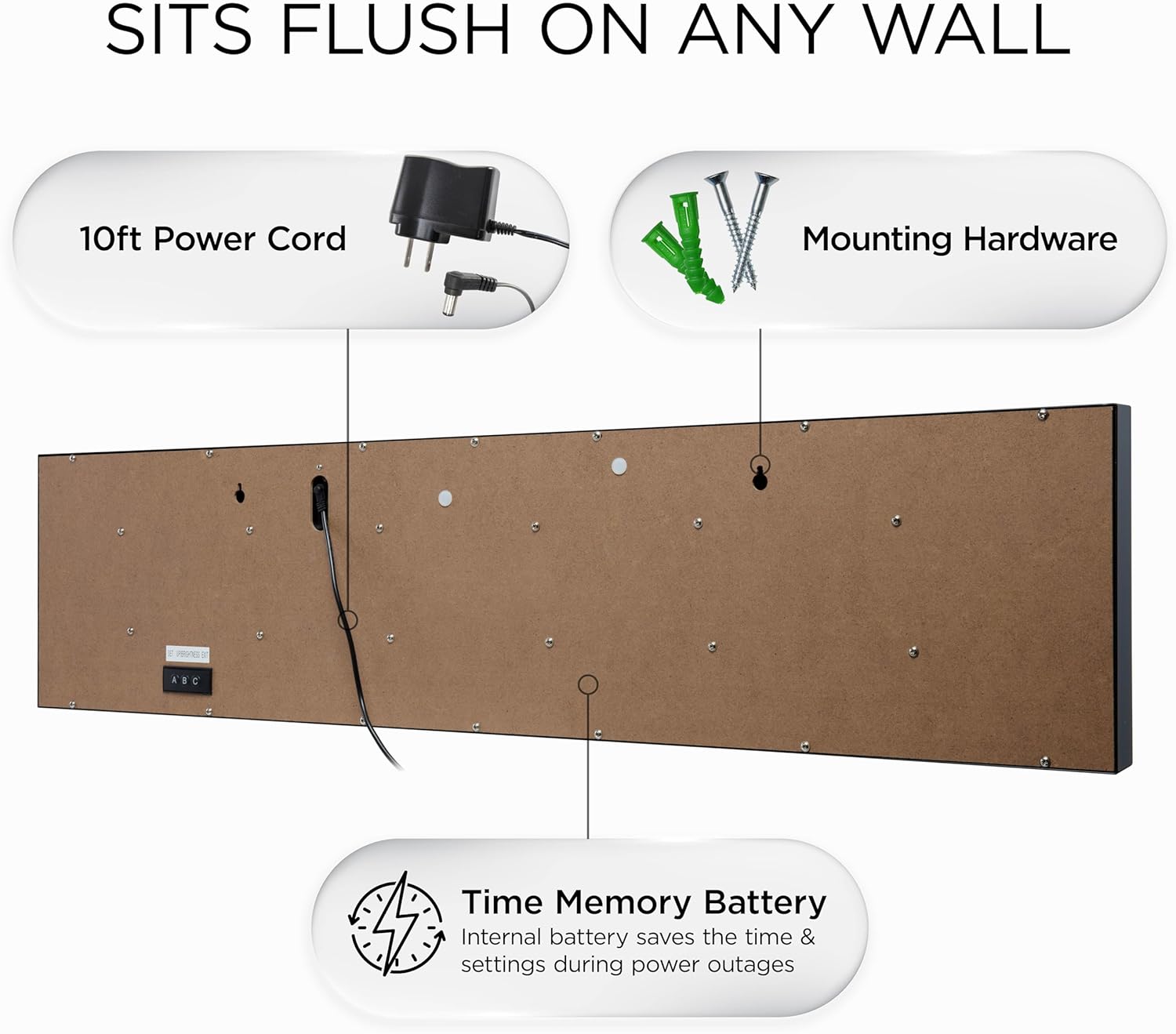
Figure 4: Rear view with power input and mounting points.
Setup
- Power Connection: Connect the 10-foot AC power adapter to the clock's power input port located on the back. Plug the adapter into a standard electrical outlet. The clock display will illuminate.
- Placement: The clock can be placed on a shelf or mounted on a wall. For wall mounting, use the provided mounting hardware (screws and wall anchors) with the built-in mounting holes on the back of the clock. Ensure the mounting surface is secure.
- Initial Time Setting: Upon first power-up, the clock may display a default time. Use the included remote control to set the correct time. Refer to the 'Operating Instructions' section for detailed steps on using the remote.
Video 1: Ivation Oversized LED Clock demonstration by DBROTH, showing the clock's features and operation.
Operating Instructions
The clock can be operated using the remote control or the manual buttons on the back (A, B, C).
Using the Remote Control

Figure 5: Remote control for the Ivation clock.
- Set Time: Press the 'Clock' button. Use the number pad to enter the desired time (HH:MM). Press 'Set/Enter' to confirm.
- Adjust Brightness: Press the 'Display' button repeatedly to cycle through 6 brightness levels. Alternatively, use the 'Brightness +' or 'Brightness -' buttons.
- 12/24 Hour Format: Press the '12/24' button to switch between 12-hour and 24-hour display modes.
- Stopwatch: Press the 'Stopwatch' button to activate. Use 'Start/Stop' to control and 'Reset' to clear.
- Countdown: Press the 'Countdown' button. Use the number pad to enter the desired countdown duration. Press 'Start/Stop' to begin and 'Reset' to clear.
- Alarm: Press the 'Alarm' button. Use the number pad to set the alarm time. Press 'Set/Enter' to activate.
Manual Control Buttons (on back of clock)
- Button A (SET/MOVE): Used to enter setup mode and move between settings.
- Button B (ADD): Used to increase values during setup.
- Button C (EXIT): Used to exit setup mode.
Features
- Large LED Display: Features jumbo 3.25-inch digits for clear visibility from a distance.
- 6 Brightness Levels: Adjustable display brightness to suit various lighting conditions, from bright daylight to dark rooms.
- Time Memory: Built-in battery retention preserves time and settings during power outages, eliminating the need for reprogramming.
- AM/PM Indicator: Clearly displays AM or PM in 12-hour mode.
- Versatile Placement: Designed for both shelf placement and wall mounting with included hardware.
- Durable Construction: Features a sleek aluminum frame.

Figure 6: Key features of the Ivation LED clock.
Maintenance
- Cleaning: Use a soft, dry cloth to clean the display and frame. Avoid abrasive cleaners or solvents that may damage the surface.
- Power: Ensure the clock is connected to a stable power source. Unplug the clock during electrical storms or when not in use for extended periods.
- Environment: Keep the clock in a dry indoor environment. Avoid extreme temperatures or high humidity.
Troubleshooting
| Problem | Possible Cause | Solution |
|---|---|---|
| Clock does not turn on. | No power or faulty adapter. | Check power connection and outlet. Ensure the AC adapter is functioning. |
| Time is incorrect. | Time not set or power interruption. | Use the remote control to set the correct time. The time memory feature should retain settings during brief power loss. |
| Display is too dim/bright. | Brightness level needs adjustment. | Use the 'Display' button on the remote to cycle through brightness levels. |
| Remote control not working. | Dead batteries or obstruction. | Replace remote control batteries. Ensure no obstructions between remote and clock sensor. |
Specifications
| Feature | Detail |
|---|---|
| Brand | Ivation |
| Model Number | 0124BLU |
| Display Type | Digital LED |
| Color | Blue (LED digits) |
| Product Dimensions | 24" W x 6" H |
| Digit Height | 3.25 inches |
| Power Source | Corded Electric |
| Brightness Levels | 6 Adjustable Levels |
| Mounting Type | Wall Mount / Shelf |
| Frame Material | Durable Aluminum |
| Item Weight | 3.8 Pounds |
| Indoor/Outdoor Usage | Indoor |
Warranty and Support
This Ivation product comes with a limited warranty. For specific warranty details, product support, or service inquiries, please refer to the warranty card included in your package or visit the official Ivation website. Keep your purchase receipt for warranty claims.


