1. Introduction and Overview
Thank you for choosing the Ryobi RPD500-G 500W 13mm Hammer Drill. This manual provides essential information for the safe and effective use of your new power tool. Please read these instructions carefully before operation and retain them for future reference. The Ryobi RPD500-G is a versatile corded hammer drill designed for drilling in wood, metal, and masonry with its powerful 500W motor and hammer function.

Image 1.1: The Ryobi RPD500-G 500W 13mm Hammer Drill, showcasing its compact design and auxiliary handle.
2. Safety Information
Always observe basic safety precautions when using electric tools to reduce the risk of fire, electric shock, and personal injury.
- Work Area Safety: Keep the work area clean and well-lit. Cluttered or dark areas invite accidents. Do not operate power tools in explosive atmospheres, such as in the presence of flammable liquids, gases, or dust.
- Electrical Safety: Power tool plugs must match the outlet. Never modify the plug in any way. Avoid body contact with earthed or grounded surfaces, such as pipes, radiators, ranges, and refrigerators.
- Personal Safety: Always wear eye protection. Use hearing protection when operating the tool for extended periods. Wear appropriate clothing; avoid loose clothing or jewelry. Secure long hair.
- Tool Use and Care: Do not force the power tool. Use the correct power tool for your application. Disconnect the plug from the power source before making any adjustments, changing accessories, or storing power tools.
- Secure Workpiece: Always clamp or secure the workpiece to prevent movement during drilling.
3. Product Components and Features
The Ryobi RPD500-G is engineered for efficiency and user comfort, featuring:
- 500W Motor: Provides ample power for various drilling tasks.
- 13mm Keyless Chuck: Allows for quick and easy bit changes without a chuck key, accommodating a wide range of drill bit sizes.
- Variable Speed Control (0-3000 RPM): Enables precise speed adjustment for different materials and applications.
- Hammer Function (0-50,000 BPM): Engages for efficient drilling into masonry and concrete.
- Gripzone Technology: Integrated soft-grip areas for enhanced user comfort and reduced vibration during prolonged use.
- Forward/Reverse Switch: For driving and removing screws, and for freeing jammed drill bits.
- Auxiliary Handle: Provides additional control and stability.
- Depth Stop: For precise control over drilling depth.

Image 3.1: Front view of the Ryobi RPD500-G, highlighting the 13mm keyless chuck and auxiliary handle attachment point.

Image 3.2: Side view of the Ryobi RPD500-G, showing the main handle with trigger and mode selector.
4. Setup
4.1 Attaching the Auxiliary Handle
The auxiliary handle provides improved control and safety. To attach, loosen the handle by rotating it counter-clockwise. Slide it over the chuck and onto the front of the drill body. Rotate the handle clockwise to tighten it securely in the desired position.
4.2 Inserting and Removing Drill Bits
- Ensure the drill is unplugged from the power source.
- Rotate the front collar of the keyless chuck counter-clockwise to open the chuck jaws.
- Insert the drill bit fully into the chuck, ensuring it is centered.
- Rotate the front collar clockwise to tighten the chuck jaws firmly around the drill bit. Hand-tighten only; do not use tools.
- To remove, reverse the tightening process.
4.3 Adjusting the Depth Stop
The depth stop allows for consistent drilling depth. Loosen the auxiliary handle, slide the depth stop rod through the hole in the handle, and adjust it to the desired depth. Retighten the auxiliary handle to secure the depth stop.
5. Operating Instructions
5.1 Power Connection
Connect the drill's power cord to a suitable power outlet. Ensure the voltage matches the tool's requirements.
5.2 Selecting Drill Mode
A switch on the top or side of the drill allows selection between rotary drilling and hammer drilling modes. Select rotary mode for wood, metal, and plastics. Select hammer drill mode for masonry and concrete.
5.3 Variable Speed Control and Forward/Reverse
- Trigger Switch: The drilling speed is controlled by the pressure applied to the trigger switch. Press lightly for slower speeds and harder for faster speeds.
- Lock-On Button: For continuous operation, press the lock-on button while the trigger is fully depressed. To release, press the trigger again.
- Forward/Reverse Switch: Located near the trigger, this switch changes the direction of rotation. Use forward for drilling and reverse for removing screws or freeing jammed bits. Always ensure the drill has come to a complete stop before changing direction.
5.4 Drilling Techniques
- General Drilling: Apply steady, even pressure. Allow the drill to do the work. Do not force the drill.
- Wood Drilling: Use wood-specific drill bits. Start with a slower speed and increase as needed.
- Metal Drilling: Use HSS (High-Speed Steel) drill bits. Use cutting oil to cool the bit and improve drilling efficiency. Start with a pilot hole for larger diameters.
- Masonry Drilling: Use carbide-tipped masonry drill bits and select the hammer drill mode. Apply firm, consistent pressure.

Image 5.1: A user demonstrating drilling into a wall with the Ryobi RPD500-G, wearing appropriate safety glasses.
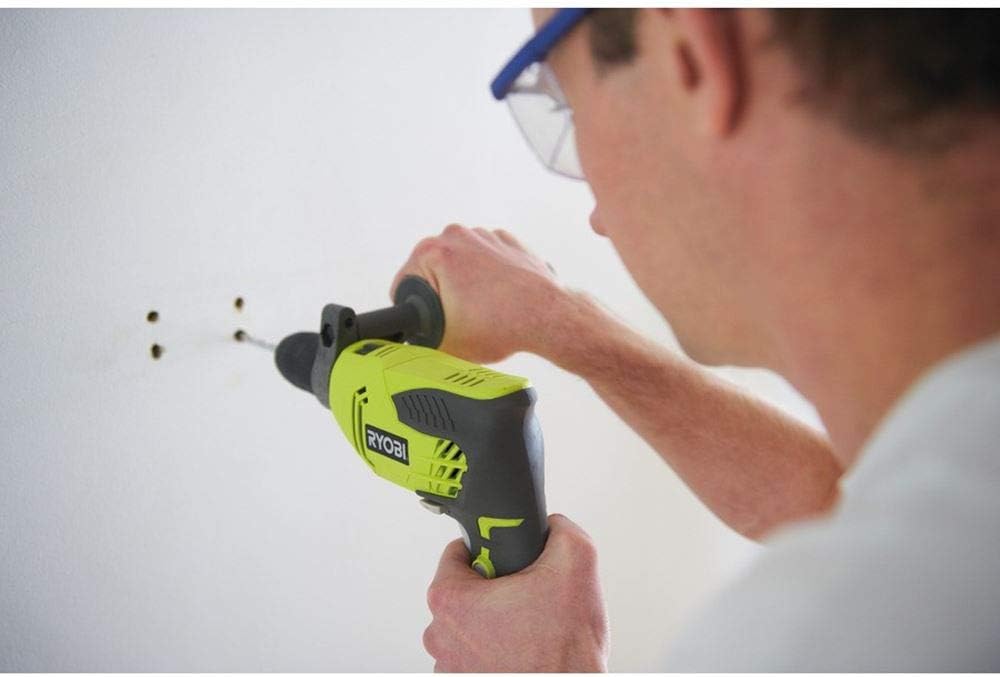
Image 5.2: A close-up view of the Ryobi RPD500-G in use, showing the drill bit engaging with the wall surface.
6. Maintenance
Regular maintenance ensures the longevity and safe operation of your drill.
- Cleaning: After each use, clean the tool with a soft, damp cloth. Do not use harsh chemicals or abrasive cleaners. Keep ventilation openings clear of dust and debris.
- Power Cord Inspection: Regularly inspect the power cord for any signs of damage, cuts, or fraying. If damaged, have it repaired by a qualified service technician.
- Chuck Maintenance: Keep the chuck jaws clean and free of debris to ensure proper gripping of drill bits.
- Storage: Store the drill in a dry, secure location out of reach of children.
7. Troubleshooting
If you encounter issues with your Ryobi RPD500-G, refer to the following common problems and solutions:
| Problem | Possible Cause | Solution |
|---|---|---|
| Drill does not start | No power supply; Faulty power cord; Trigger switch issue | Check power outlet and cord; Consult a qualified technician for repair. |
| Poor drilling performance | Dull drill bit; Incorrect drill mode; Insufficient pressure | Replace or sharpen drill bit; Select appropriate mode (e.g., hammer for masonry); Apply steady, firm pressure. |
| Overheating | Overloading; Blocked ventilation; Prolonged use | Reduce load; Clear ventilation slots; Allow tool to cool down. |
| Drill bit jams | Incorrect speed; Hitting an obstruction; Excessive force | Use appropriate speed; Use reverse function to free bit; Reduce force. |
8. Specifications
Key technical specifications for the Ryobi RPD500-G Hammer Drill:
- Model: RPD500-G
- Reference Number: 5133002244
- Power Input: 500 W
- Chuck Size: 13 mm Keyless
- No-Load Speed: 0-3000 RPM (revolutions per minute)
- Impact Rate: 0-50,000 BPM (blows per minute)
- Max Torque: 9.1 Nm (Newton-meters)
- Power Source: Corded Electric
- Voltage: 800 Volts (Note: This value appears unusually high for a standard power tool. Please verify with product labeling.)
- Amperage: 15 A
- Weight: 2.1 kg
- Dimensions (L x W x H): 26.4 x 70 x 245 cm (Note: These dimensions appear unusually large. Please verify with product labeling.)
- Material: Metal
9. Warranty and Support
Specific warranty details for the Ryobi RPD500-G are not provided in this manual. For comprehensive warranty information, service, or technical support, please refer to the documentation included with your purchase or visit the official Ryobi website for your region. Always ensure any repairs or servicing are carried out by authorized service centers to maintain product safety and warranty validity.


