
Introduction
The Blue Wave NA4212 Poolwatch Pool Alarm System is designed to enhance pool safety by detecting unauthorized entry into the water. This system complies with ASTM F2208 requirements for pool alarms, providing an efficient solution for both above-ground and in-ground pools. It features an electronic sensor that detects entry by children, pets, or intruders, and a remote receiver that sounds an alarm up to 100 feet away.
Key features include:
- NSF Certified to ASTM F2208 requirements for pool alarms.
- Electronic sensor detects entry into pool by objects weighing 18 pounds or more.
- Remote receiver sounds when the pool alarm is activated, with a 100 ft wireless range.
- Powered by 110V A/C with a 9V battery backup for the receiver, and six (6) D size batteries for the sensor (batteries not included).
Components Overview
The Poolwatch system consists of two main components: the sensor alarm body and the remote siren. Mounting hardware and an AC adapter are also included.

Image: Overview of the Blue Wave Poolwatch Immersion Alarm System, highlighting its accurate sensing, battery power, and easy installation.
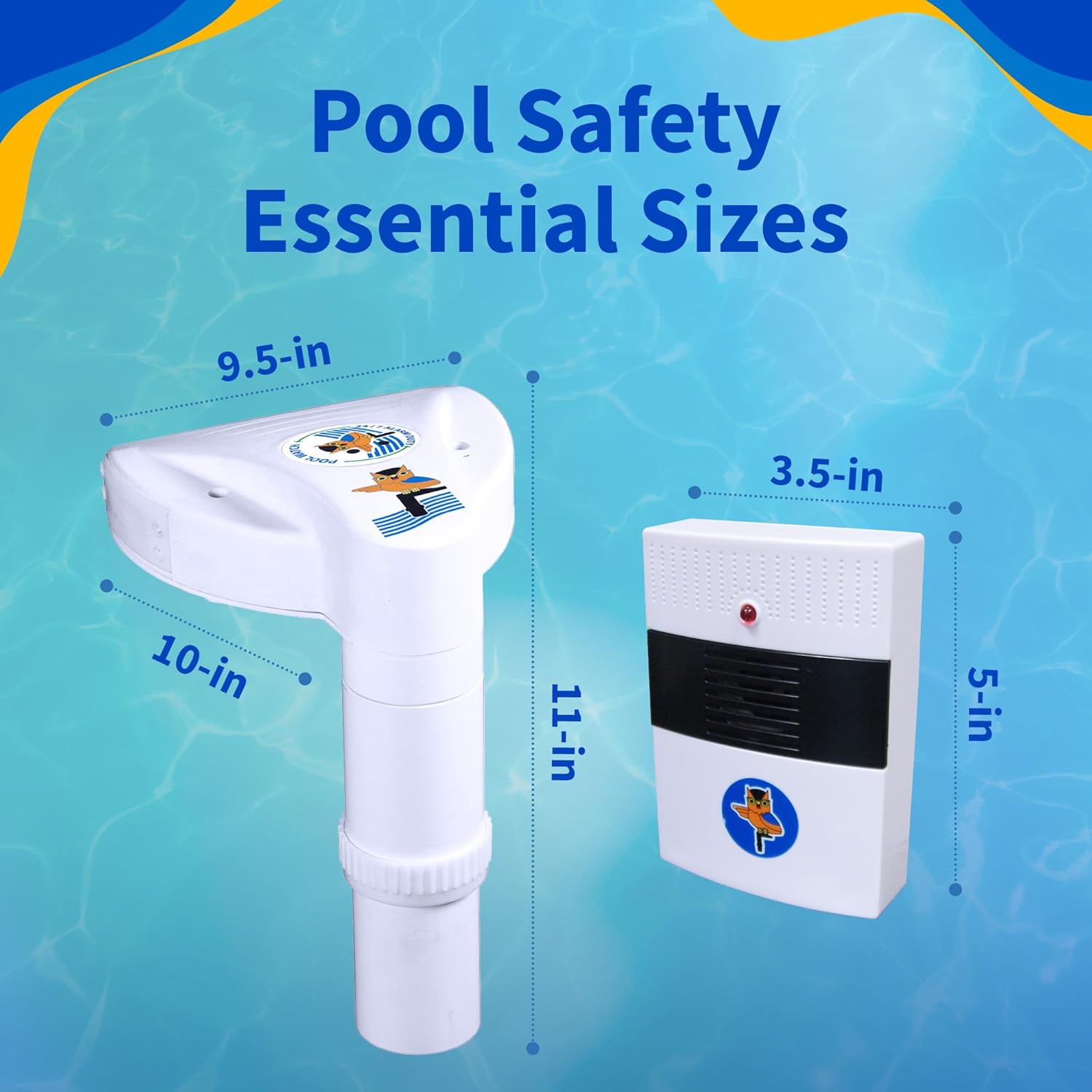
Image: Dimensions of the Poolwatch sensor (9.5-in x 10-in x 11-in) and remote receiver (3.5-in x 5-in).
Setup and Installation
Proper setup is crucial for the alarm's effective operation. Refer to the detailed instructions provided in the packaging for specific mounting requirements for your pool type (above-ground or in-ground).
- Battery Installation (Sensor): The sensor requires six (6) D size batteries (not included). Unscrew the battery compartment cover on the side of the sensor unit and insert the batteries, ensuring correct polarity. Securely reattach the cover.
- Battery Installation (Receiver): The remote receiver operates on 110V AC power but also requires a 9V battery (not included) for backup. Install the 9V battery into the receiver's battery compartment.
- Mounting the Sensor: Mount the sensor unit onto the deck or pool rail. Ensure the part designed to go into the water is submerged to the recommended depth as specified in the full manual. The sensor should be positioned to detect water disturbances effectively.
- Placing the Remote Receiver: Plug the remote receiver into a standard 110V AC outlet inside your home, within 100 feet of the pool sensor. This unit will sound an alarm if the pool sensor is triggered.
- Testing the System: After installation, it is essential to test the alarm system to ensure it functions correctly. Follow the testing procedures outlined in the comprehensive manual to verify both the sensor and remote receiver are operational.

Image: The Poolwatch sensor mounted on the edge of a pool, demonstrating its placement for water immersion.

Image: Close-up of the Poolwatch sensor, detailing features like smart detection (ignores wind/rain), reliable water entry detection, and the dual-zone alert system with 100-ft wireless range.
Operating Instructions
The Poolwatch alarm system is designed for continuous monitoring of your pool. Once properly installed and activated, it will automatically detect disturbances in the water.
- Activation: The system is active once the sensor is correctly placed in the water and the remote receiver is powered on.
- Alarm Trigger: The submerged sensor activates when an object weighing 18 pounds or heavier enters the pool, triggering an immediate safety alert.
- Alarm Sound: Both the poolside sensor and the indoor remote receiver will emit a loud alarm. The remote receiver has a wireless range of up to 100 feet.
- Resetting the Alarm: After an alarm event, follow the instructions in the full manual to reset the system. This typically involves pressing a reset button on the sensor unit.
- Temporary Deactivation: For planned pool use, the alarm can be temporarily deactivated. Refer to the manual for the specific procedure to avoid false alarms during swimming. Remember to reactivate the system immediately after use.

Image: The remote receiver, illustrating that the automatic alarm activates for objects 18 lbs or heavier, and is NSF Certified for in-ground and above-ground pools.

Image: The remote receiver, highlighting its quick response with a loud alarm, reliable home protection, peace of mind, and easy, tool-free installation.
Maintenance
Regular maintenance ensures the longevity and reliability of your Poolwatch alarm system.
- Battery Check: Periodically check the batteries in both the sensor and the remote receiver. Replace D-cell batteries in the sensor and the 9V backup battery in the receiver as needed. Low battery indicators may be present; refer to the full manual.
- Cleaning: Keep the sensor unit clean and free from debris, algae, or mineral buildup that could interfere with its operation. Use a soft cloth and mild cleaning solution.
- Winterization: During winter months or periods of non-use, it is recommended to remove the sensor unit from the pool, clean it thoroughly, remove batteries, and store it in a dry, protected area.
- System Testing: Regularly test the alarm system (e.g., weekly or monthly) by simulating an entry into the pool to confirm it is functioning correctly.
Troubleshooting
If your Poolwatch alarm system is not functioning as expected, consider the following common issues:
- No Alarm Sound:
- Check batteries in both the sensor and receiver. Replace if necessary.
- Ensure the remote receiver is plugged into a working outlet and within range (100 ft) of the sensor.
- Verify the sensor is properly submerged and not obstructed by debris.
- False Alarms:
- Ensure the sensor is installed according to the manual's depth requirements to avoid triggering by wind or small objects.
- Check for excessive water movement from pool jets or strong winds. Adjust sensitivity if possible (refer to full manual).
- Weak Alarm Sound:
- Replace batteries in both units.
- Ensure the remote receiver is not obstructed and is placed in an open area for optimal sound projection.
For persistent issues, consult the complete user manual or contact customer support.
Specifications
| Model Number | NA4212 |
| Brand | Blue Wave |
| Color | White |
| Power Source | Electric (110V AC) & Battery (6 D-cell for sensor, 9V for receiver backup) |
| Product Dimensions (Sensor) | 1.2"L x 0.7"W x 2.2"H (Note: This seems to be for a component, not the full sensor. Refer to image for overall dimensions.) |
| Item Weight | 3 Pounds |
| Maximum Range (Wireless) | 100 Feet (between sensor and remote receiver) |
| Sensor Technology | Electronic Sensor (detects objects 18 lbs or more) |
| Mounting Type | Tabletop Mount (for receiver), Deck/Pool Rail Mount (for sensor) |
| Certifications | NSF Certified to ASTM F2208 requirements |
What's in the Box
The Blue Wave NA4212 Poolwatch Pool Alarm System package includes:
- Sensor Alarm Body
- Remote Siren
- AC Adapter
- Mounting Hardware
Warranty Information
The Blue Wave NA4212 Poolwatch Pool Alarm System comes with a 1-year limited warranty from the manufacturer. Please retain your proof of purchase for warranty claims. For detailed terms and conditions, refer to the warranty documentation included with your product.
Customer Support
For further assistance, technical support, or warranty inquiries, please contact Blue Wave customer service. Contact information can typically be found on the product packaging or the official Blue Wave website.
Product Video Demonstration
Video: A demonstration and review of the Blue Wave Poolwatch Pool Alarm System, showcasing its components and basic functionality. This video provides a visual guide to understanding the product.


