
Introduction
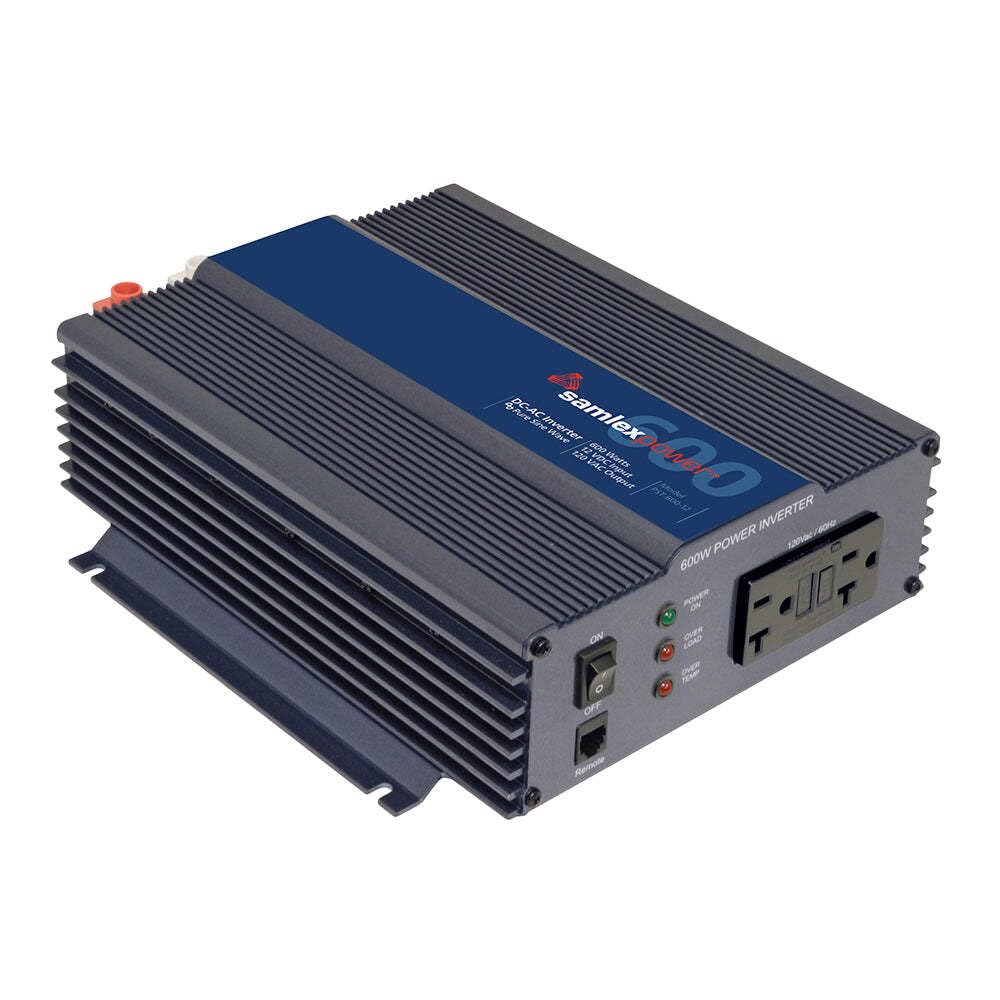
The Samlex America PST-600-12 Pure Sine Wave Inverter provides reliable alternating current (AC) power identical to household electricity. This inverter is designed for powering sensitive devices such as TVs, stereos, and home office equipment, as well as for heavy-duty loads, continuous operation, and emergency backup applications. It features a commercial-grade design and includes two GFCI protected outlets for enhanced safety.
This manual provides essential information for the safe and efficient installation, operation, and maintenance of your PST-600-12 inverter.
Safety Information
Please read and understand all safety instructions before installing or operating the inverter. Failure to follow these instructions may result in electric shock, fire, or serious injury.
- Electrical Safety: Ensure all connections are secure and properly insulated. Do not operate the inverter in wet conditions.
- Ventilation: Install the inverter in a well-ventilated area to prevent overheating.
- Battery Safety: Work in a well-ventilated area when connecting to batteries. Wear eye protection.
- Grounding: The inverter must be properly grounded.
- Certified Product: This product is Safety Certified to UL standards and FCC Approved.
Setup
Proper installation is crucial for the performance and longevity of your inverter.
- Mounting Location: Choose a dry, cool, and well-ventilated area. Avoid direct sunlight or heat sources. Ensure sufficient space around the inverter for airflow.
- Battery Connection: Connect the inverter directly to a 12-volt DC battery bank. Use appropriate gauge cables for the current draw. Ensure correct polarity: positive (+) to positive, negative (-) to negative. Incorrect polarity will damage the inverter.
- Grounding: Connect the inverter's chassis ground terminal to a reliable earth ground.
- DC Fuse/Breaker: Install an appropriately rated DC fuse or circuit breaker in the positive (+) battery cable, as close to the battery as possible, to protect against overcurrent.
Operating Instructions
Follow these steps to operate your Samlex PST-600-12 inverter:
- Power On: Once all connections are secure, turn on the inverter using its power switch. The indicator light should illuminate, confirming the inverter is active.
- Connect Devices: Plug your AC appliances into the two GFCI protected outlets on the front panel of the inverter. Ensure the total wattage of your appliances does not exceed the inverter's continuous output rating (600 watts).
- Pure Sine Wave Output: The inverter produces a pure sine wave output, making it safe for all types of electronics, including sensitive audio/video equipment and medical devices.
- Silent Operation: The inverter features a temperature-controlled cooling fan that runs quietly, reducing energy consumption and noise.
- Power Off: When finished, turn off the inverter using the power switch before disconnecting any appliances.
Maintenance
Regular maintenance ensures optimal performance and extends the lifespan of your inverter.
- Cleaning: Periodically clean the exterior of the inverter with a dry cloth. Ensure ventilation openings are free from dust and debris. Do not use liquid cleaners.
- Connection Checks: Regularly inspect all DC and AC connections for tightness and corrosion. Loose connections can cause overheating and poor performance.
- Battery Health: Ensure your 12V battery bank is well-maintained and charged. A healthy battery is essential for inverter performance.
- Storage: If storing the inverter for an extended period, ensure it is clean, dry, and disconnected from all power sources.
Troubleshooting
This section addresses common issues you might encounter with your inverter.
| Problem | Possible Cause | Solution |
|---|---|---|
| No AC output / Inverter not turning on | Loose DC connections, discharged battery, blown DC fuse/breaker, inverter fault. | Check all DC connections. Recharge or replace battery. Check and replace fuse/reset breaker. If fault persists, contact support. |
| Low AC output voltage | Low DC input voltage (battery), excessive load. | Check battery voltage and charge level. Reduce connected load. |
| Inverter shuts down frequently | Overload, overheating, low battery voltage. | Reduce connected load. Ensure proper ventilation. Check battery voltage and charge. |
| Interference with TV/radio | External interference source (inverter is designed for low interference). | Relocate the inverter or the affected appliance. Ensure proper grounding. |
If you encounter issues not listed here or if solutions do not resolve the problem, please contact Samlex America customer support.
Specifications
Key technical specifications for the Samlex America PST-600-12 Pure Sine Wave Inverter:
| Feature | Specification |
|---|---|
| Model Name | PST-600-12 |
| Output Power (Continuous) | 600 Watts |
| Peak Output Power | 600 Watts |
| Input Voltage | 12 Volts DC |
| Output Voltage | 230 Volts AC |
| Electrical Output Waveform | Pure Sine Wave |
| Frequency | 60 Hertz |
| Number of Outlets | 2 (GFCI Protected) |
| Item Dimensions (L x W x H) | 9.37"L x 9.37"W x 3.23"H |
| Item Weight | 7 pounds |
| Safety Certifications | UL standards, FCC Approved |
Warranty Information
The Samlex America PST-600-12 Pure Sine Wave Inverter comes with a two-year limited warranty from the date of purchase. This warranty covers defects in materials and workmanship under normal use.
Please retain your proof of purchase for warranty claims. The warranty does not cover damage caused by improper installation, misuse, abuse, unauthorized modifications, or natural disasters.
Support
For technical assistance, warranty claims, or further information regarding your Samlex America PST-600-12 inverter, please contact Samlex America customer support.
Refer to the official Samlex America website or your product packaging for the most current contact information.