
BenQ MX662
BenQ MX662 DLP Projector User Manual
Model: MX662
Product Overview
The BenQ MX662 is an XGA resolution DLP projector designed for various settings, offering 3500 ANSI lumens brightness and a 13000:1 contrast ratio. It supports multi-display connections, PC-less presentations, and 3D projection. This projector incorporates BenQ's SmartEco Technology for optimized lamp life and energy efficiency. Eco Blank mode allows presenters to blank the projection screen whenever they need to direct the audience's focus back on them or simply when the projector is not in use. The SmartEco Mode cleverly adjusts the lamp power to maximize power savings by delivering the best contrast and brightness performance using only as much light as needed for the image/video being presented. No source detected mode switches the MX662 to Eco Blank Mode if the projector is left on for over three minutes without a display source. When inactive, the MX662 keeps power consumption to a minimum with 0.5W standby power. It also supports wireless display with an optional Wi-Fi dongle and direct projection from a USB flash drive.

Image: Front-side view of the BenQ MX662 DLP Projector, showcasing its lens and ventilation grilles.
Key Features:
- Resolution: XGA (1024x768) native resolution.
- Brightness: 3500 ANSI lumens for clear projections in various lighting conditions.
- Contrast Ratio: 13000:1 for sharp image detail.
- SmartEco Technology: Extends lamp life and reduces power consumption.
- 3D Ready: Supports DLP Link 3D content.
- Connectivity: HDMI, VGA, USB, S-Video, and more.
- PC-less Presentation: Project directly from a USB flash drive.
- Easy Lamp Access: Top-side lamp door for convenient replacement.
- Security: Kensington lock slot to deter theft.
Setup Guide
1. Unpacking and Placement
Carefully remove the projector and all accessories from the packaging. Place the projector on a stable, flat surface or mount it securely. Ensure adequate ventilation around the projector to prevent overheating.

Image: Front view of the BenQ MX662 DLP Projector, showing the lens and control panel on top.
2. Connecting to Power
- Connect the power cord to the projector's AC inlet.
- Plug the other end of the power cord into a grounded electrical outlet.
3. Connecting Input Sources
The MX662 offers various input ports. Choose the appropriate cable for your source device (e.g., computer, Blu-ray player).
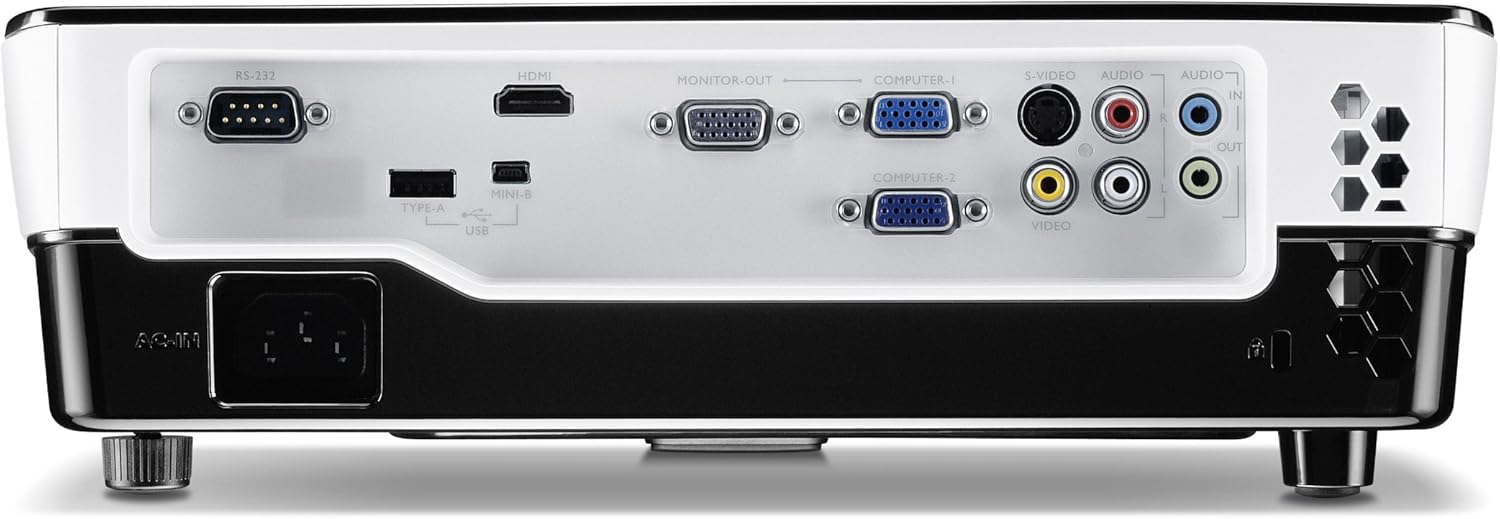
Image: Rear view of the BenQ MX662 DLP Projector, displaying various input and output ports including HDMI, VGA, USB, and audio connections.
- HDMI: Connect an HDMI cable from your source device to the projector's HDMI port.
- VGA (Computer-I/II): Connect a VGA cable from your computer to either Computer-I or Computer-II port. For audio, connect a 3.5mm audio cable to the Audio In port.
- USB (Type A): For PC-less presentations, insert a USB flash drive. For wireless display, insert an optional Wi-Fi dongle.
- S-Video/Video: Connect S-Video or composite video cables for older devices.
Operating Instructions
1. Powering On/Off
- Power On: Press the power button on the projector or remote control. The power indicator light will turn green.
- Power Off: Press the power button twice. The projector will enter cooling mode, and the power indicator will flash orange before turning off.
2. Adjusting the Image
- Focus: Rotate the focus ring on the lens until the image is sharp.
- Zoom: Adjust the zoom ring on the lens to change the image size.
- Keystone Correction: Use the "Keystone" buttons on the projector or remote to correct trapezoidal distortion if the projector is not perfectly perpendicular to the screen.
3. Selecting Input Source
Press the "Source" button on the projector or remote control to cycle through available input sources (HDMI, Computer 1, Computer 2, Video, S-Video, USB Display).

Image: Top view of the BenQ MX662 DLP Projector, highlighting the control panel with buttons for power, menu, source selection, and navigation.
4. SmartEco Features
- Eco Blank Mode: Press the "Blank" button on the remote to temporarily turn off the projection and dim the lamp, saving power. Press again to resume.
- SmartEco Mode: This mode automatically adjusts lamp power based on content to optimize brightness and save energy. It is enabled by default.
- No Source Detected Mode: If no input source is detected for three minutes, the projector will automatically switch to Eco Blank Mode to save power.
- 0.5W Standby: The projector consumes minimal power (0.5W) when in standby mode.
Maintenance
1. Lamp Replacement
The projector lamp has a limited lifespan. When the lamp indicator lights up or a warning message appears, it's time to replace the lamp.
- Turn off the projector and disconnect the power cord. Allow it to cool down for at least 30 minutes.
- Locate the lamp cover on the top of the projector.
- Unscrew the lamp cover and carefully remove it.
- Unscrew the lamp module and gently pull it out.
- Insert the new lamp module, ensuring it is seated correctly.
- Secure the new lamp module with screws and replace the lamp cover.
- Reset the lamp timer in the projector's OSD menu.
2. Cleaning the Projector
- Lens: Use a soft, lint-free cloth specifically designed for optical lenses. Do not use abrasive cleaners.
- Casing: Wipe the projector casing with a soft, damp cloth. Avoid using strong detergents or solvents.
- Air Vents: Periodically clean the air vents to ensure proper airflow and prevent dust buildup. Use a soft brush or compressed air.
Troubleshooting
| Problem | Possible Cause | Solution |
|---|---|---|
| No image on screen |
|
|
| Image is blurry |
|
|
| Image is trapezoidal |
|
|
| Lamp indicator flashing |
|
|
Specifications
| Feature | Detail |
|---|---|
| Model Number | MX662 |
| Native Resolution | XGA (1024x768) |
| Brightness | 3500 ANSI Lumens |
| Contrast Ratio | 13000:1 |
| Lamp Life | Up to 6000 hours (SmartEco Mode) |
| Display Technology | DLP |
| Aspect Ratio | 4:3 Native (5 aspect ratio selectable) |
| Keystone Adjustment | Manual Vertical ±40 degrees |
| Connectivity | HDMI, VGA (x2), S-Video, Composite Video, USB Type A, USB Type B (Mini-B), RS-232, Audio In/Out |
| Dimensions (W x H x D) | 11.3 x 9.2 x 4.5 inches (approx.) |
| Weight | 6.06 pounds (approx.) |
| Power Consumption | 0.5W (Standby) |
Warranty and Support
For warranty information, please refer to the warranty card included with your product or visit the official BenQ website. Keep your purchase receipt as proof of purchase.
For technical support, product registration, or service inquiries, please contact BenQ customer support through their official channels. You can often find support contact details on the BenQ website or in the product packaging.
BenQ Official Website: www.benq.com
Related documentsMX662


Ask a question about this manual
Ask about setup, troubleshooting, compatibility, parts, safety, or missing instructions. Manuals+ will review the question and use this page’s manual context to help answer it.