1. Introduction
Thank you for choosing the TROTEC TTK 50 E Comfort Dehumidifier. This manual provides essential information for the safe and effective use of your appliance. Please read these instructions carefully before operating the device and keep them for future reference. The TTK 50 E is designed to reduce humidity levels in enclosed spaces, helping to prevent mold, mildew, and condensation.
2. Safety Instructions
Always observe the following safety precautions to prevent injury or damage to the appliance:
- Ensure the power supply matches the specifications on the rating label.
- Do not operate the unit with a damaged power cord or plug.
- Keep the appliance away from heat sources, direct sunlight, and flammable materials.
- Do not insert objects into the air inlet or outlet grilles.
- Always unplug the unit before cleaning, maintenance, or when not in use.
- Do not use the appliance in areas where water might splash onto it.
- This appliance is not intended for use by persons (including children) with reduced physical, sensory or mental capabilities, or lack of experience and knowledge, unless they have been given supervision or instruction concerning use of the appliance by a person responsible for their safety.
- Children should be supervised to ensure that they do not play with the appliance.
3. Product Overview
The TROTEC TTK 50 E is a compact and efficient dehumidifier. Familiarize yourself with its components and controls.
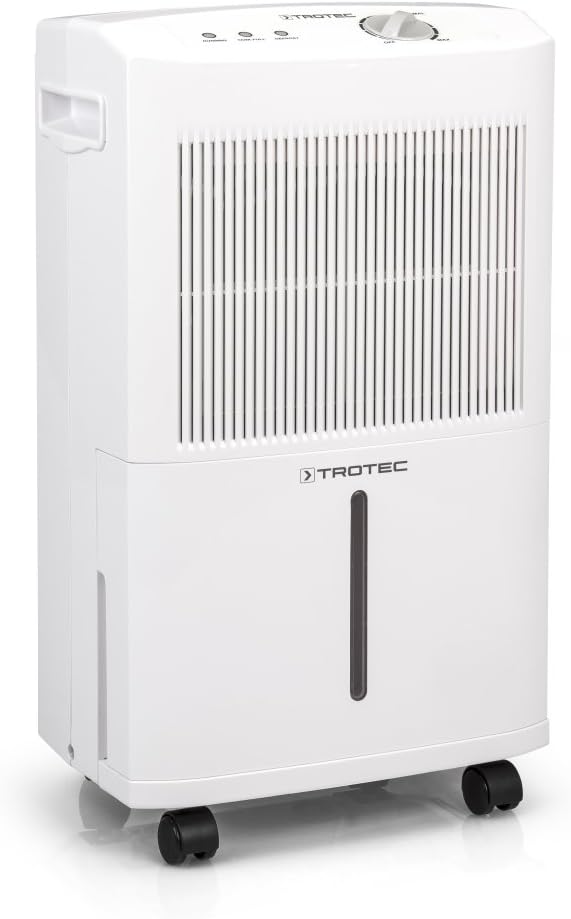
Figure 1: Front view of the TROTEC TTK 50 E Comfort Dehumidifier, showing the air intake grille, control panel, and water tank.

Figure 2: The dehumidifier with its approximate dimensions: 54 cm height, 31 cm width, and 22 cm depth.
3.1 Control Panel

Figure 3: Close-up of the control panel, featuring the rotary switch for power and humidity settings, and indicator lights for 'Running', 'Tank Full', and 'Defrost'.
- Rotary Switch: Used to turn the unit ON/OFF and adjust the desired humidity level (from MIN to MAX).
- Running Indicator: Illuminates when the unit is actively dehumidifying.
- Tank Full Indicator: Illuminates when the water collection tank is full, and the unit will automatically shut off.
- Defrost Indicator: Illuminates when the unit is in defrost mode.
3.2 Water Tank
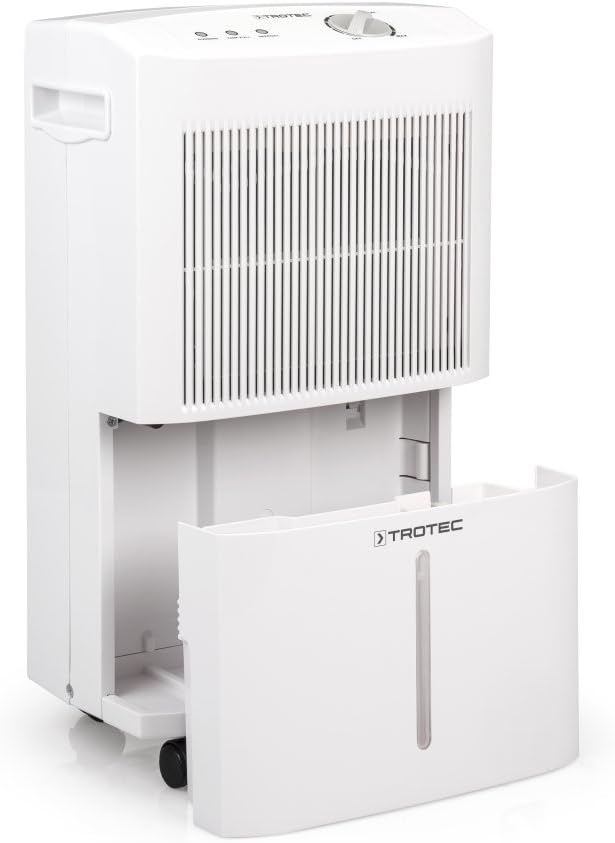
Figure 4: The water collection tank is easily accessible and removable from the front of the unit for emptying.
3.3 Air Filter

Figure 5: The air filter is located behind the front grille and can be easily accessed for cleaning.
3.4 Handles and Casters

Figure 6: Integrated handle on the side of the unit for easy portability.
The unit is equipped with integrated handles and smooth-rolling casters for convenient movement between rooms.
4. Setup
4.1 Unpacking
- Carefully remove the dehumidifier from its packaging.
- Remove any protective materials or tape.
- Check the unit for any signs of damage. If damaged, do not operate and contact customer support.
4.2 Placement
- Place the dehumidifier on a firm, level surface.
- Ensure there is at least 20 cm (8 inches) of clear space around the air inlet and outlet grilles for proper airflow.
- Avoid placing the unit near walls, furniture, or curtains that could obstruct airflow.
- For optimal performance, close all doors and windows in the room where the dehumidifier is operating.
4.3 Power Connection
Plug the power cord into a grounded electrical outlet. Ensure the outlet meets the voltage requirements of the unit (230V).
4.4 Continuous Drainage (Optional)

Figure 7: Back view of the dehumidifier, indicating the location for the continuous drainage hose connection.
For continuous operation without manually emptying the water tank, connect a suitable hose (not included) to the drainage outlet at the back of the unit. Ensure the hose is sloped downwards to allow gravity drainage into a floor drain or larger container.
5. Operating Instructions
5.1 Turning On/Off
Turn the rotary switch on the control panel from 'OFF' to any position between 'MIN' and 'MAX' to turn the unit on. To turn off, rotate the switch back to 'OFF'.
5.2 Setting Humidity Level
The TTK 50 E features an adjustable hygrostat. Rotate the switch to set the desired humidity level:
- MIN: For higher humidity levels (less dehumidification).
- MAX: For lower humidity levels (maximum dehumidification).
The unit will operate until the set humidity level is reached, then automatically switch off. It will restart when the humidity rises above the set level.
5.3 Emptying the Water Tank
When the 'Tank Full' indicator light illuminates, the unit will stop operating. Carefully remove the water tank from the front of the unit, empty the collected water, and reinsert the tank securely. The unit will resume operation automatically.
6. Maintenance
Regular maintenance ensures optimal performance and extends the lifespan of your dehumidifier.
6.1 Cleaning the Air Filter
The air filter should be cleaned every two weeks or more frequently depending on usage and air quality.
- Turn off the unit and unplug it from the power outlet.
- Remove the air filter from its slot (refer to Figure 5).
- Clean the filter using a vacuum cleaner to remove dust and debris. For heavy dirt, wash it gently with warm, soapy water.
- Allow the filter to dry completely before reinserting it into the unit.
6.2 Cleaning the Unit
Wipe the exterior of the unit with a soft, damp cloth. Do not use harsh chemicals, abrasive cleaners, or solvents, as these can damage the surface.
6.3 Storage
If storing the unit for an extended period:
- Empty the water tank and ensure it is clean and dry.
- Clean the air filter.
- Store the unit upright in a dry, dust-free location.
7. Troubleshooting
| Problem | Possible Cause | Solution |
|---|---|---|
| Unit does not turn on. | No power supply; power cord not plugged in; rotary switch is OFF. | Check power connection; ensure switch is set to MIN-MAX. |
| Unit is running but not dehumidifying. | Air filter is clogged; room temperature is too low; humidity setting is too high. | Clean the air filter; ensure room temperature is above 10°C; adjust humidity setting lower. |
| 'Tank Full' indicator is on, but tank is not full. | Water tank is not correctly inserted. | Remove and reinsert the water tank securely. |
| 'Defrost' indicator is on. | Unit is automatically defrosting. | This is normal operation. The unit will resume dehumidifying once defrosting is complete. |
| Unusual noise during operation. | Unit is not on a level surface; internal component issue. | Ensure unit is on a flat surface. If noise persists, contact customer support. |
8. Specifications
| Feature | Specification |
|---|---|
| Brand | TROTEC |
| Model | TTK 50 E |
| Part Number | 1120001002 |
| Dehumidification Capacity (max) | 16 liters/day |
| Recommended Room Size | Up to 31 m² / 78 m³ |
| Water Tank Capacity | 3.5 liters |
| Product Dimensions (D x W x H) | 22 x 31 x 54 cm |
| Weight | 11.1 kg |
| Voltage | 230 Volt |
| Wattage | 250 watt |
| Noise Level | 40 Decibels |
| Material | Plastic |
| Number of Speeds | 2 |
| Special Features | Adjustable hygrostat, easy-access air filter, durable rotary compressor, extra hose connection for drainage. |
9. Warranty and Support
For warranty information, technical support, or service inquiries, please refer to the warranty card included with your purchase or visit the official TROTEC website. Keep your proof of purchase for warranty claims.


