
1. Introduction
Thank you for choosing the Beetel M52 CLI Corded Phone. This manual provides essential information for setting up, operating, and maintaining your new telephone. Please read these instructions carefully before use to ensure optimal performance and longevity of your device.
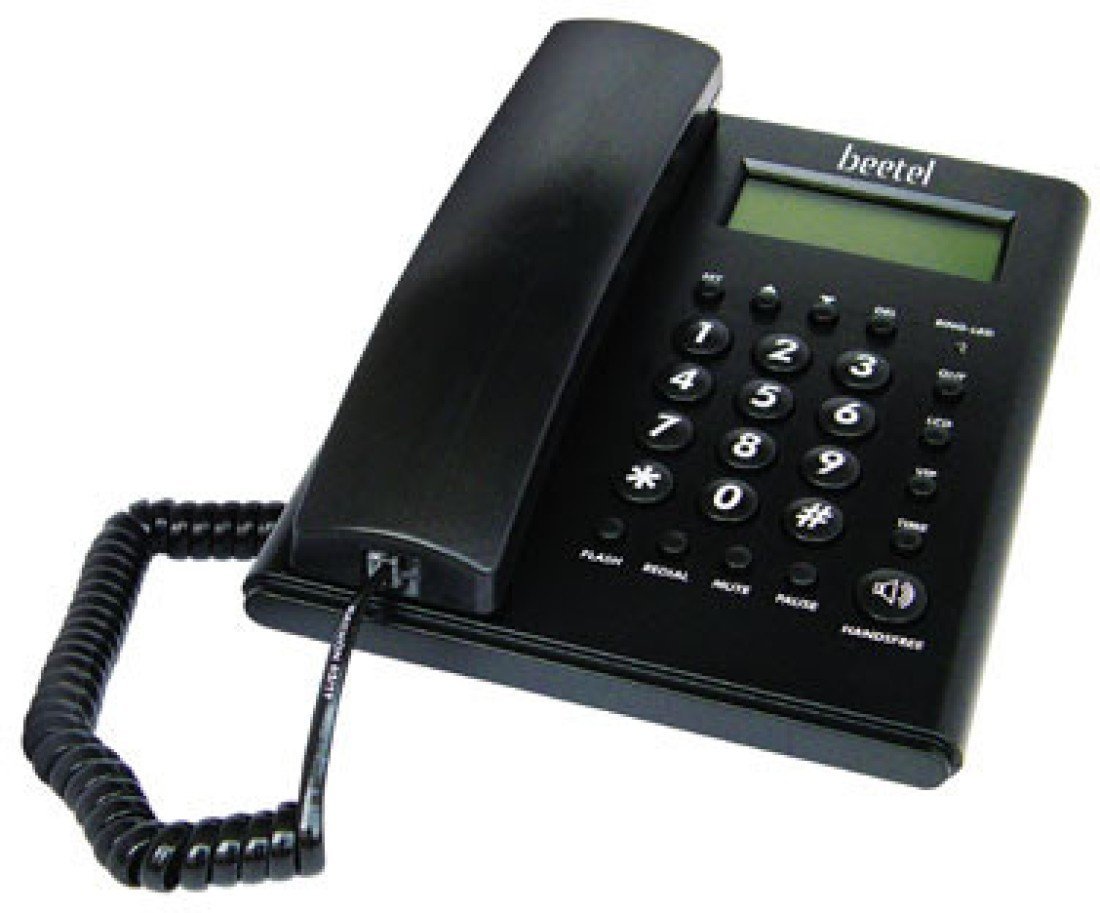
Figure 1: Beetel M52 CLI Corded Phone Overview
2. Setup
Follow these steps to set up your Beetel M52 CLI Corded Phone:
- Unpack the Phone: Carefully remove all components from the packaging. Ensure you have the telephone base, handset, coiled handset cord, and telephone line cord.
- Connect the Handset: Plug one end of the coiled handset cord into the handset and the other end into the designated jack on the side of the telephone base.
- Connect the Telephone Line: Plug one end of the telephone line cord into the jack labeled 'LINE' on the back of the telephone base and the other end into your wall telephone jack.
- Power Source: The Beetel M52 is a corded electric phone and draws power directly from the telephone line. No external power adapter is required for basic operation.
Figure 2: Connection Ports
3. Operating Instructions
3.1 Basic Calling Functions
- Making a Call: Lift the handset, wait for a dial tone, and dial the desired number.
- Answering a Call: When the phone rings, lift the handset to answer.
- Ending a Call: Place the handset back on the base.
3.2 Caller ID (CLI) Features
The Beetel M52 supports DTMF/FSK compatible Caller ID, displaying incoming numbers.
- Display of Incoming Numbers: The 16-digit LCD display will show the incoming caller's number (if available and subscribed to CLI service).
- Checking Incoming Calls: Use the navigation buttons (if present, typically 'UP'/'DOWN' or 'REVIEW') to scroll through the 30 incoming call memory entries.
- Phone Back (Call Back): While viewing an incoming call record, press the 'PHONE BACK' or 'DIAL' button to automatically dial the displayed number.
- Erasing Call Records: Use the 'ERASE' button to delete individual or all call records from memory.
3.3 Advanced Features
- Hands-free Dialing: Press the 'HANDSFREE' button to activate the speakerphone. You can dial and converse without lifting the handset. Press 'HANDSFREE' again to end the call or lift the handset to switch to private mode.
- Ringer Sound Control: Adjust the ringer volume using the 'RINGER' switch (usually located on the side or back of the phone).
- Mute Function: During a call, press the 'MUTE' button to temporarily disable your microphone. The other party will not hear you. Press 'MUTE' again to resume conversation.
- Flash Function: The 'FLASH' button (300ms default, adjustable to 100ms, 300ms, 600ms, 1000ms) is used for accessing network features like call waiting or conference calls. Consult your telephone service provider for specific timings.
- Redial: Press the 'REDIAL' button to automatically dial the last number called.
- Pause: The 'PAUSE' button inserts a brief delay during dialing, useful for accessing extensions or specific services.
- LCD Contrast Adjustment: Use the 'LCD CONTRAST' switch or button (6 steps) to adjust the display's readability.
- Conversation Time Display: The LCD will show the duration of your current call.
- Outgoing Call Memory: The phone stores up to 5 outgoing call numbers. Use navigation buttons to review and redial.
4. Maintenance
To ensure the longevity and proper functioning of your Beetel M52 phone, follow these maintenance guidelines:
- Cleaning: Wipe the phone's plastic surfaces with a soft, damp cloth. Do not use abrasive cleaners, solvents, or strong chemicals, as these can damage the finish.
- Avoid Liquids: Keep the phone away from water and other liquids. Do not operate with wet hands.
- Placement: Place the phone on a stable, flat surface. Avoid direct sunlight, excessive heat, or extreme cold.
- Cord Care: Avoid tangling or stretching the handset and line cords excessively.
5. Troubleshooting
If you encounter issues with your Beetel M52 phone, try the following troubleshooting steps:
- No Dial Tone:
- Ensure the telephone line cord is securely plugged into both the phone and the wall jack.
- Test the wall jack with another working phone to confirm the line is active.
- No Display/Faint Display:
- Adjust the LCD contrast setting.
- Ensure the phone is properly connected to the telephone line.
- Caller ID Not Working:
- Confirm that you have subscribed to Caller ID service from your telephone service provider.
- Ensure the phone is connected to a compatible telephone line.
- Cannot Hear or Be Heard:
- Check that the handset cord is securely connected at both ends.
- If using hands-free, ensure the 'MUTE' function is not active.
- Buttons Not Responding:
- Disconnect the phone from the line for a few minutes, then reconnect it.
If the problem persists after trying these steps, please contact customer support.
6. Specifications
| Feature | Description |
|---|---|
| Brand | Beetel |
| Model | M52 |
| Colour | Black |
| Telephone Type | Corded |
| Material | Plastic |
| Power Source | Corded Electric (Line Powered) |
| Dialer Type | Single Keypad |
| Answering System Type | Digital |
| Caller ID | Yes (DTMF/FSK Compatible) |
| Display | 16-digit LCD Display with 6-step contrast adjustment |
| Memory | 30 Incoming Calls, 5 Outgoing Calls |
| Flash Time | 300ms (Adjustable: 100ms, 300ms, 600ms, 1000ms) |
| Features | Hands-free Dialing, Mute, Redial, Pause, Ringer Control, Conversation Time Display |
| Item Weight | 1.32 Pounds |
| Manufacturer | rca |
7. Warranty
The Beetel M52 CLI Corded Phone comes with a 12-month Beetel Warranty from the date of purchase. Please retain your purchase receipt as proof of warranty. The warranty covers manufacturing defects under normal use. It does not cover damage caused by misuse, accidents, unauthorized repairs, or natural disasters.
8. Support
For further assistance, technical support, or warranty claims, please contact Beetel customer service. You may also visit the official Beetel website or their store on Amazon for more information.
Beetel Store Link: Visit the Beetel Store on Amazon

