
1. Introduction
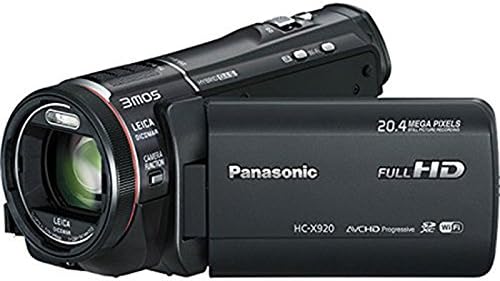
This manual provides essential information for the proper use and maintenance of your Panasonic HC-X920 HD 3MOS Digital Camcorder. It covers setup, operation, and troubleshooting to help you achieve optimal performance from your device. The HC-X920 features a 3MOS BSI sensor, a wide 29.8mm Leica lens with 12x optical zoom, and built-in Wi-Fi capabilities.
2. Setup
2.1 Battery Installation and Charging
The camcorder requires one Lithium Ion battery (included). To install, open the battery compartment cover, align the battery according to the polarity indicators, and gently push until it clicks into place. Close the cover securely. Connect the AC adapter to the camcorder and a power outlet to charge the battery. The charging indicator will illuminate during charging.
2.2 SD Card Insertion
The camcorder uses SD memory cards for recording. Locate the SD card slot, typically near the battery compartment. Insert the SD card with the label facing the correct direction until it clicks. To remove, push the card in slightly until it springs out.

3. Operating the Camcorder
3.1 Basic Recording
To power on the camcorder, open the LCD screen or pull out the electronic viewfinder (EVF). Press the RECORD START/STOP button to begin and end video recording. Use the zoom lever to adjust the 12x optical zoom or the 25x intelligent zoom. The camcorder records video in MP4 format at up to 4K resolution.
3.2 Wi-Fi Connectivity
The HC-X920 features built-in Wi-Fi for wireless data transfer and remote control via a compatible smartphone application. Access the Wi-Fi settings through the camcorder's menu to connect to a network or enable direct connection mode.
3.3 Manual Controls
For advanced users, the camcorder offers a manual ring around the lens for precise control over focus, zoom, or iris. The electronic viewfinder (EVF) provides an alternative viewing option, especially useful in bright outdoor conditions.

3.4 LCD Screen Usage
The 3.5-inch LCD screen serves as the primary interface for framing shots, reviewing footage, and navigating the camcorder's menus. It provides touch control for various functions.

3.5 Audio Features
The camcorder supports 5.1 channel zoom audio recording, which adjusts microphone directionality with the zoom. It also features a new wind canceller function to reduce unwanted noise and is compatible with external gun microphones.
3.6 Still Picture Capture
Still images can be captured in JPEG format. Note that there may be a slight delay in writing still image files to the SD card, during which new pictures cannot be taken.
4. Maintenance
To ensure the longevity and performance of your camcorder, follow these maintenance guidelines:
- Cleaning the Body: Use a soft, dry cloth to wipe the camcorder body. Avoid abrasive cleaners or solvents.
- Cleaning the Lens: Use a lens brush or a soft, clean microfiber cloth specifically designed for optical lenses. Do not touch the lens surface with your fingers.
- Battery Care: Store batteries in a cool, dry place. If not using the camcorder for an extended period, remove the battery.
5. Troubleshooting
5.1 Common Issues
- Wi-Fi Connectivity: If experiencing issues with Wi-Fi, ensure the camcorder is within range of the network and that network settings are correctly configured.
- Slow Still Image Writing: The camcorder may take a few seconds to process and write still images. This is normal operation; wait for the process to complete before attempting another capture.
- Camcorder Becomes Warm: During extended recording sessions, especially when using the viewfinder, the camcorder may become warm. Ensure adequate ventilation and take breaks if necessary.
For issues not covered here, please consult the official Panasonic support website or contact customer service for further assistance.
6. Specifications
| Product Dimensions | 2.64 x 5.9 x 2.83 inches |
| Item Weight | 14.6 ounces |
| Item Model Number | HC-X920K |
| Batteries | 1 Lithium Ion battery (included) |
| Photo Sensor Technology | BSI MOS |
| Video Capture Resolution | 4K |
| Maximum Focal Length | 34.1 Millimeters |
| Maximum Aperture | 0.33 Millimeters |
| Flash Memory Type | SD |
| Video Capture Format | MP4 |
| Supported Audio Format | AAC |
| Screen Size | 3.5 Inches |
| Connectivity Technology | HDMI, NFC, Wi-Fi |
7. Warranty and Support
This Panasonic HC-X920 Digital Camcorder is manufactured by Panasonic. For detailed warranty information, product registration, and technical support, please visit the official Panasonic website. You can find contact information for customer service and access additional resources there.