
1. Introduction
Thank you for purchasing the Onn Personal CD Player ONA12AV025. This device is designed to provide portable playback of your favorite audio CDs. It features 60-second skip protection for uninterrupted listening, up to 20-track program memory, and an LCD display for easy navigation. Please read this manual carefully before using the product to ensure proper operation and to maximize its lifespan.
2. Safety Information
- Do not expose the unit to rain, moisture, or extreme temperatures.
- Avoid placing the unit near heat sources such as radiators or stoves.
- Do not disassemble or attempt to repair the unit yourself. Refer all servicing to qualified personnel.
- Use only the specified power source (batteries) for this device.
- Keep the unit away from strong magnetic fields.
- Clean the unit only with a soft, dry cloth. Do not use liquid cleaners or aerosol sprays.
3. Package Contents
Please check that all items are present in the package:
- Onn Personal CD Player ONA12AV025
- User Manual
- Headphones (may be included depending on package variant)
4. Product Overview
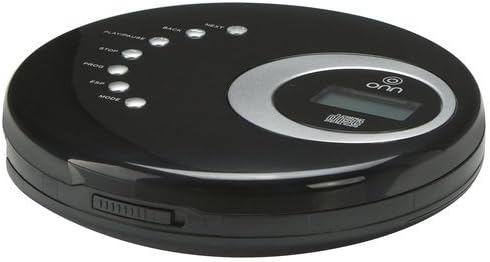
This image displays the Onn Personal CD Player ONA12AV025. The device is black and oval-shaped. On the top surface, there are control buttons for playback, stop, program, ESP (Electronic Skip Protection), and mode. A silver-colored ring surrounds a small LCD display screen. On the side, a volume control slider is visible.
Controls and Features:
- PLAY/PAUSE Button: Starts or pauses CD playback.
- STOP Button: Stops CD playback.
- BACK Button: Skips to the previous track or rewinds within a track.
- NEXT Button: Skips to the next track or fast-forwards within a track.
- PROG (Program) Button: Enters program mode to create a custom playlist.
- ESP (Electronic Skip Protection) Button: Activates or deactivates skip protection.
- MODE Button: Selects different playback modes (e.g., repeat one, repeat all, random).
- LCD Display: Shows track number, playback time, and other status indicators.
- Volume Control: Slider on the side to adjust audio output level.
- 3.5mm Headphone Jack: For connecting headphones or external speakers.
5. Setup
5.1 Battery Installation
- Locate the battery compartment on the bottom of the CD player.
- Slide the battery compartment cover open.
- Insert two (2) AA batteries (not included), ensuring correct polarity (+/-) as indicated inside the compartment.
- Close the battery compartment cover securely.
- The low battery indicator on the LCD display will illuminate when batteries are low.
5.2 Connecting Headphones/Speakers
Plug your headphones or external speakers into the 3.5mm headphone jack located on the side of the CD player. Ensure the connection is firm.
6. Operating Instructions
6.1 Loading a CD
- Gently press the OPEN button or slide the latch to open the CD compartment lid.
- Place a CD onto the center spindle with the label side facing up.
- Gently press the CD down until it clicks into place.
- Close the CD compartment lid firmly until it latches.
6.2 Basic Playback
- To Play: Press the PLAY/PAUSE button. The CD will begin playing from the first track.
- To Pause: Press the PLAY/PAUSE button during playback. Press again to resume.
- To Stop: Press the STOP button.
- To Skip Tracks: Press the NEXT button to skip to the next track. Press the BACK button to skip to the beginning of the current track or the previous track.
- To Fast Forward/Rewind: Press and hold the NEXT button to fast forward. Press and hold the BACK button to rewind.
6.3 Program Memory (20 Tracks)
- With the CD stopped, press the PROG button. The program indicator will flash on the LCD.
- Use the NEXT or BACK buttons to select the desired track number.
- Press the PROG button again to add the selected track to the program memory.
- Repeat steps 2 and 3 to add up to 20 tracks.
- After programming all desired tracks, press the PLAY/PAUSE button to start playback of your programmed sequence.
6.4 Electronic Skip Protection (ESP)
The Onn Personal CD Player features 60-second Electronic Skip Protection to help prevent audio interruptions during movement. This feature is typically active by default. Press the ESP button to toggle this function on or off if needed. When active, the ESP indicator will appear on the LCD.
6.5 Playback Modes
Press the MODE button repeatedly to cycle through different playback modes:
- Repeat One: Repeats the current track.
- Repeat All: Repeats all tracks on the CD.
- Random: Plays tracks in a random order.
- Intro: Plays the first few seconds of each track.
7. Maintenance
7.1 Cleaning the Unit
Wipe the exterior of the CD player with a soft, dry, lint-free cloth. Do not use abrasive cleaners, waxes, or solvents as they may damage the finish. For the optical lens, use a specialized CD lens cleaning kit if necessary, following the kit's instructions carefully.
7.2 Battery Replacement
When the low battery indicator appears on the LCD, replace both AA batteries with new ones. Always replace both batteries at the same time and ensure correct polarity.
7.3 CD Care
- Handle CDs by their edges to avoid fingerprints on the playing surface.
- Store CDs in their cases when not in use to prevent scratches and dust accumulation.
- Clean dirty CDs with a soft, lint-free cloth, wiping from the center outwards.
8. Troubleshooting
| Problem | Possible Cause | Solution |
|---|---|---|
| No power | Batteries are dead or incorrectly inserted. | Replace batteries with new ones, ensuring correct polarity. |
| No sound | Headphones/speakers not connected or volume too low. | Ensure headphones/speakers are fully plugged into the 3.5mm jack. Increase volume using the side slider. |
| Disc skipping or playback interruption | CD is dirty, scratched, or unit is experiencing excessive movement. | Clean the CD. Ensure ESP is active. Avoid strong vibrations or impacts during playback. |
| LCD display not working | Low battery or unit malfunction. | Replace batteries. If problem persists, contact customer support. |
| CD not recognized | CD is inserted incorrectly or is damaged. | Ensure CD is placed correctly with label side up. Try a different, known-good CD. |
9. Specifications
| Brand | ONN |
| Model Number | ONA12AV025 (4331016518) |
| Product Dimensions | 18.03 x 9.14 x 4.83 cm |
| Item Weight | 272.16 g (0.6 Pounds) |
| Supported Audio Format | MP3 |
| Special Features | Anti-Skip Protection (60 seconds) |
| Compatible Devices | Headphone, Speaker |
| Connector Type | 3.5mm Jack |
| Batteries Required | 2 AA batteries (not included) |
| Colour | Black |
10. Warranty and Support
For warranty information and customer support, please refer to the documentation provided at the time of purchase or visit the official ONN website. Keep your purchase receipt as proof of purchase for any warranty claims.


