
1. Introduction
This manual provides essential information for the safe and efficient installation, operation, and maintenance of your Autotrol 255/760 Logix 48,000 Grain Water Softener. Please read these instructions thoroughly before beginning installation or operation to ensure proper function and longevity of your system. Retain this manual for future reference.
2. Product Overview
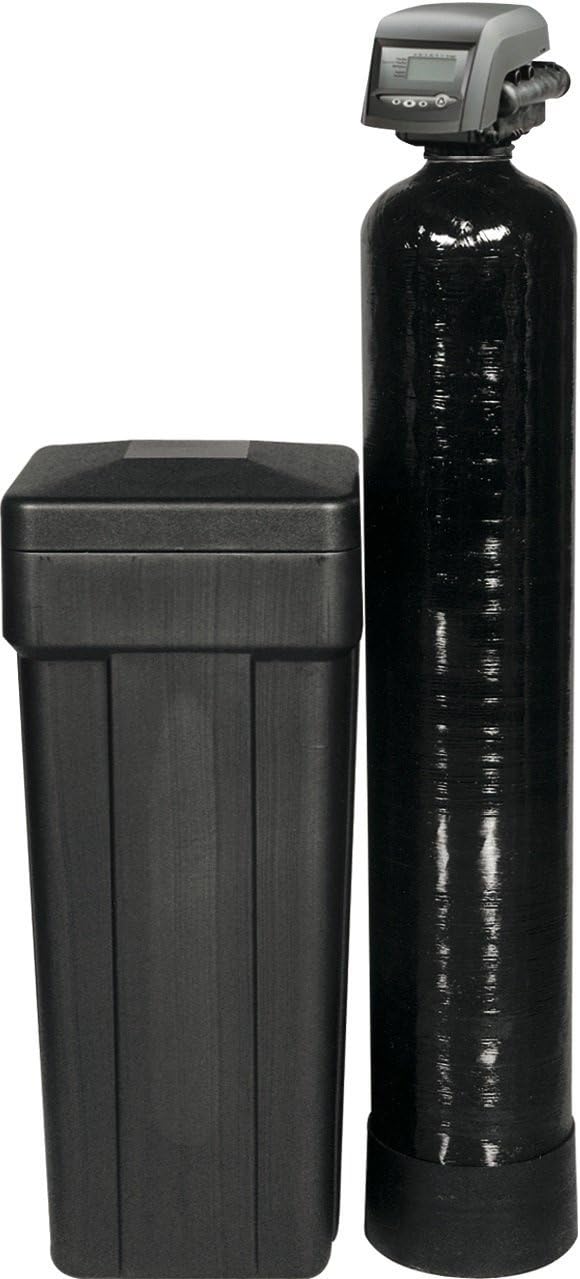
The Autotrol 255/760 Logix Water Softener system is designed to reduce hardness minerals from your water supply, providing softened water for your home. The system typically consists of three main components:
- Autotrol 255 Logix Control Valve: The intelligent head unit that manages the softening and regeneration cycles.
- Mineral Tank: A polyglass tank containing the resin media responsible for ion exchange. This model features a 48,000 grain capacity.
- Brine Tank: Holds the salt (sodium chloride or potassium chloride) used to create the brine solution for regenerating the resin.
3. Setup and Installation
Installation of the Autotrol 255/760 Logix Water Softener requires basic plumbing knowledge. If you are not comfortable with plumbing tasks, it is recommended to consult a qualified professional.
3.1 Pre-Installation Checks
- Ensure you have adequate space for both the mineral tank (approximately 10 x 10 x 54 inches) and the brine tank.
- Verify that your home's water pressure is within the operating limits specified for the unit.
- Confirm access to a drain for the regeneration discharge and an electrical outlet for the control valve.
- Gather necessary plumbing tools and materials, which may include PEX tubing, Shark-bite connectors, or other appropriate fittings for your existing plumbing.
3.2 Installation Steps (General Guidelines)
- Turn off Main Water Supply: Locate and shut off the main water supply to your home.
- Drain Water Lines: Open a faucet to relieve pressure and drain water from the lines.
- Select Location: Choose a level, dry location near the main water line, a drain, and an electrical outlet. Avoid areas where the unit could freeze.
- Install Bypass Valve: The system comes complete with a bypass tube and adapters. Install the bypass valve according to the manufacturer's instructions to allow water flow during maintenance.
- Connect Plumbing: Connect the inlet and outlet ports of the control valve to your main water line. The unit features 3/4" inlet and outlet connections. Ensure all connections are secure and leak-free.
- Connect Drain Line: Route the drain line from the control valve to an appropriate drain, ensuring an air gap to prevent back-siphonage.
- Connect Brine Line: Connect the brine line from the control valve to the brine tank.
- Add Resin and Gravel (if not pre-loaded): Follow specific instructions for adding the standard mesh resin and any necessary gravel to the mineral tank.
- Fill Brine Tank: Add water to the brine tank, then add water softener salt (sodium chloride or potassium chloride) to the recommended level.
- Connect Power: Plug the control valve into a grounded electrical outlet.
- Slowly Restore Water Supply: Gradually open the main water supply valve and check for leaks.
- Program Control Valve: Refer to the Autotrol 255 Logix control valve specific programming instructions to set time, water hardness, and regeneration cycles.
4. Operating Instructions
Your Autotrol 255/760 Logix system features a demand-initiated regeneration system, meaning it regenerates based on your actual water usage, optimizing salt and water efficiency.
4.1 Initial Startup
- After installation and programming, the system will typically perform an initial regeneration cycle. Allow this cycle to complete without interruption.
- Check for proper water flow and ensure no leaks are present.
4.2 Normal Operation
- The Logix control valve continuously monitors water usage. When the resin bed is nearing exhaustion, the system will automatically schedule a regeneration cycle, typically during off-peak hours (e.g., 2:00 AM).
- You should notice a significant improvement in water quality, including reduced soap scum, softer skin and hair, and cleaner dishes.
4.3 Manual Regeneration
In some cases, you may need to initiate a manual regeneration (e.g., after heavy water usage or if you notice a return of hard water symptoms). Consult your Autotrol 255 Logix control valve manual for specific instructions on how to manually start a regeneration cycle.
5. Maintenance
Regular maintenance ensures the optimal performance and longevity of your water softener.
- Salt Level: Periodically check the salt level in the brine tank. Ensure it remains above the water level and is not allowed to run out completely. Refill with high-quality water softener salt as needed.
- Salt Bridge: Occasionally, salt can form a "bridge" or crust in the brine tank, preventing it from dissolving properly. Break up any salt bridges with a broom handle or similar tool.
- Brine Tank Cleaning: Every few years, or if you notice excessive sediment, it is advisable to clean the brine tank. This involves draining the tank, removing any sludge, and rinsing it thoroughly.
- Control Valve Inspection: Visually inspect the control valve periodically for any signs of leaks or damage.
6. Troubleshooting
This section addresses common issues you might encounter with your water softener. For more detailed troubleshooting, refer to the specific Autotrol 255 Logix control valve manual.
6.1 No Soft Water
- Check Salt Level: Ensure there is sufficient salt in the brine tank and no salt bridge has formed.
- Power Supply: Verify the control valve is plugged in and receiving power.
- Bypass Valve: Confirm the bypass valve is in the "service" position, allowing water to flow through the softener.
- Regeneration Cycle: Check if the system is regenerating regularly. You may need to initiate a manual regeneration.
- Programming: Ensure the water hardness setting and time are correctly programmed into the control valve.
6.2 Excessive Water Usage / Frequent Regeneration
- Water Hardness Setting: The programmed water hardness might be set too low.
- Water Leaks: Check for leaks in your plumbing system that could be causing excessive water flow through the softener.
6.3 Brine Tank Overflowing
- Drain Line Obstruction: Check the drain line for kinks or blockages.
- Float Assembly: Inspect the float assembly in the brine tank for proper operation. It may be stuck or damaged.
- Control Valve Malfunction: A faulty control valve component might be causing continuous water flow into the brine tank.
7. Specifications
Key specifications for the Autotrol 255/760 Logix 48,000 Grain Water Softener:
| Feature | Specification |
|---|---|
| Brand | Autotrol |
| Model Number | MT255/760B-48B |
| Control Valve | Autotrol 255 Logix (760 microprocessor) |
| Grain Capacity | 48,000 Grains |
| Mineral Tank Type | Polyglass |
| Resin Type | Standard Mesh Resin |
| Inlet/Outlet Connections | 3/4 inch |
| Item Weight | 140 pounds |
| Product Dimensions | 10 x 10 x 54 inches (Mineral Tank) |
8. Warranty and Support
Specific warranty details for the Autotrol 255/760 Logix 48,000 Grain Water Softener are not provided in this document. For warranty information, technical support, or to purchase replacement parts, please contact Autotrol directly or the authorized dealer from whom you purchased the system. Always provide your model number (MT255/760B-48B) when seeking support.
Note: The color of the brine tank may vary (e.g., blue or black) depending on stock, but this does not affect the system's functionality.


