
Introduction
Thank you for purchasing the Trevi RC 827 D Radio Alarm Clock. This manual provides detailed instructions for setting up, operating, and maintaining your device. Please read this manual carefully before use and keep it for future reference.
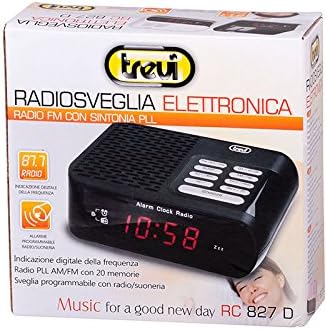
The Trevi RC 827 D is an electronic radio alarm clock featuring a large digital display, allowing you to wake up to your favorite radio station or a buzzer. It includes 20 radio presets, a programmable sleep timer, and a temporary alarm interruption (snooze) function. It supports both AM and FM radio bands.
Safety Information
- Do not expose the unit to rain or moisture to prevent fire or electric shock.
- Do not expose the unit to direct sunlight, extreme temperatures, or high humidity.
- Ensure proper ventilation; do not block ventilation openings.
- Use only the specified power adapter (230V 50Hz AC).
- Keep the unit away from strong magnetic fields.
- Do not attempt to disassemble or modify the unit. Refer all servicing to qualified personnel.
- Dispose of batteries responsibly according to local regulations.
Package Contents
- Trevi RC 827 D Radio Alarm Clock
- Power Adapter (integrated or separate, typical for such devices)
- User Manual (this document)
Product Overview
Familiarize yourself with the main components and controls of your Trevi RC 827 D Radio Alarm Clock.

Control Buttons (Top Panel):
- TIME: Set the current time.
- SLEEP: Activate/adjust the sleep timer.
- Tun - / Hour: Tune radio frequency down / Adjust hour during time setting.
- Vol -: Decrease volume.
- Snooze: Temporarily silence the alarm.
- Power / Off: Turn the unit on/off.
- Pre / M+: Select preset radio stations / Store radio stations.
- Tun + / Min: Tune radio frequency up / Adjust minute during time setting.
- Vol +: Increase volume.
Rear Panel:
- FM Antenna: For improved radio reception.
- AC Power Input: Connect the power adapter.
- Battery Compartment: For backup batteries (batteries not included).
Setup
1. Power Connection
- Connect the AC power cord to the AC power input on the rear of the unit.
- Plug the other end of the power cord into a standard 230V 50Hz wall outlet.
2. Battery Backup (Optional)
For time and alarm settings to be retained during a power outage, install backup batteries (e.g., 2 x AAA, not included) into the battery compartment on the rear of the unit. Ensure correct polarity.
3. Setting the Time
- Press and hold the TIME button until the display flashes.
- Press Tun - / Hour to adjust the hour.
- Press Tun + / Min to adjust the minute.
- Press TIME again to confirm and exit time setting mode.
4. Adjusting the Antenna
Extend the FM wire antenna located at the rear of the unit for optimal radio reception. Adjust its position for the best signal.
Operating Instructions
Turning On/Off and Volume Control
- Press the Power / Off button to turn the unit on or off.
- Use the Vol + and Vol - buttons to adjust the listening volume.
Radio Operation (AM/FM)
- Press the Power / Off button to turn on the radio.
- Press Tun + / Min or Tun - / Hour to manually tune to a desired frequency.
- Auto Scan: Press and hold Tun + / Min or Tun - / Hour for a few seconds to automatically scan for the next available station.
Storing and Recalling Radio Presets (20 Memories)
- Tune to the desired radio station.
- Press and hold the Pre / M+ button until the preset number flashes on the display.
- Use Tun + / Min or Tun - / Hour to select the desired preset number (1-20).
- Press Pre / M+ again to confirm and save the station.
- To recall a preset station, repeatedly press the Pre / M+ button to cycle through the stored stations.
Setting the Alarm
The device allows you to set an alarm to wake up to either the radio or a buzzer.
- In standby mode, press and hold the TIME button until the display flashes (for current time setting).
- Press the TIME button again briefly to enter Alarm 1 setting mode. The alarm time will flash.
- Use Tun - / Hour to adjust the alarm hour.
- Use Tun + / Min to adjust the alarm minute.
- Press TIME again to confirm the alarm time.
- After setting the time, the display might show options for alarm source (e.g., "bU" for buzzer, "rAd" for radio). Use Tun + / Min or Tun - / Hour to select your preferred alarm source.
- Press TIME one last time to save the alarm settings and exit.
Snooze Function
- When the alarm sounds, press the Snooze button to temporarily silence the alarm for a few minutes (typically 9 minutes). The alarm will sound again after the snooze period.
Sleep Timer
The sleep timer allows you to fall asleep to the radio, which will automatically turn off after a set period.
- While the radio is playing, press the SLEEP button repeatedly to cycle through available sleep times (e.g., 90, 60, 30, 15 minutes, OFF).
- The radio will automatically turn off after the selected duration.
Maintenance
Cleaning
- Wipe the unit with a soft, dry cloth.
- Do not use abrasive cleaners, waxes, or solvents as they may damage the finish.
Battery Replacement
- If the unit experiences frequent power outages or if the time/alarm settings are not retained, replace the backup batteries in the battery compartment.
- Ensure to use the correct type and polarity of batteries.
Troubleshooting
| Problem | Possible Cause | Solution |
|---|---|---|
| Unit does not power on. | No power supply. | Check if the power cord is securely plugged into the unit and the wall outlet. Ensure the outlet is functional. |
| Poor radio reception. | Antenna not extended or positioned correctly. | Fully extend the FM wire antenna and adjust its position for better signal. Try moving the unit to a different location. |
| Alarm does not sound. | Alarm not set or volume too low. | Verify that the alarm time is correctly set and activated. Increase the volume if the alarm source is radio. |
| Time/settings lost after power outage. | Backup batteries are dead or not installed. | Install new backup batteries or replace existing ones. |
| Clock gains time. | Internal clock drift (less common but reported in reviews). | Reset the time periodically. If persistent, contact customer support. |
Specifications
| Brand: | Trevi |
| Model: | RC 827 D (0082700) |
| Color: | Black |
| Dimensions (L x W x H): | 14 x 4.4 x 11.4 cm |
| Weight: | 320 grams |
| Power Source: | AC 230V 50Hz (with battery backup option) |
| Display Type: | Digital |
| Radio Bands: | AM / FM (PLL Radio with 20 memories) |
| Special Features: | Radio Alarm, Buzzer Alarm, Snooze, Sleep Timer |
| Material: | Plastic |
Warranty and Support
For warranty information and customer support, please refer to the documentation provided with your purchase or visit the official Trevi website. Keep your proof of purchase for any warranty claims.
Manufacturer: Trevi
Model Number: 0082700


