
AudioControl LC7i
Contents
AudioControl LC7i User Manual
6-Channel Line Output Converter with AccuBASS Bass Restoration
Introduction
The AudioControl LC7i is a 6-channel line output converter designed to integrate aftermarket amplifiers with factory installed audio systems. It features AccuBASS bass restoration, GTO signal sensing turn-on, and internal signal summing, providing a clean, high-quality signal for your audio system. This manual provides essential information for the proper installation, operation, and maintenance of your LC7i unit.
For a detailed PDF version of this manual, please refer to the User Manual (PDF).
Safety Information
- Always disconnect the vehicle's battery before beginning any installation.
- Ensure all wiring is properly insulated and secured to prevent shorts and damage.
- Do not mount the unit in locations exposed to excessive heat, moisture, or direct sunlight.
- Consult a professional installer if you are unsure about any part of the installation process.
- Use appropriate fuses as specified in the wiring diagrams to protect the unit and your vehicle's electrical system.
Product Overview
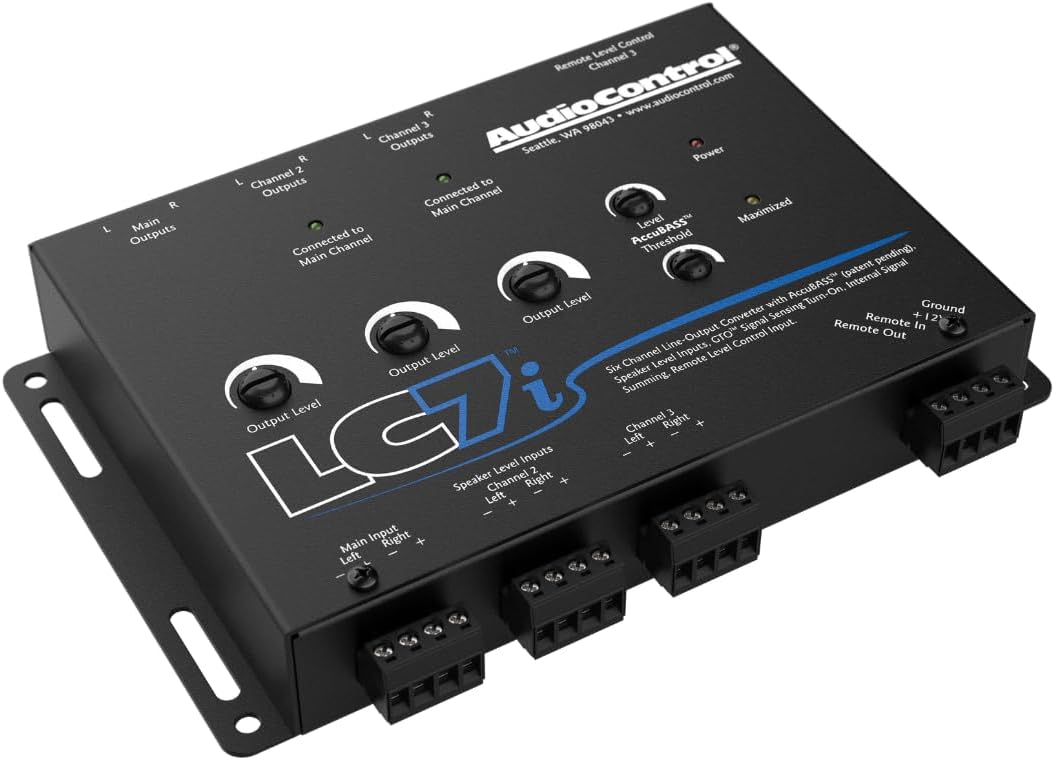
The AudioControl LC7i is engineered to provide optimal audio signal conversion and bass restoration. Below are images illustrating the unit's various angles and connections.



Setup and Installation
Wiring Connections
- Power (+12V): Connect to a constant +12V source from the vehicle's battery, fused appropriately.
- Ground (GND): Connect to a clean, solid chassis ground point.
- Remote In (REM IN): Connect to the remote turn-on lead from your head unit, or utilize the GTO signal sensing feature.
- Remote Out (REM OUT): Provides a 12V remote turn-on signal for your aftermarket amplifiers.
- Speaker Level Inputs: Connect the speaker wires from your factory head unit or amplifier to the corresponding input terminals (Main, Channel 2, Channel 3). Ensure correct polarity.
- RCA Outputs: Connect the RCA outputs (Main, Channel 2, Channel 3) to the inputs of your aftermarket amplifiers.
Mounting
Mount the LC7i in a secure, dry location away from direct heat sources. Ensure adequate ventilation around the unit. Common mounting locations include under seats, in the trunk, or behind dashboard panels.
Operating Instructions
Output Level Adjustment
Each channel (Main, Channel 2, Channel 3) has an independent output level control. Adjust these controls to match the input sensitivity of your connected amplifiers. Start with the LC7i output levels at minimum and gradually increase them while monitoring for distortion.
AccuBASS Bass Restoration
The AccuBASS feature restores bass frequencies that are often rolled off by factory audio systems at higher volumes. The LC7i includes two controls for AccuBASS:
- Level: Adjusts the amount of bass restoration applied.
- Threshold: Determines the volume level at which the AccuBASS circuit begins to engage. Set this to the point where your factory system starts to roll off bass.
Proper adjustment of AccuBASS ensures a full, rich bass response without distortion.
GTO Signal Sensing
The GTO (Great Turn-On) signal sensing feature allows the LC7i to automatically turn on when it detects an audio signal from the factory head unit, eliminating the need for a separate remote turn-on wire from the head unit. This feature is active by default.
Maintenance
The AudioControl LC7i requires minimal maintenance. Keep the unit clean and free from dust and debris. Use a soft, dry cloth for cleaning. Do not use harsh chemicals or solvents.
Periodically check all wiring connections to ensure they are secure and free from corrosion. Ensure adequate airflow around the unit to prevent overheating.
Troubleshooting
| Problem | Possible Cause | Solution |
|---|---|---|
| No sound output | No power to LC7i; Incorrect input/output connections; Amplifier not turning on. | Check power and ground connections. Verify speaker level inputs and RCA outputs. Ensure remote turn-on signal is present for amplifiers. |
| Distorted sound | Input signal too high; Output level too high; Improper AccuBASS settings. | Reduce input signal from head unit. Lower LC7i output levels. Adjust AccuBASS Level and Threshold. |
| Unit not turning on | No +12V power; Faulty ground; GTO not detecting signal; Remote In not connected. | Verify power and ground connections. Ensure audio signal is present for GTO. Connect a remote wire if GTO is not desired or functional. |
| Weak bass response | AccuBASS not properly set; Incorrect input summing; Low output level to subwoofer amplifier. | Adjust AccuBASS Level and Threshold. Ensure proper input summing if required for your setup. Increase output level to the subwoofer amplifier. |
If problems persist after attempting these solutions, please contact AudioControl customer support or consult a qualified car audio technician.
Specifications
| Feature | Detail |
|---|---|
| Product Dimensions | 10.1 x 7.6 x 2.8 inches |
| Item Weight | 8 ounces |
| Model Number | LC7i |
| Color | Black |
| Manufacturer | AudioControl |
| Date First Available | December 27, 2012 |
| What's in the box | LC7i unit |
Warranty and Support
Warranty information for the AudioControl LC7i is typically included with the product packaging. Please refer to the documentation provided at the time of purchase for specific warranty terms and conditions.
For technical support, product registration, or additional resources, please visit the official AudioControl website or contact their customer service department. You can also find more information on their Amazon Brand Store: AudioControl Store.
Ask a question about this manual
Ask about setup, troubleshooting, compatibility, parts, safety, or missing instructions. Manuals+ will review the question and use this page’s manual context to help answer it.