Introduction
This manual provides essential information for the safe and effective operation of your Panasonic Lumix DMC-TS25 Digital Camera. Please read it thoroughly before using the camera and keep it for future reference.
The Panasonic Lumix DMC-TS25 is a rugged digital compact camera designed for durability. It features a 16.1-megapixel sensor, 4x optical zoom (8x Intelligent Zoom), and HD 720p video recording. Its robust construction makes it waterproof up to 7 meters (23 feet), freezeproof down to -10°C (14°F), shockproof up to 1.5 meters (5 feet), and dustproof.
Important Safety Information
- Always ensure the battery/card compartment cover is securely closed and locked before exposing the camera to water. Failure to do so may result in water damage.
- Do not open the battery/card compartment in wet or dusty environments.
- After using the camera in saltwater, rinse it thoroughly with fresh water and dry it completely before opening any compartments.
- Avoid dropping the camera from heights exceeding 1.5 meters (5 feet).
- Do not expose the camera to temperatures below -10°C (14°F) or above 40°C (104°F).
- Use only genuine Panasonic accessories and batteries.
Package Contents
Verify that all items are present in the package:
- Panasonic Lumix DMC-TS25 Digital Camera
- Battery
- USB Cable
- Wrist Strap
- Quick Start Guide
- Warranty Card
Setup
1. Inserting the Battery and Memory Card
The camera uses a rechargeable battery. A micro SD/SDHC/SDXC card (not included) is required to store photos and videos.
- Locate the battery/card compartment cover on the side of the camera.
- Slide the lock switch to the "OPEN" position and open the cover.
- Insert the battery with the correct orientation as indicated inside the compartment.
- Insert the micro SD card into its designated slot until it clicks into place.
- Close the compartment cover and slide the lock switch to the "LOCK" position to ensure it is waterproof.
Description: This image shows a hand inserting a micro SD card and battery into the open, side compartment of the blue Panasonic Lumix DMC-TS25 camera. The compartment has a secure locking mechanism to maintain its waterproof seal.
2. Charging the Battery
Charge the battery using the provided USB cable and a compatible USB power adapter (not included).
- Connect the micro USB end of the cable to the charging port inside the battery/card compartment.
- Connect the standard USB end to a USB power adapter or a computer's USB port.
- The charging indicator light will illuminate during charging and turn off when complete.

Description: This image displays the blue Panasonic Lumix DMC-TS25 camera with its side compartment open, revealing the micro USB charging port. A black USB cable is connected to the port, indicating the camera is being charged.
Operating Instructions
1. Powering On/Off
Press the ON/OFF button located on the top of the camera to power it on or off.
2. Taking Photos
- Ensure the camera is in photo mode (usually indicated by an icon on the screen).
- Frame your shot using the 2.7-inch LCD screen.
- Press the shutter button halfway down to focus. The focus frame will turn green when focus is achieved.
- Press the shutter button all the way down to take the picture.

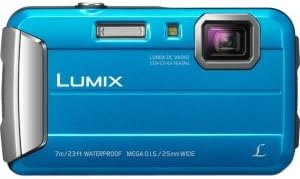
Description: This image shows a front, slightly angled view of the blue Panasonic Lumix DMC-TS25 digital camera. The lens, flash, and "LUMIX" branding are clearly visible, along with text indicating its waterproof capabilities.
3. Recording Videos
- Press the MODE button to select video recording mode.
- Press the dedicated video record button (often marked with a red dot) to start and stop recording.
- The camera supports HD 720p video recording.
4. Zoom Function
Use the W (Wide) and T (Telephoto) buttons on the back of the camera to adjust the optical zoom (4x) and Intelligent Zoom (up to 8x).
5. Underwater Mode
The Advanced Underwater Mode features Red Color Reproduction to restore natural colors and a Torch Light function (built-in LED) for better illumination in low-light underwater conditions.

Description: This image shows the back of the blue Panasonic Lumix DMC-TS25 digital camera, featuring its 2.7-inch LCD screen and various control buttons for navigation, mode selection, and zoom.
Maintenance
- Cleaning: Wipe the camera body with a soft, dry cloth. For stubborn dirt, use a slightly damp cloth. Do not use organic solvents.
- After Water Use: After using the camera in saltwater, rinse it thoroughly under running fresh water for a few minutes. Do not use hot water. Dry the camera completely with a soft cloth, paying special attention to the battery/card compartment seals, before opening any covers.
- Storage: Store the camera in a cool, dry place away from direct sunlight and high humidity. Remove the battery if the camera will not be used for an extended period.
Troubleshooting
| Problem | Possible Cause | Solution |
|---|---|---|
| Camera does not power on. | Battery is depleted or incorrectly inserted. | Charge the battery. Reinsert the battery correctly. |
| Cannot take pictures. | Memory card is full or not inserted. | Insert a memory card. Delete unnecessary files or replace the card. |
| Water detected warning. | Battery/card compartment cover not properly sealed. | Ensure the cover is closed and locked. Check seals for debris. |
| Blurry images. | Camera shake or focus issue. | Hold the camera steady. Allow the camera to focus properly before fully pressing the shutter. |
Specifications
- Model Name: Panasonic Lumix DMC-TS25
- Photo Sensor Resolution: 16.1 MP
- Optical Zoom: 4x
- Intelligent Zoom: 8x
- Waterproof: Up to 7 meters (23 feet)
- Shockproof: Up to 1.5 meters (5 feet)
- Freezeproof: Down to -10°C (14°F)
- Dustproof: Yes
- Screen Size: 2.7 Inches LCD
- Video Resolution: HD 720p (MP4)
- Image Stabilization: Optical (MEGA O.I.S.)
- Connectivity: USB
- Supported File Format: JPEG (Exif v2.3)
- Internal Memory: 70 MB
- Compatible Memory Cards: SD/SDHC/SDXC
Warranty and Support
Your Panasonic Lumix DMC-TS25 Digital Camera comes with a Manufacturer Warranty. For detailed terms and conditions, please refer to the included Warranty Card or visit the official Panasonic support website.
For technical support, troubleshooting assistance, or service inquiries, please contact Panasonic Customer Service.
Official Product Videos
River Rafting with Panasonic Lumix DMC-TS25
Description: This video captures a river rafting experience, showcasing the Panasonic Lumix DMC-TS25's ability to record clear video in dynamic outdoor and potentially wet environments. It highlights the camera's suitability for adventure activities.


