
1. Introduction
This manual provides detailed instructions for the setup, operation, and maintenance of your Rii Mini i8 2.4GHz Wireless Keyboard with Touchpad. This device combines a full QWERTY keyboard with a multi-touch touchpad, designed for convenient control of various devices such as PCs, Smart TVs, Android TV Boxes, and game consoles.

Image: Angled view of the Rii Mini i8 Wireless Keyboard, showcasing its compact design and key layout.
2. Package Contents
Please check the package contents to ensure all items are present:
- Rii Mini i8 Wireless Keyboard with Touchpad
- USB Receiver (stored inside the battery compartment)
- USB Charging Cable
- User Manual (this document)
3. Setup
- Locate the USB Receiver: Open the battery compartment cover on the back of the keyboard. The USB receiver is stored inside.
- Insert the USB Receiver: Plug the USB receiver into an available USB port on your device (PC, Smart TV, Android TV Box, etc.).
- Power On the Keyboard: Locate the ON/OFF switch on the side of the keyboard and slide it to the "ON" position.
- Automatic Connection: The keyboard should automatically connect to your device. No additional drivers are typically required.

Image: Rear view of the Rii Mini i8 keyboard, showing the battery compartment and the USB receiver stored within.

Image: Rear view of the Rii Mini i8 keyboard with the battery cover open, illustrating the location of the removable USB receiver.
4. Operating Instructions
Once connected, the Rii Mini i8 functions as a standard keyboard and mouse.
- Typing: Use the QWERTY keyboard layout for text input.
- Mouse Function: The central touchpad allows for cursor control.
- Multimedia Keys: Dedicated keys for volume control, play/pause, and other media functions are located on the left side.
- Function Keys (Fn): Press and hold the Fn key (bottom left) and then press a key with a blue icon to access its secondary function (e.g., Fn + F1 for email).

Image: A user holding the Rii Mini i8 keyboard, demonstrating its use for controlling a television display.
5. Keyboard Layout and Functions
The Rii Mini i8 features a compact QWERTY layout with additional function and multimedia keys.

Image: Top-down view of the Rii Mini i8 Wireless Keyboard, clearly showing the full QWERTY layout, touchpad, and dedicated function keys.
- QWERTY Keys: Standard alphanumeric keys for typing.
- Function Keys (F1-F12): Accessed by pressing Fn + corresponding key.
- Multimedia Control Keys: Volume up/down, mute, play/pause, next/previous track.
- Directional Pad: Located on the right side for navigation.
- Left/Right Mouse Buttons: Dedicated buttons below the touchpad.
6. Touchpad Functions
The integrated touchpad supports multi-touch gestures for intuitive navigation.
- Single Finger Tap: Functions as a left mouse click.
- Two Finger Tap: Functions as a right mouse click.
- Two Finger Drag (Vertical): Scrolls up or down.
- Single Finger Drag: Moves the cursor.
7. Charging the Device
The Rii Mini i8 keyboard is powered by a rechargeable Lithium Metal battery.
- Connect the Charging Cable: Plug the small end of the included USB charging cable into the mini-USB port on the top edge of the keyboard.
- Connect to Power Source: Plug the standard USB end of the cable into a USB port on your computer, a USB wall adapter, or a power bank.
- Charging Indicator: A charging indicator light (usually red) will illuminate during charging and turn off or change color when fully charged.
- Battery Life: The keyboard is designed for extended use on a single charge.

Image: The included USB charging cable, showing the mini-USB connector for the keyboard and the standard USB connector for a power source.
8. Maintenance
- Cleaning: Use a soft, dry cloth to clean the surface of the keyboard. For stubborn dirt, a slightly damp cloth can be used, ensuring no liquid enters the device.
- Storage: When not in use for extended periods, turn off the keyboard to conserve battery life. Store in a cool, dry place.
- Battery Care: Avoid fully discharging the battery frequently. Charge the device regularly to maintain battery health.
9. Troubleshooting
| Problem | Possible Solution |
|---|---|
| Keyboard not responding |
|
| Cursor movement is erratic or slow |
|
| Keys are not working |
|
10. Specifications
Key technical specifications for the Rii Mini i8 Wireless Keyboard:
- Model: RT-MWK08RF
- Connectivity: 2.4GHz Wireless (via USB Dongle)
- Hardware Interface: Radio Frequency
- Operating Voltage: 3.3 Volts
- Power Source: Battery Powered (Lithium Metal, included)
- Product Dimensions: 5.79 x 0.75 x 3.86 cm (approx. 147 x 18 x 97 mm)
- Item Weight: 110 g
- Special Features: Wireless, Touchpad
- Movement Detection Technology: Optical (for touchpad)
- Keyboard Description: Indoor
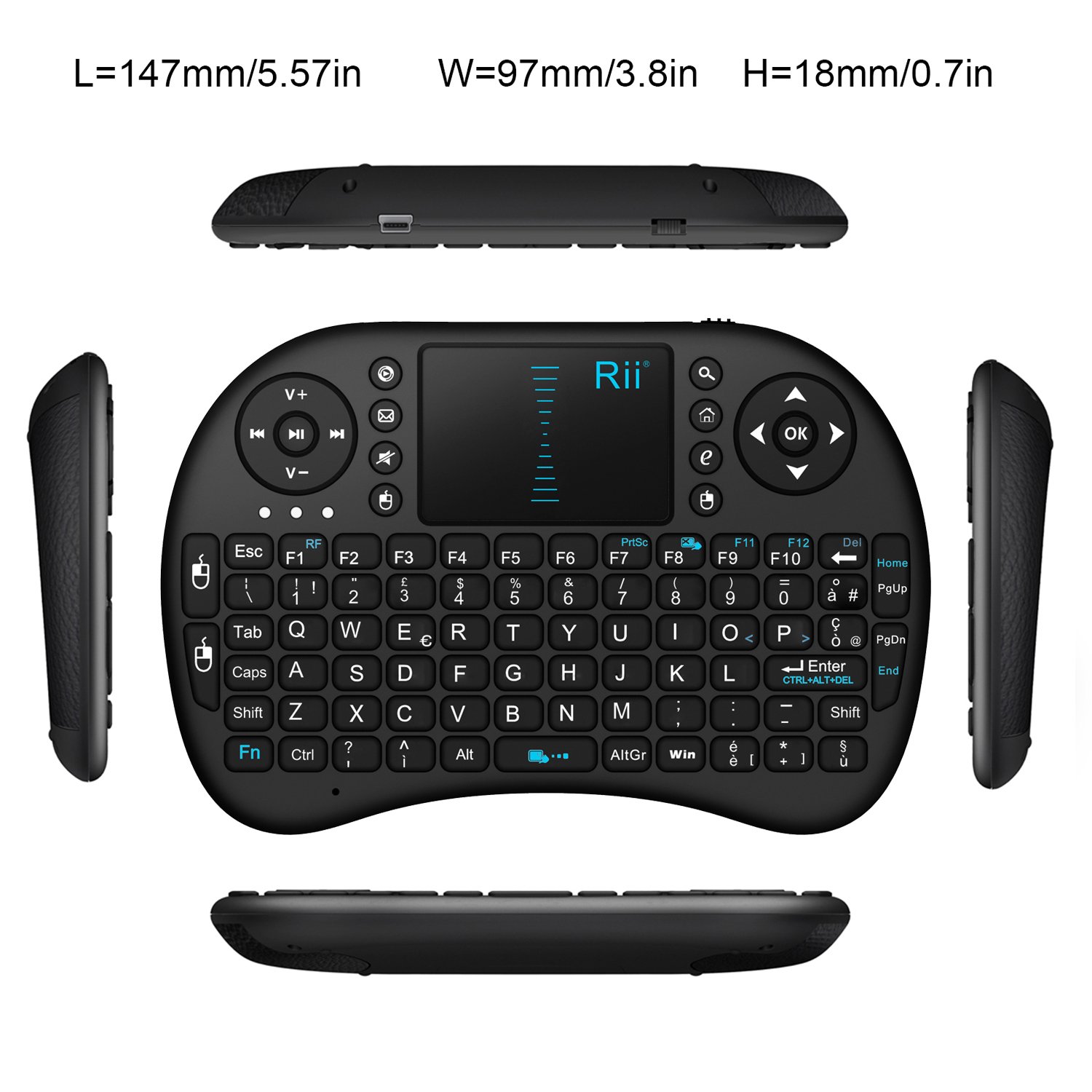
Image: Top-down view of the Rii Mini i8 keyboard with its dimensions (length, width, height) indicated in millimeters and inches.
11. Warranty and Support
For warranty information and technical support, please refer to the manufacturer's official website or contact your retailer. Keep your purchase receipt for warranty claims.