
GIMA OXY 6
GIMA OXY 6 Finger Pulse Oximeter Instruction Manual
Model: OXY 6 (34285)
1. Introduction
The GIMA OXY 6 Finger Pulse Oximeter is a portable device designed for non-invasive spot-checking of arterial oxygen saturation (SpO2) and pulse rate. It is suitable for use in medical and hospital environments, as well as for personal use under medical guidance. This manual provides essential information for the safe and effective operation of the device.
2. Safety Information
Please read all safety warnings and precautions before using the device. Failure to do so may result in inaccurate readings or device malfunction.
- This device is intended for spot-checking and not for continuous monitoring.
- Do not use the oximeter in an MRI or CT environment.
- Keep the device away from water and moisture.
- Consult a medical professional for interpretation of readings. This device is not a substitute for professional medical advice.
- Ensure the finger is clean and free of nail polish or artificial nails, as these can affect accuracy.
- Avoid excessive movement during measurement to ensure stable readings.
3. Product Overview
The GIMA OXY 6 features a high-resolution OLED color display showing SpO2, pulse rate, pulse bar graph, perfusion index (PI), and battery level. It is designed for ease of use with a compact form factor.

Figure 1: Front view of the GIMA OXY 6 Pulse Oximeter, displaying SpO2 and pulse rate values on its screen.
3.1. Package Contents
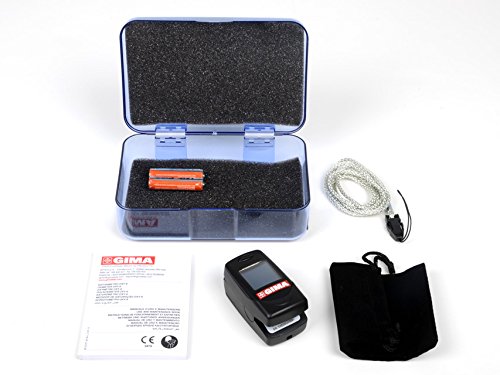
Figure 2: The package includes the GIMA OXY 6 Pulse Oximeter, a plastic case, AAA batteries, and a lanyard.
- GIMA OXY 6 Pulse Oximeter
- 2 x AAA Batteries
- Plastic Carrying Case
- Lanyard
- Instruction Manual
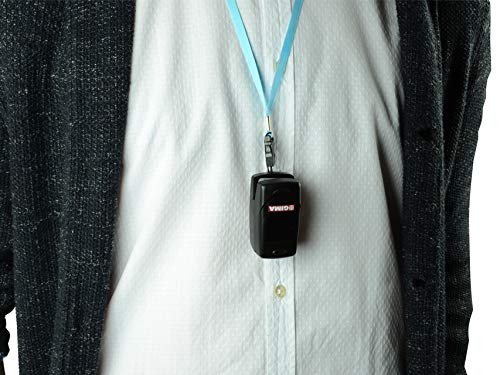
Figure 3: The GIMA OXY 6 Pulse Oximeter attached to a lanyard, demonstrating its portability and ease of carrying.
4. Setup
4.1. Battery Installation
- Open the battery compartment cover located on the back of the device.
- Insert two AAA batteries according to the polarity indicators (+/-) inside the compartment.
- Close the battery compartment cover securely.
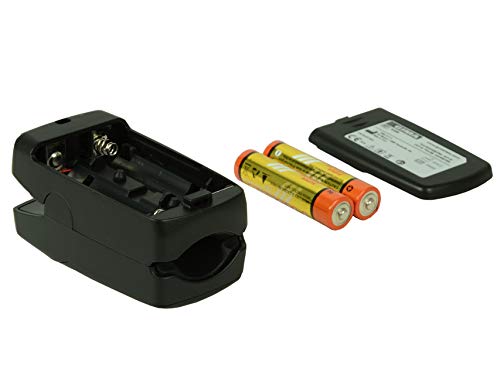
Figure 4: Open battery compartment showing placement for two AAA batteries.
5. Operating Instructions
5.1. Taking a Measurement
- Ensure the device has fresh batteries installed.
- Open the clamp of the oximeter.
- Insert one finger (preferably the index, middle, or ring finger) into the rubber opening of the oximeter, ensuring the finger is fully inserted and resting on the sensor. The recommended finger thickness for this model is 1-22 mm.
- Release the clamp. The device will automatically turn on and begin measurement.
- Keep your hand still during the measurement. Avoid bending your finger or making hand movements.
- Readings for SpO2, Pulse Rate, and Perfusion Index (PI) will appear on the display within a few seconds.

Figure 5: The GIMA OXY 6 Pulse Oximeter correctly placed on a finger for measurement.
5.2. Understanding the Display
- SpO2: Peripheral Oxygen Saturation, displayed as a percentage.
- PR: Pulse Rate, displayed in beats per minute (bpm).
- PI: Perfusion Index, a numerical value indicating the strength of the pulse signal at the sensor site.
- Pulse Bar Graph: Visual representation of pulse strength.
- Battery Indicator: Shows the current battery level.
5.3. Automatic Power Off
The device will automatically power off after approximately 8 seconds of inactivity or when the finger is removed.
5.4. Low Voltage Alarm
When the battery voltage is low, a low voltage alarm will be indicated on the display. Replace the batteries promptly to ensure accurate operation.
5.5. Voice Guide
The GIMA OXY 6 features an 8-language voice guide (English, French, Italian, Spanish, Greek, Portuguese, Arabic) for enhanced usability. Refer to the full manual for specific instructions on activating and changing voice guide settings.
6. Maintenance
6.1. Cleaning
- Clean the surface of the oximeter with a soft cloth dampened with medical alcohol (70% ethanol or isopropanol).
- Do not immerse the device in water or any cleaning solution.
- Ensure the device is completely dry before reuse.
6.2. Battery Replacement
Replace batteries when the low voltage indicator appears. Always use two new AAA alkaline batteries. Dispose of used batteries according to local regulations.
6.3. Storage
Store the oximeter in its plastic carrying case in a cool, dry place, away from direct sunlight and extreme temperatures. Remove batteries if the device will not be used for an extended period.
7. Troubleshooting
| Problem | Possible Cause | Solution |
|---|---|---|
| No display after power on | Batteries are dead or incorrectly installed. | Replace batteries or re-install them correctly, observing polarity. |
| Inaccurate readings | Finger not properly inserted; excessive movement; nail polish; cold finger. | Re-insert finger correctly; remain still; remove nail polish; warm the finger. |
| "Finger Out" or similar error message | Finger not detected or improperly placed. | Ensure finger is fully inserted and resting on the sensor. |
| Device turns off unexpectedly | Low battery; automatic power-off due to inactivity. | Replace batteries; ensure finger is inserted for measurement. |
8. Specifications
| Model Number | 34285 (OXY 6) |
| Display Type | OLED Color Display |
| Measurement Parameters | SpO2, Pulse Rate, Perfusion Index (PI) |
| SpO2 Measurement Range | (Typical range, refer to device for exact range) |
| Pulse Rate Measurement Range | (Typical range, refer to device for exact range) |
| Accuracy | High precision and repeatability with noise suppression |
| Power Requirements | 2 x AAA 1.5V Alkaline Batteries |
| Battery Life | Approximately 3 hours of continuous operation with full batteries |
| Dimensions (L x W x H) | 16 x 5.5 x 10 cm |
| Weight | 200 grams (including batteries) |
| Finger Thickness Range | 1-22 mm |
| Voice Guide | 8 languages (GB, FR, IT, ES, GR, PT, Arabic) |
9. Warranty and Support
Information regarding specific warranty terms and customer support for the GIMA OXY 6 Pulse Oximeter is not provided in this document. Please refer to the product packaging or contact GIMA customer service for details.
Related documentsOXY 6


Ask a question about this manual
Ask about setup, troubleshooting, compatibility, parts, safety, or missing instructions. Manuals+ will review the question and use this page’s manual context to help answer it.