
1. Introduction
The MFJ-969 is a versatile manual antenna tuner designed for amateur radio operators. It provides a wide matching range for various antennas across the 1.8 to 50 MHz frequency spectrum, handling power levels up to 300 Watts PEP SSB. This manual details the proper setup, operation, and maintenance of your MFJ-969 tuner to ensure optimal performance and longevity.
Key Features:
- 300 Watts PEP SSB power handling.
- Wide antenna matching range.
- Full-size, lighted Cross-Needle SWR/Wattmeter for true peak forward power readings.
- QRM-Free PreTune function for silent tuning.
- 8-position antenna switch for multiple antenna configurations.
- Built-in 50 Ohm dummy load for testing and tuning.
- Heavy-duty 4:1 balun for balanced line antennas.
- Durable aluminum case with a scratch-proof multi-colored Lexan front panel.
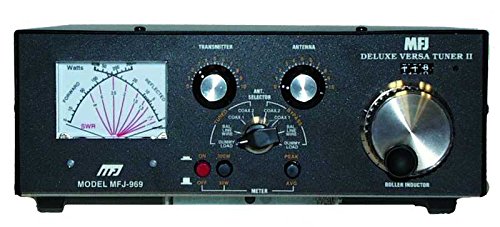
Figure 1.1: Front view of the MFJ-969 Manual Tuner. This image displays the unit's compact design, including the large SWR/Wattmeter, tuning controls, and antenna selector switch on its multi-colored Lexan front panel.
2. Safety Information
Please read and understand all safety instructions before operating the MFJ-969 tuner. Failure to do so may result in personal injury or damage to the equipment.
- High Voltage: This device operates with high radio frequency (RF) voltages. Never touch antenna connections or internal components while transmitting.
- Grounding: Always ensure the tuner and your radio equipment are properly grounded to prevent electrical shock and minimize RF interference.
- Power Levels: Do not exceed the maximum power rating of 300 Watts PEP SSB. Exceeding this limit can damage the tuner and connected equipment.
- Ventilation: Ensure adequate ventilation around the tuner to prevent overheating, especially during prolonged operation at high power.
- Environmental Conditions: Operate the tuner in a dry environment, away from moisture, extreme temperatures, and direct sunlight.
- Servicing: Refer all servicing to qualified personnel. Do not attempt to open or repair the unit yourself.
3. Package Contents
Verify that all items are present in the package:
- MFJ-969 Manual Tuner + SWR Unit
- Operating Manual (this document)
- DC Power Cable (for meter illumination)
4. Controls and Indicators
4.1 Front Panel Controls:
- SWR/Wattmeter: Displays forward power, reflected power, and SWR. Features a lighted cross-needle design for easy reading.
- TRANSMITTER TUNING (TUNE) Knob: Adjusts the input impedance to the tuner.
- ANTENNA TUNING (LOAD) Knob: Adjusts the output impedance to the antenna.
- INDUCTANCE Switch: Selects various inductance values for matching.
- ANTENNA Switch: Selects between different antenna ports (e.g., Coax 1, Coax 2, Balanced Line, Dummy Load, Bypass).
- METER Switch: Selects meter range (e.g., 30W, 300W) and function (e.g., FWD/REF, SWR).
- LIGHT Switch: Turns the meter illumination on or off.
4.2 Rear Panel Connections:
- TRANSMITTER Input (SO-239): Connects to your transceiver's antenna output.
- COAX 1 / COAX 2 Outputs (SO-239): Connects to coaxial fed antennas.
- BALANCED LINE Terminals: Connects to balanced line antennas (e.g., ladder line, open wire).
- GROUND Terminal: Connects to a good station ground.
- DC Input Jack: For connecting the 12V DC power supply for meter illumination.
5. Setup and Connections
Follow these steps to properly connect your MFJ-969 tuner to your amateur radio station:
- Grounding: Connect a heavy-gauge wire from the GROUND terminal on the rear panel of the MFJ-969 to a reliable station ground. This is crucial for safety and performance.
- Transceiver Connection: Use a high-quality 50 Ohm coaxial cable (e.g., RG-8X, RG-213) to connect your transceiver's antenna output to the TRANSMITTER input (SO-239) on the rear of the MFJ-969.
- Antenna Connection:
- Coaxial Antennas: Connect your coaxial-fed antenna(s) to the COAX 1 or COAX 2 SO-239 outputs.
- Balanced Line Antennas: Connect the two wires of your balanced line antenna to the BALANCED LINE terminals.
- DC Power (Optional): If you wish to use the meter illumination, connect a 12V DC power source (not included) to the DC INPUT jack. Ensure correct polarity.
6. Operating Instructions
This section outlines the general procedure for tuning your antenna system with the MFJ-969.
6.1 Initial Settings:
- Set your transceiver to a low power output (e.g., 5-10 Watts).
- Set the METER switch to the appropriate power range (e.g., 30W).
- Set the ANTENNA switch to the port connected to your desired antenna.
- Turn on the LIGHT switch if meter illumination is desired and DC power is connected.
6.2 Tuning Procedure (QRM-Free PreTune):
The MFJ-969 features a QRM-Free PreTune function, allowing you to tune without transmitting a signal that could interfere with other stations.
- Set the ANTENNA switch to the DUMMY LOAD position.
- Transmit a continuous carrier (e.g., AM, FM, or CW key down) at low power.
- Adjust the TRANSMITTER TUNING and ANTENNA TUNING knobs for minimum SWR on the meter. The SWR should be 1:1 on the dummy load.
- Once tuned to the dummy load, switch the ANTENNA switch to your desired antenna (e.g., COAX 1).
- Momentarily transmit a low-power carrier. Adjust the TRANSMITTER TUNING and ANTENNA TUNING knobs for the lowest possible SWR. Aim for 1.5:1 or lower.
- Once a satisfactory SWR is achieved, you can increase your transceiver's power output, ensuring the SWR remains low.
6.3 Using the SWR/Wattmeter:
The cross-needle meter simultaneously displays forward power, reflected power, and SWR. The point where the two needles cross indicates the SWR. The left needle indicates forward power, and the right needle indicates reflected power.
- Select the appropriate power range (30W or 300W) using the METER switch.
- For accurate SWR readings, ensure the tuner is properly matched to the antenna.
6.4 Using the Dummy Load:
The built-in 50 Ohm dummy load is useful for testing your transceiver, setting power levels, and performing the QRM-Free PreTune without radiating a signal.
- Set the ANTENNA switch to DUMMY LOAD.
- Transmit at your desired power level. The SWR should read 1:1, and the forward power should match your transceiver's output.
- Avoid prolonged transmission at high power into the dummy load to prevent overheating.
7. Maintenance
The MFJ-969 tuner is designed for reliable operation with minimal maintenance.
- Cleaning: Keep the unit clean and free of dust. Use a soft, dry cloth to wipe the exterior. Do not use abrasive cleaners or solvents.
- Connections: Periodically check all coaxial and ground connections to ensure they are secure and free from corrosion.
- Storage: If storing the unit for an extended period, disconnect all cables and store it in a dry, temperature-controlled environment.
8. Troubleshooting
If you encounter issues with your MFJ-969 tuner, refer to the following common problems and solutions:
| Problem | Possible Cause | Solution |
|---|---|---|
| High SWR cannot be tuned out. | Antenna mismatch too severe; incorrect antenna selection; faulty antenna or feedline. | Check antenna and feedline for damage. Ensure correct antenna port is selected. Some antennas may be too far out of resonance for the tuner's range. |
| Meter lights do not illuminate. | No 12V DC power connected; LIGHT switch off; faulty DC cable. | Ensure 12V DC power is connected and the LIGHT switch is on. Check DC cable for continuity. |
| SWR reading is erratic or unstable. | Poor ground connection; loose coaxial connectors; RF feedback. | Verify all ground connections are secure. Tighten all coaxial connectors. Ensure proper RF choking on feedlines if necessary. |
| No power reading on meter. | Transceiver not transmitting; METER switch set to incorrect range; faulty coaxial cable. | Confirm transceiver is transmitting. Select appropriate power range on METER switch. Test coaxial cables. |
9. Specifications
| Model Number | MFJ969 |
| Frequency Range | 1.8 - 50 MHz |
| Power Handling | 300 Watts PEP SSB |
| Impedance | 50 Ohms (nominal) |
| Antenna Connections | 2 x SO-239 (Coaxial), Balanced Line Terminals |
| Transceiver Connection | 1 x SO-239 |
| Dummy Load | Built-in 50 Ohm |
| Balun | Heavy-duty 4:1 |
| Meter Illumination | Requires 12V DC (external power supply not included) |
| Product Dimensions (H x D x W) | 3.5" x 10.5" x 9.5" (approximate) |
| Item Weight | 6.34 pounds (approximate) |
10. Warranty and Support
MFJ products typically come with a manufacturer's warranty. For specific warranty terms, duration, and service procedures, please refer to the warranty card included with your product or visit the official MFJ Enterprises, Inc. website. For technical support or repair inquiries, contact MFJ customer service directly. Keep your purchase receipt as proof of purchase for warranty claims.
Note: Warranty and support policies are subject to change by the manufacturer. Always consult the most current information provided by MFJ.


