
1. Introduction
The MFJ-934 is a versatile antenna tuner designed for amateur radio use. It integrates an antenna tuner with an artificial ground, enabling efficient operation with various antenna types, including random wires. This unit is capable of handling up to 300 watts of RF power and covers a frequency range from 1.8 to 30 MHz.
Key features include:
- Integrated Artificial Ground for improved antenna performance.
- Wide frequency coverage from 1.8 MHz to 30 MHz.
- Functions as a full-featured antenna tuner.
- Power handling capability of 300 watts.
- Compact dimensions: 10 5/8 inches (W) x 3 1/2 inches (H) x 8 inches (D).
2. Safety Information
Please read and understand all safety instructions before operating the MFJ-934 tuner. Failure to do so may result in personal injury or damage to the equipment.
- High Voltage: This device operates with high RF voltages. Never open the case or attempt to service the unit while it is connected to a transceiver or antenna.
- Grounding: Always ensure the tuner is properly grounded to prevent RF shock and ensure optimal performance.
- Power Limits: Do not exceed the maximum power rating of 300 watts. Exceeding this limit can damage the tuner and connected equipment.
- Ventilation: Ensure adequate ventilation around the unit to prevent overheating.
- Environment: This unit is not water resistant. Avoid exposure to moisture, rain, or extreme temperatures.
3. Setup
Follow these steps to properly set up your MFJ-934 Manual Tuner:
- Placement: Place the tuner on a stable, flat surface near your transceiver. Ensure there is sufficient space for cable connections and ventilation.
- Transceiver Connection: Connect the RF output of your transceiver to the 'TRANSMITTER' input connector on the MFJ-934 using a high-quality 50-ohm coaxial cable.
- Antenna Connection: Connect your antenna to the appropriate antenna terminal on the MFJ-934. For coaxial-fed antennas, use the 'COAX' connector. For balanced lines or random wires, use the 'BALANCED' or 'WIRE' terminals, respectively.
- Ground Connection: Connect a good RF ground to the 'GROUND' terminal on the MFJ-934. A short, heavy gauge wire to an earth ground rod or a substantial metal cold water pipe is recommended.
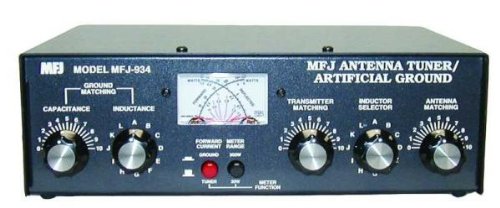
Figure 3.1: Front view of the MFJ-934 Manual Tuner, showing the tuning knobs, SWR meter, and input/output connectors.
4. Operating Instructions
The MFJ-934 allows you to match your antenna system to your transceiver for optimal power transfer and reduced SWR.
- Initial Settings: Set all tuning controls (e.g., INDUCTANCE, CAPACITANCE, ARTIFICIAL GROUND) to their mid-range positions.
- Select Frequency: Tune your transceiver to the desired operating frequency within the 1.8-30 MHz range.
- Low Power Tune: Transmit a low-power CW (Continuous Wave) signal or use the tune function of your transceiver.
- Adjust for Minimum SWR: While observing the SWR meter on the MFJ-934, carefully adjust the tuning controls (INDUCTANCE, CAPACITANCE) for the lowest possible SWR reading. Make small, incremental adjustments.
- Artificial Ground Adjustment: If using the artificial ground feature, adjust its control for further SWR reduction or improved signal reports, especially with random wire antennas.
- Verify SWR: Once a low SWR is achieved, increase power to your desired operating level (up to 300 watts) and re-check the SWR. Minor adjustments may be necessary.
- Note Settings: For frequently used frequencies, note down the tuner settings to quickly recall them later.
5. Maintenance
The MFJ-934 is designed for reliable operation with minimal maintenance. However, periodic checks can ensure its longevity.
- Cleaning: Keep the unit clean and free of dust. Use a soft, dry cloth for cleaning the exterior. Do not use liquid cleaners or solvents.
- Connections: Periodically check all coaxial and ground connections to ensure they are secure and free from corrosion.
- Inspection: Visually inspect the unit for any signs of damage, such as loose knobs or connectors.
- Internal Access: Do not open the unit unless you are a qualified technician. There are no user-serviceable parts inside, and opening the case may expose you to high voltages.
6. Troubleshooting
If you encounter issues with your MFJ-934, consider the following troubleshooting steps:
- High SWR:
- Ensure all connections (transceiver, antenna, ground) are secure.
- Verify that the antenna is suitable for the operating frequency.
- Carefully re-adjust the tuning controls. Sometimes, a slight change in one control requires re-adjustment of others.
- Check the artificial ground setting, if applicable.
- No SWR Reading:
- Confirm the transceiver is transmitting power.
- Check all coaxial cables for continuity and proper connection.
- Ensure the SWR meter is functioning correctly (if possible, test with another device).
- Intermittent Operation or Unusual Noise:
- Inspect the unit for any loose internal components or connections that may have shifted during transport or use. (Note: This requires opening the unit and should only be performed by qualified personnel.)
- Ensure the ground connection is solid and effective.
- Unit Does Not Function:
- If the unit appears completely unresponsive, double-check all connections and ensure the transceiver is operating correctly.
- If issues persist, contact MFJ customer support or a qualified service technician.
7. Specifications
| Model Number | MFJ-934 |
| Brand | MFJ |
| Frequency Range | 1.8 - 30 MHz |
| Power Handling | 300 Watts |
| Special Feature | Artificial Ground |
| Item Weight | 4.3 pounds |
| Dimensions (W x H x D) | 10 5/8" x 3 1/2" x 8" |
| Water Resistance Level | Not Water Resistant |
| UPC | 650619002355 |
8. Warranty and Support
For warranty information, technical support, or service inquiries, please refer to the official MFJ Enterprises website or contact their customer service department directly. Keep your purchase receipt as proof of purchase for warranty claims.
MFJ Enterprises, Inc.
Website: www.mfjenterprises.com
(Contact information may vary, please check the official website for the most current details.)


