
1. Introduction
The Lindell Audio 7X-500 is a high-quality FET compressor/limiter designed for integration into a standard API 500 Series rack. This unit provides dynamic range control for audio signals, offering both compression and limiting capabilities with a classic '60s-style FET sound. Its design focuses on essential controls for efficient audio processing in studio environments.
2. Safety Instructions
- Power: This unit operates within a 500 Series rack, which supplies power. Ensure the rack's power supply meets specifications and is properly grounded.
- Environment: Operate the unit in a dry environment, away from moisture, extreme temperatures, and direct sunlight.
- Ventilation: Ensure adequate ventilation around the 500 Series rack to prevent overheating.
- Servicing: Refer all servicing to qualified personnel. Do not attempt to open or modify the unit.
- Connections: Always power off the 500 Series rack before inserting or removing the 7X-500 module.
3. Setup
To set up your Lindell Audio 7X-500, follow these steps:
- Rack Installation: Ensure your 500 Series rack is powered off. Carefully slide the 7X-500 module into an available slot in your API 500 Series compatible rack. Apply firm, even pressure until the module is fully seated and secured by its mounting screws.
- Audio Connections: Connect your audio source (e.g., microphone preamp output, instrument, or mixer send) to the input of the 7X-500 module on the rear of the 500 Series rack. Connect the output of the 7X-500 to your desired destination (e.g., audio interface input, mixer return, or next processing stage). Use balanced XLR or TRS cables as appropriate for your setup.
- Power On: Once all connections are secure, power on your 500 Series rack. The 7X-500 module will receive power from the rack.
4. Operating Instructions
The Lindell Audio 7X-500 provides intuitive controls for dynamic range processing. Understanding each control's function is key to achieving desired results.
Basic Compression Workflow:
- Set Input Level: Begin by setting the INPUT knob to achieve a healthy signal level without clipping.
- Engage Compression: Flip the COMP IN switch to the 'IN' position to engage the compressor.
- Select Ratio: Choose your desired compression ratio using the RATIO switch (4:1 for general compression, 100:1 for limiting).
- Adjust Attack and Release: Set the ATTACK and RELEASE switches to control how quickly the compressor reacts to and recovers from signals. Faster settings (FAST) are good for transients, while slower settings (SLOW) can provide a smoother, more transparent compression.
- Monitor Gain Reduction: Observe the GR (Gain Reduction) LEDs to see how much compression is being applied. Aim for appropriate gain reduction for your source material.
- Set Output Level: Use the OUTPUT knob to compensate for any level loss due to compression, ensuring the signal exits the unit at an appropriate level.
- Blend with Mix Knob (Parallel Compression): The DRY/COMP MIX knob allows you to blend the uncompressed ('DRY') signal with the fully compressed ('COMP MIX') signal. This is useful for parallel compression techniques, adding density and punch while retaining natural dynamics.
5. Controls and Indicators
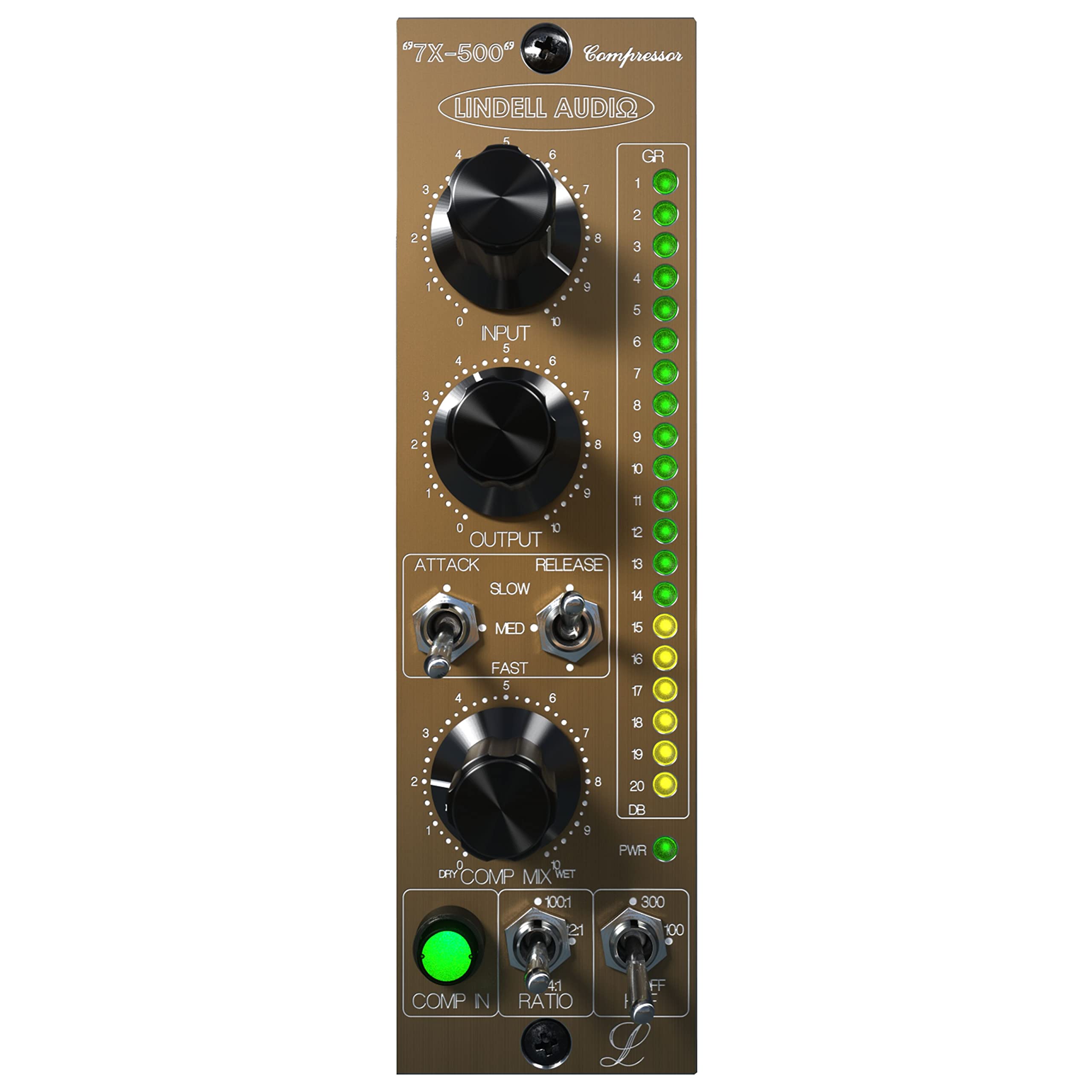
Figure 1: Front Panel of the Lindell Audio 7X-500
- INPUT Knob: (Labeled 'INPUT' 0-10) Adjusts the input gain of the audio signal entering the compressor. Turning clockwise increases the input level, driving the compressor harder.
- OUTPUT Knob: (Labeled 'OUTPUT' 0-10) Adjusts the output gain of the processed audio signal. Use this to set the final level after compression.
- ATTACK Switch: (Toggle switch with 'SLOW', 'MED', 'FAST' settings) Controls the speed at which the compressor begins to reduce gain once the signal exceeds the threshold. 'FAST' reacts quickly, 'SLOW' reacts more gradually.
- RELEASE Switch: (Toggle switch with 'SLOW', 'MED', 'FAST' settings) Controls the speed at which the compressor returns to its original gain once the signal falls below the threshold. 'FAST' releases quickly, 'SLOW' releases more gradually.
- DRY/COMP MIX Knob: (Labeled 'DRY' to 'COMP MIX') Blends the original, unprocessed ('DRY') signal with the fully compressed ('COMP MIX') signal. Fully counter-clockwise is 100% dry, fully clockwise is 100% compressed.
- COMP IN Switch: (Toggle switch with 'COMP IN' and 'OFF' positions) Engages or bypasses the compressor circuit. When 'OFF', the unit acts as a clean signal path.
- RATIO Switch: (Toggle switch with '4:1' and '100:1' settings) Selects the compression ratio. '4:1' provides a moderate compression, while '100:1' acts as a hard limiter.
- GR (Gain Reduction) LEDs: (Vertical LED meter) Indicates the amount of gain reduction being applied by the compressor in decibels (dB). Higher illuminated LEDs indicate more gain reduction.
6. Maintenance
- Cleaning: Use a soft, dry cloth to clean the exterior of the unit. Do not use liquid cleaners or solvents.
- Storage: When not in use for extended periods, store the unit in a cool, dry place, preferably within its 500 Series rack or in protective packaging.
- Inspection: Periodically check all connections for secure fit.
7. Troubleshooting
| Problem | Possible Cause | Solution |
|---|---|---|
| No audio output |
|
|
| No compression effect |
|
|
| Distorted audio |
|
|
8. Specifications
- Model: 7X-500
- Type: FET Compressor/Limiter
- Format: API 500 Series Module
- Item Weight: 1.26 pounds
- Product Dimensions: 7.75 x 5.7 x 2.15 inches
- Material Type: Stainless Steel
- Power Source: Corded Electric (via 500 Series rack)
9. Warranty and Support
Lindell Audio products are designed and manufactured to high standards. For information regarding warranty coverage, technical support, or service, please refer to the official Lindell Audio website or contact your authorized dealer. Please retain your proof of purchase for warranty claims.


