
Introduction
This manual provides essential instructions for the safe and efficient operation of your VisionTek Pitbull RockDoc Power Portable MP3 Speaker. Please read this manual thoroughly before using the device and retain it for future reference.
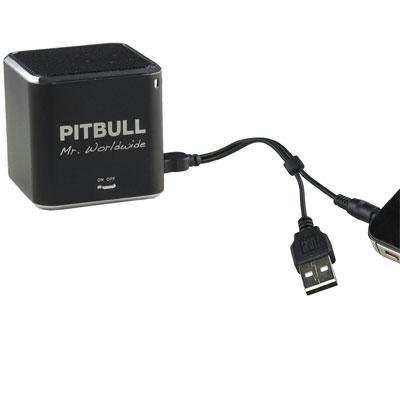
This image displays the compact, black cube-shaped Pitbull RockDoc Power Portable MP3 Speaker. The front face features the 'PITBULL Mr. Worldwide' logo and an 'ON OFF' switch. An integrated cable with a USB connector and a 3.5mm audio jack is shown connected to the speaker, ready for charging or audio input.
Product Features
- Portable Design: Compact and lightweight for easy transport.
- Integrated MP3 Player: Features 4GB of internal memory for direct music playback.
- Wireless Connectivity: Supports Bluetooth for audio streaming from compatible devices.
- Wired Audio Input: Includes a 3.5 mm audio jack for connecting non-Bluetooth devices.
- Battery Powered: Operates on an internal battery for cordless use.
- 1-Way Speaker System: Delivers clear audio output.
Setup
Charging the Speaker
- Locate the integrated USB cable attached to the speaker.
- Connect the USB-A end of the cable to a powered USB port (e.g., computer, USB wall adapter).
- The speaker's indicator light will illuminate to show charging status. Refer to the device for specific light indications.
- Once fully charged, disconnect the USB cable.
Powering On/Off
- To power on, slide the 'ON OFF' switch to the 'ON' position.
- To power off, slide the 'ON OFF' switch to the 'OFF' position.
Connecting Audio Sources
Your speaker supports three primary methods for audio input:
1. Using Internal 4GB Memory (MP3 Playback)
- To load music onto the internal 4GB memory, connect the speaker to a computer using the USB cable. The speaker should appear as a removable storage device.
- Drag and drop your MP3 audio files into the speaker's storage.
- Once files are transferred, safely eject the speaker from your computer.
- The speaker will automatically play files from its internal memory when powered on and no other audio source is connected.
2. Bluetooth Connection
- Ensure the speaker is powered on.
- Activate Bluetooth on your smartphone, tablet, or other compatible device.
- Search for available Bluetooth devices. The speaker should appear as "Pitbull RockDoc" or similar.
- Select the speaker from the list to pair. A confirmation sound or light indication may occur upon successful pairing.
3. 3.5 mm Audio Jack Connection
- Locate the integrated 3.5 mm audio jack on the speaker's cable.
- Connect this jack to the headphone output or audio-out port of your external audio device (e.g., MP3 player, phone, laptop).
- Ensure the speaker is powered on. Audio will be routed through this connection.
Operating Instructions
Basic Playback Controls
The speaker features basic controls for media playback. These controls typically include:
- Play/Pause: Press to start or pause audio playback.
- Next Track: Press to skip to the next audio file.
- Previous Track: Press to go back to the beginning of the current track or to the previous track.
- Volume Control: Adjust the volume level. (Specific button layout not provided, assume standard controls).
Note: When connected via Bluetooth or 3.5mm audio jack, playback controls on the speaker may control the connected device, or you may need to control playback directly from the source device.
Maintenance
Cleaning
- Wipe the exterior of the speaker with a soft, dry, lint-free cloth.
- Do not use abrasive cleaners, solvents, or strong chemicals.
- Avoid getting moisture into any openings.
Storage
- Store the speaker in a cool, dry place away from direct sunlight and extreme temperatures.
- If storing for an extended period, ensure the battery is partially charged (around 50%) to prolong its lifespan.
Troubleshooting
| Problem | Possible Cause | Solution |
|---|---|---|
| No power | Battery is depleted | Charge the speaker using the USB cable. |
| No sound from speaker | Volume too low; Incorrect input source; Device not paired (Bluetooth); Cable not connected (3.5mm) | Increase speaker volume; Ensure correct mode (internal MP3, Bluetooth, or AUX); Re-pair Bluetooth device; Check 3.5mm cable connection. |
| Bluetooth pairing fails | Speaker not in pairing mode; Device too far; Interference | Ensure speaker is discoverable; Move device closer to speaker; Turn off other Bluetooth devices. |
| Cannot transfer files to 4GB memory | Incorrect USB connection; Driver issue; Memory full | Ensure speaker is connected to computer via USB; Try a different USB port/cable; Check available memory space. |
Specifications
| Feature | Detail |
|---|---|
| Model Number | 900584 |
| Speaker Type | 1-Way Portable Speaker |
| Internal Memory | 4GB (for MP3 playback) |
| Connectivity | Bluetooth, 3.5 mm Audio Jack |
| Power Source | Battery Powered |
| Speaker Maximum Output Power | 3 Watts |
| Item Weight | 159 g |
| Product Dimensions (LxWxH) | 5 x 5 x 4.9 cm |
| Manufacturer | VISIONTEK MASS STORAGE |
Warranty Information
For detailed warranty information regarding your VisionTek Pitbull RockDoc Power Portable MP3 Speaker, please refer to the warranty card included with your purchase or contact the manufacturer directly. Amazon's buying options mention a 'Warranty Policy', indicating manufacturer coverage.
Support
If you require technical assistance or have questions not covered in this manual, please contact VisionTek Mass Storage, the manufacturer of this product. Contact details can typically be found on their official website or product packaging.
