
Introduction
The CEM DT-123 is a compact, handheld device designed for measuring the moisture content in wood. It provides quick and accurate readings, essential for woodworking, construction, and home inspection applications. The meter utilizes two sharp, integrated pins to penetrate the wood surface and determine its moisture level, displayed clearly on an LCD screen.
Safety Information
- Keep the device out of reach of children. The measurement pins are sharp and can cause injury.
- Do not attempt to measure live electrical circuits or materials. This device is not designed for electrical testing.
- Avoid exposing the meter to extreme temperatures, high humidity, or direct sunlight.
- Do not immerse the device in water or any other liquid.
- Remove batteries if the device will not be used for an extended period to prevent leakage.
- Use only the specified battery type (9V).
Product Overview
The CEM DT-123 features a durable casing, an easy-to-read LCD display, and integrated measurement pins. A protective cap covers the pins when not in use.
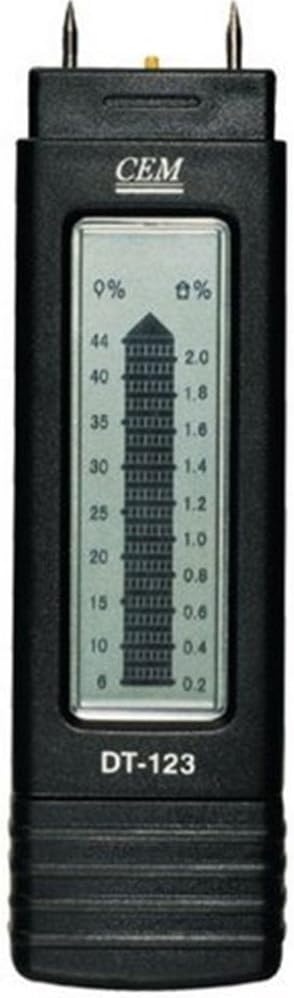
Figure 1: Front view of the CEM DT-123 moisture meter, highlighting the LCD display and measurement pins.

Figure 2: Back view of the CEM DT-123, showing the battery cover and product markings.
Setup
Battery Installation
- Ensure the device is turned off.
- Locate the battery compartment cover on the back of the meter (refer to Figure 2).
- Slide or unclip the cover to open the compartment.
- Insert a new 9V battery, observing the correct polarity (+/-) as indicated inside the compartment.
- Replace the battery compartment cover securely.
The meter is now ready for operation.
Operating Instructions
- Remove the protective cap from the measurement pins.
- Press the power button to turn on the meter. The LCD display will illuminate.
- Carefully push the two measurement pins into the wood surface to be tested. Ensure the pins are fully inserted and parallel to the wood grain for accurate readings.
- Read the moisture content percentage directly from the LCD display. The display shows the moisture percentage on the left scale (0% to 44%) and a corresponding value on the right scale (0.2 to 2.0), which may represent a different unit or a relative scale.
- After taking the reading, gently pull the meter out of the wood.
- Press the power button again to turn off the meter. If left idle, the meter may have an auto-off function to conserve battery life.
- Replace the protective cap over the pins for storage.

Figure 3: The CEM DT-123 in use, demonstrating proper pin insertion into wood.
Maintenance
Cleaning
Wipe the meter's body with a soft, dry cloth. Do not use abrasive cleaners or solvents. Ensure the measurement pins are clean and free of debris after each use.
Storage
Store the meter in a cool, dry place, away from direct sunlight and extreme temperatures. Always replace the protective cap over the pins before storage.
Troubleshooting
| Problem | Possible Cause | Solution |
|---|---|---|
| Meter does not turn on. | Dead or incorrectly installed battery. | Check battery polarity. Replace with a new 9V battery. |
| Inaccurate or fluctuating readings. | Pins not fully inserted; pins dirty or damaged; measuring wet surface. | Ensure pins are fully inserted. Clean pins. Avoid measuring standing water. |
| Display shows "LO" or low battery indicator. | Low battery voltage. | Replace the 9V battery. |
Specifications
- Model: DT-123
- Measurement Range (Wood): 6% to 44%
- Display: LCD
- Power Source: 9V Battery (not included)
- Item Weight: 6.4 ounces (approx. 181g)
- Package Dimensions: 10.5 x 6.4 x 1.8 inches (approx. 26.7 x 16.3 x 4.6 cm)
Warranty and Support
For warranty information or technical support, please refer to the documentation provided with your purchase or contact the manufacturer directly. Keep your proof of purchase for warranty claims.