
1. Introduction
This manual provides essential information for the safe and efficient operation of your EMB PA2400 Professional Power Amplifier. Please read this manual thoroughly before using the amplifier to ensure proper setup, operation, and maintenance. Retain this manual for future reference.
2. Important Safety Instructions
- Power Source: Connect the amplifier only to a power supply of the type described in this manual and marked on the unit. Ensure the voltage selector (115V/230V) on the rear panel is set correctly for your region.
- Ventilation: Do not block any ventilation openings. Install in accordance with the manufacturer's instructions. Ensure adequate airflow around the unit.
- Water and Moisture: Do not use this apparatus near water or expose it to dripping or splashing.
- Heat: Do not install near any heat sources such as radiators, heat registers, stoves, or other apparatus (including amplifiers) that produce heat.
- Grounding: This product must be grounded. Do not defeat the safety purpose of the polarized or grounding-type plug.
- Servicing: Refer all servicing to qualified service personnel. Servicing is required when the apparatus has been damaged in any way, such as power-supply cord or plug is damaged, liquid has been spilled or objects have fallen into the apparatus, the apparatus has been exposed to rain or moisture, does not operate normally, or has been dropped.
- Cleaning: Clean only with a dry cloth.
3. Product Overview
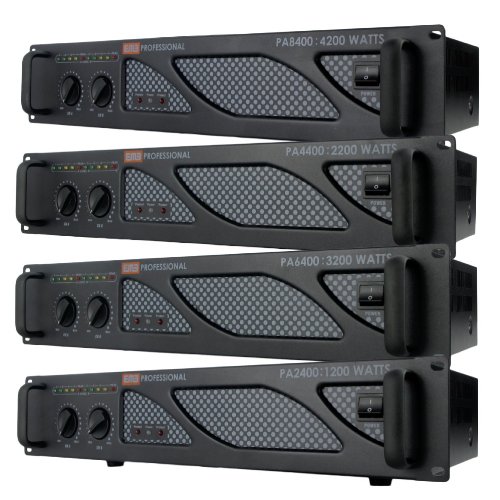
The EMB PA2400 is a rack-mountable professional power amplifier designed for various audio applications. It features robust construction and versatile connectivity options.
3.1 Front Panel Controls
- AC Switch: Main power switch for the amplifier.
- Ch.1 and Ch.2 Gain Knobs: Rotary controls to adjust the input sensitivity (volume) for Channel 1 and Channel 2 independently.
- LED Indicators: Typically include Power, Signal, Clip, and Protection indicators to monitor amplifier status.
3.2 Rear Panel Connections
This image displays the rear panel of the EMB PA2400 amplifier. From left to right, it features the AC power input with a voltage selector (115V/230V) and fuse holder, followed by XLR and 1/4-inch (6.35mm) audio inputs for Channel A and Channel B. To the right are the Speakon and banana binding post outputs for Channel A and Channel B, and a cooling fan.
- AC Power Input: Connects to the main power supply. Includes a fuse holder and a voltage selector switch (115V/230V).
- Audio Inputs (Ch A & Ch B): XLR and 1/4" (6.35mm) jacks for connecting audio sources such as mixers or preamplifiers.
- Audio Outputs (Ch A & Ch B): Speakon and Banana binding post connectors for connecting speakers.
- Cooling Fan: Provides necessary cooling for the amplifier's internal components.
4. Setup
4.1 Unpacking
- Carefully remove the amplifier from its packaging.
- Inspect the unit for any signs of damage that may have occurred during transit. If damage is found, contact your dealer immediately.
- Retain the original packaging for future shipping or storage.
4.2 Rack Mounting
The EMB PA2400 is designed for standard 19-inch rack mounting. Secure the amplifier using appropriate rack screws and washers to prevent vibration and ensure stability.
4.3 Connecting Audio Sources
- Ensure the amplifier is powered off and unplugged.
- Connect your audio source (e.g., mixer, preamplifier) to the amplifier's input jacks (XLR or 1/4") for Channel A and Channel B. Use high-quality shielded cables to minimize noise.
4.4 Connecting Speakers
- Ensure the amplifier is powered off and unplugged.
- Connect your speakers to the amplifier's output terminals (Speakon or Banana binding post) for Channel A and Channel B.
- Ensure correct polarity (+ to + and - to -) when using banana binding posts.
- Verify that the impedance of your speakers is compatible with the amplifier's specifications to prevent damage.
4.5 Power Connection
- Before connecting the power cord, verify that the voltage selector switch on the rear panel is set to the correct voltage for your region (115V or 230V).
- Connect the supplied AC power cord to the amplifier's AC input and then to a grounded electrical outlet.
5. Operating Instructions
5.1 Powering On/Off
- Power On: Turn on your audio source devices first, then turn on the EMB PA2400 amplifier using the AC switch on the front panel.
- Power Off: Turn off the EMB PA2400 amplifier first, then turn off your audio source devices. This prevents loud pops or thumps through your speakers.
5.2 Adjusting Volume (Gain)
- Start with the Ch.1 and Ch.2 Gain Knobs set to their minimum position (fully counter-clockwise).
- Begin playing audio from your source.
- Slowly increase the Gain Knobs for Channel 1 and Channel 2 until the desired volume level is achieved.
- Monitor the LED indicators: The Signal LED should illuminate when audio is present. The Clip LED should only flash occasionally during peak signals. If the Clip LED stays lit, reduce the gain to prevent distortion and potential speaker damage.
6. Maintenance
6.1 Cleaning
- Always disconnect the power cord before cleaning.
- Use a soft, dry cloth to wipe the exterior surfaces of the amplifier.
- Do not use liquid cleaners, aerosols, or solvents, as they may damage the finish or internal components.
6.2 Ventilation
- Regularly check that the ventilation openings and cooling fan are free from dust and debris.
- Ensure there is adequate space around the amplifier for proper airflow, especially if rack-mounted.
7. Troubleshooting
| Problem | Possible Cause | Solution |
|---|---|---|
| No power | Power cord disconnected; Blown fuse; AC switch off; Incorrect voltage selection. | Check power cord connection; Replace fuse (refer to specifications for type); Turn AC switch on; Verify voltage selector (115V/230V) is correct. |
| No sound output | Input cables disconnected; Speaker cables disconnected or incorrect polarity; Gain knobs set too low; Source device not playing. | Check all audio input and output connections; Ensure speaker polarity is correct; Increase gain knobs; Verify audio source is active. |
| Distorted sound | Gain set too high (clipping); Faulty cables; Speaker impedance mismatch. | Reduce gain until Clip LED flashes only occasionally; Test with different cables; Ensure speaker impedance matches amplifier requirements. |
| Humming or buzzing noise | Ground loop; Unshielded cables; Interference from other equipment. | Ensure all equipment is on the same electrical circuit; Use shielded cables; Move amplifier away from potential interference sources. |
8. Specifications
| Feature | Specification |
|---|---|
| Model Number | PA-2400 |
| Max Peak Power | 1200 Watts |
| Output Circuitry | Class A/B |
| Input Connectors | XLR, 1/4" (6.35mm) |
| Output Connectors | Speakon, Banana binding post |
| Front Controls | AC switch, Ch.1 and Ch.2 Gain Knobs |
| Product Dimensions (W x D x H) | 18.9 x 11.42 x 3.54 inches (48 x 29 x 9 cm) |
| Item Weight | 13.5 pounds (6.12 kg) |
| Power Source | AC adapter (115V/60Hz F4A, 230V/50Hz F2A selectable) |
| Color | Black |
9. Warranty and Support
For warranty information and technical support, please refer to the documentation provided with your purchase or contact your authorized EMB dealer. Keep your proof of purchase for warranty claims.