
1. Introduction and Overview
The Hoover Dirt Devil Versa Clean Bagless Stick Vacuum Cleaner and Hand Vac, Model SD20010, is an innovative and versatile cleaning solution designed for various surfaces. This lightweight appliance functions as both a full-size stick vacuum for rugs and hard floors and easily converts into a portable hand vacuum for quick clean-ups. Its bagless design simplifies maintenance, offering convenient dirt disposal.
Key features include multi-surface cleaning capability, a detachable hand vac for elevated cleaning, and an on-board crevice tool for reaching tight spaces. Its compact and lightweight design ensures easy maneuverability and storage.

Image Description: The Hoover Dirt Devil Versa Clean Bagless Stick Vacuum Cleaner, Model SD20010, is shown in its complete upright stick vacuum configuration. The vacuum is red with a black power cord wrapped around the handle. It features a clear dirt cup at the base of the main unit and a floor nozzle at the bottom.
2. Important Safety Information
Please read all instructions carefully before using this appliance. Failure to follow these instructions may result in electric shock, fire, or serious injury.
- DO NOT use outdoors or on wet surfaces.
- DO NOT allow to be used as a toy. Close attention is necessary when used by or near children.
- DO NOT use with a damaged cord or plug. If appliance is not working as it should, has been dropped, damaged, left outdoors, or dropped into water, return it to a service center.
- DO NOT pull or carry by cord, use cord as a handle, close a door on cord, or pull cord around sharp edges or corners. Keep cord away from heated surfaces.
- DO NOT unplug by pulling on cord. To unplug, grasp the plug, not the cord.
- DO NOT handle plug or appliance with wet hands.
- DO NOT put any object into openings. Do not use with any opening blocked; keep free of dust, lint, hair, and anything that may reduce air flow.
- Keep hair, loose clothing, fingers, and all parts of body away from openings and moving parts.
- DO NOT pick up anything that is burning or smoking, such as cigarettes, matches, or hot ashes.
- DO NOT use to pick up flammable or combustible liquids, such as gasoline, or use in areas where they may be present.
- Turn off all controls before unplugging.
- Use extra care when cleaning on stairs.
- DO NOT use without dust cup and/or filters in place.
- Connect to a properly grounded outlet only.
3. Package Contents
Carefully unpack your new Hoover Dirt Devil Versa Clean vacuum and ensure all components are present:
- Main Hand Vac Unit
- Handle Tube
- Floor Nozzle
- Crevice Tool
- User Manual (this document)
4. Assembly Instructions
Your Dirt Devil Versa Clean vacuum requires minimal assembly. Follow these steps to set up your vacuum:
- Insert the Handle Tube firmly into the top opening of the Main Hand Vac Unit until it clicks into place.
- Attach the Floor Nozzle to the bottom opening of the Main Hand Vac Unit. Ensure it is securely fastened.
- Wrap the power cord around the cord hooks on the handle and main unit for neat storage.
- The Crevice Tool can be stored on the vacuum or kept separately for when needed.
Your vacuum is now assembled and ready for use as a stick vacuum.
5. Operating Instructions
5.1. Using as a Stick Vacuum
- Ensure the vacuum is fully assembled as a stick vacuum.
- Plug the power cord into a suitable electrical outlet.
- Press the ON/OFF switch located on the main unit to start the vacuum.
- Guide the vacuum across your rugs, carpets, or hard floors to clean.
- When finished, press the ON/OFF switch again to turn off the vacuum and unplug it from the outlet.

Image Description: A woman is shown effortlessly carrying the lightweight Hoover Dirt Devil Versa Clean vacuum up a flight of white stairs, demonstrating its portability and ease of use for multi-level homes.
5.2. Converting to a Hand Vacuum
The Versa Clean easily converts for handheld cleaning:
- Unplug the vacuum from the power outlet.
- Press the release button (if present) or firmly pull the Handle Tube upwards to detach it from the Main Hand Vac Unit.
- Press the release button (if present) or firmly pull the Floor Nozzle downwards to detach it from the Main Hand Vac Unit.
- The Main Hand Vac Unit is now ready for handheld use.
5.3. Using as a Hand Vacuum and Crevice Tool
- With the Main Hand Vac Unit detached, plug the power cord into an outlet.
- Press the ON/OFF switch to activate the hand vacuum.
- For tight spaces, attach the Crevice Tool to the nozzle of the hand vac. This is ideal for cleaning corners, along edges, between cushions, and on shelves.
- Use the hand vac to clean furniture, counters, upholstery, drapes, and other elevated surfaces.
- When finished, press the ON/OFF switch to turn off and unplug.
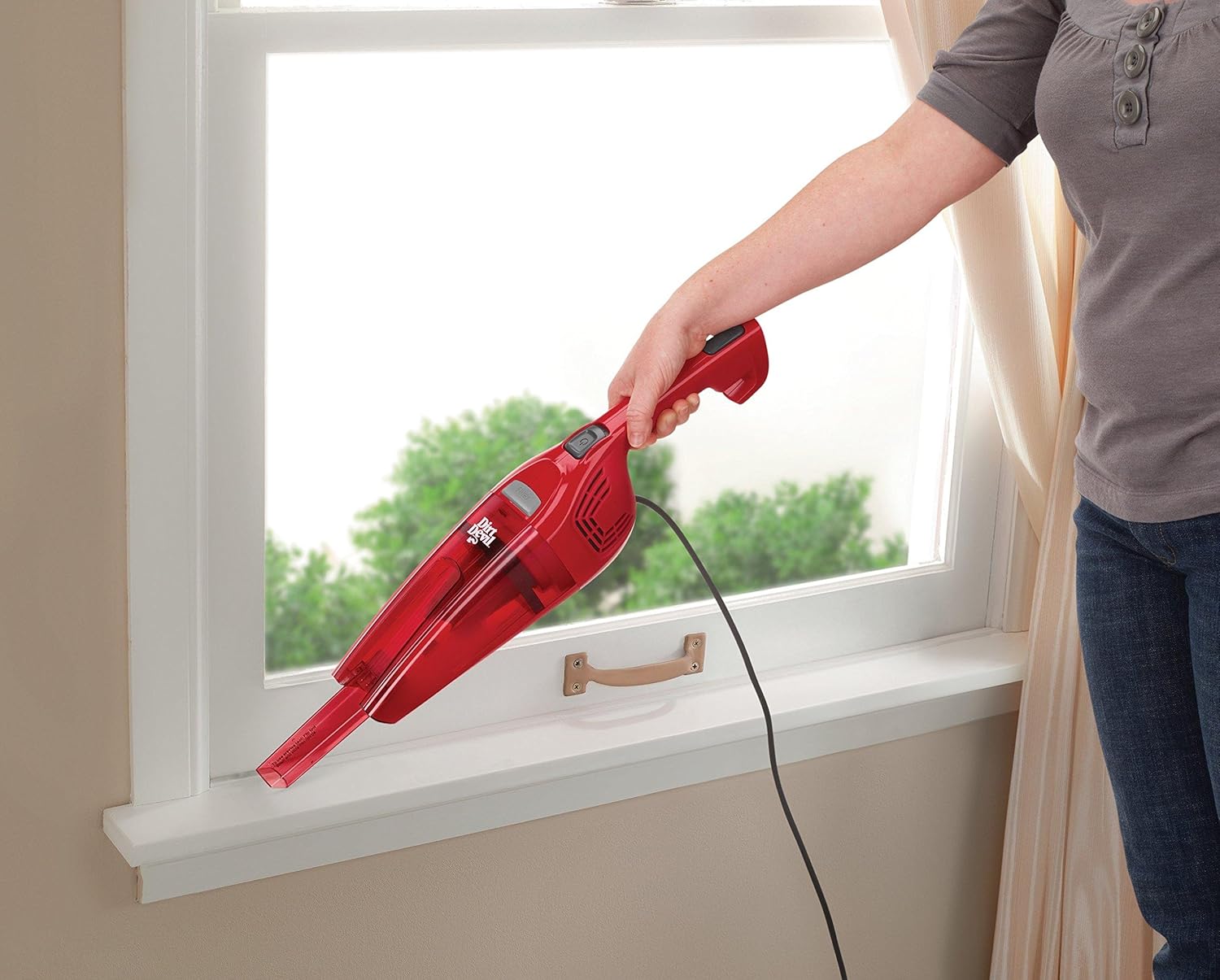
Image Description: A hand is holding the red Hoover Dirt Devil Versa Clean hand vacuum, equipped with its crevice tool, to clean dust and debris from a windowsill. The image highlights the precision cleaning capability of the handheld mode.

Image Description: The red Hoover Dirt Devil Versa Clean hand vacuum is being used to clean crumbs and dirt from between the cushions of a grey sofa, demonstrating its effectiveness for upholstery cleaning.
6. Maintenance and Cleaning
Regular maintenance ensures optimal performance and extends the life of your vacuum. Always unplug the vacuum before performing any maintenance or cleaning.
6.1. Emptying the Dirt Cup
- Ensure the vacuum is unplugged.
- Locate the dirt cup release button, typically near the dirt cup.
- Press the button and carefully remove the dirt cup from the main unit.
- Hold the dirt cup over a trash receptacle and open the bottom flap to empty debris.
- Close the flap and reattach the dirt cup to the vacuum until it clicks securely into place.
6.2. Cleaning the Filter
The filter should be cleaned regularly to maintain suction power.
- With the dirt cup removed, locate the filter inside.
- Remove the filter. Tap it gently over a trash can to remove loose dirt and dust.
- If necessary, rinse the filter under cool running water. DO NOT use detergent.
- Allow the filter to air dry completely for at least 24 hours before reinserting it into the dirt cup. DO NOT use the vacuum with a wet filter.
- Once dry, place the filter back into the dirt cup and reattach the dirt cup to the vacuum.
6.3. General Care
- Wipe the exterior of the vacuum with a clean, damp cloth.
- Check the floor nozzle for any tangled hair or debris and remove as necessary.
- Store the vacuum in a cool, dry place.
7. Troubleshooting
If you encounter issues with your vacuum, refer to the following common problems and solutions:
| Problem | Possible Cause | Solution |
|---|---|---|
| Vacuum does not turn on. | Not plugged in; Power switch off; No power at outlet. | Ensure plug is fully inserted; Turn power switch ON; Check circuit breaker or try another outlet. |
| Poor suction. | Dirt cup full; Filter clogged; Nozzle/hose clogged. | Empty dirt cup; Clean or replace filter; Remove any obstructions from nozzle or hose. |
| Unusual noise. | Obstruction in nozzle or hose; Motor issue. | Check for and remove obstructions; If noise persists, contact customer support. |
8. Specifications
| Feature | Detail |
|---|---|
| Brand | Hoover |
| Model Name | Versa Clean Bagless Stick Vacuum Cleaner and Hand Vac |
| Model Number | SD20010 |
| Color | Red |
| Form Factor | Stick, Handheld |
| Power Source | Corded Electric |
| Cord Length | 16 feet (approx.) |
| Bagless | Yes |
| Filter Type | Disk |
| Item Weight | 3.3 pounds |
| Product Dimensions | 7"L x 9"W x 40"H |
| Wattage | 150 watts |
| Amperage | 1.25 Amps |
| Noise Level | 78 dB |
9. Warranty and Support
This Hoover Dirt Devil Versa Clean Bagless Stick Vacuum Cleaner and Hand Vac (Model SD20010) comes with a 1-year limited warranty from the date of purchase. This warranty covers manufacturing defects under normal household use.
For warranty claims, technical support, or if you have questions not covered in this manual, please contact Hoover customer service. Keep your purchase receipt as proof of purchase for warranty validation.


