
Product Overview
The ACV 42-1190-101 Steering Wheel Control Adapter allows you to retain the functionality of your vehicle's existing steering wheel remote controls when installing an aftermarket car radio. This adapter ensures seamless integration, providing convenience and safety by keeping essential controls accessible on your steering wheel.
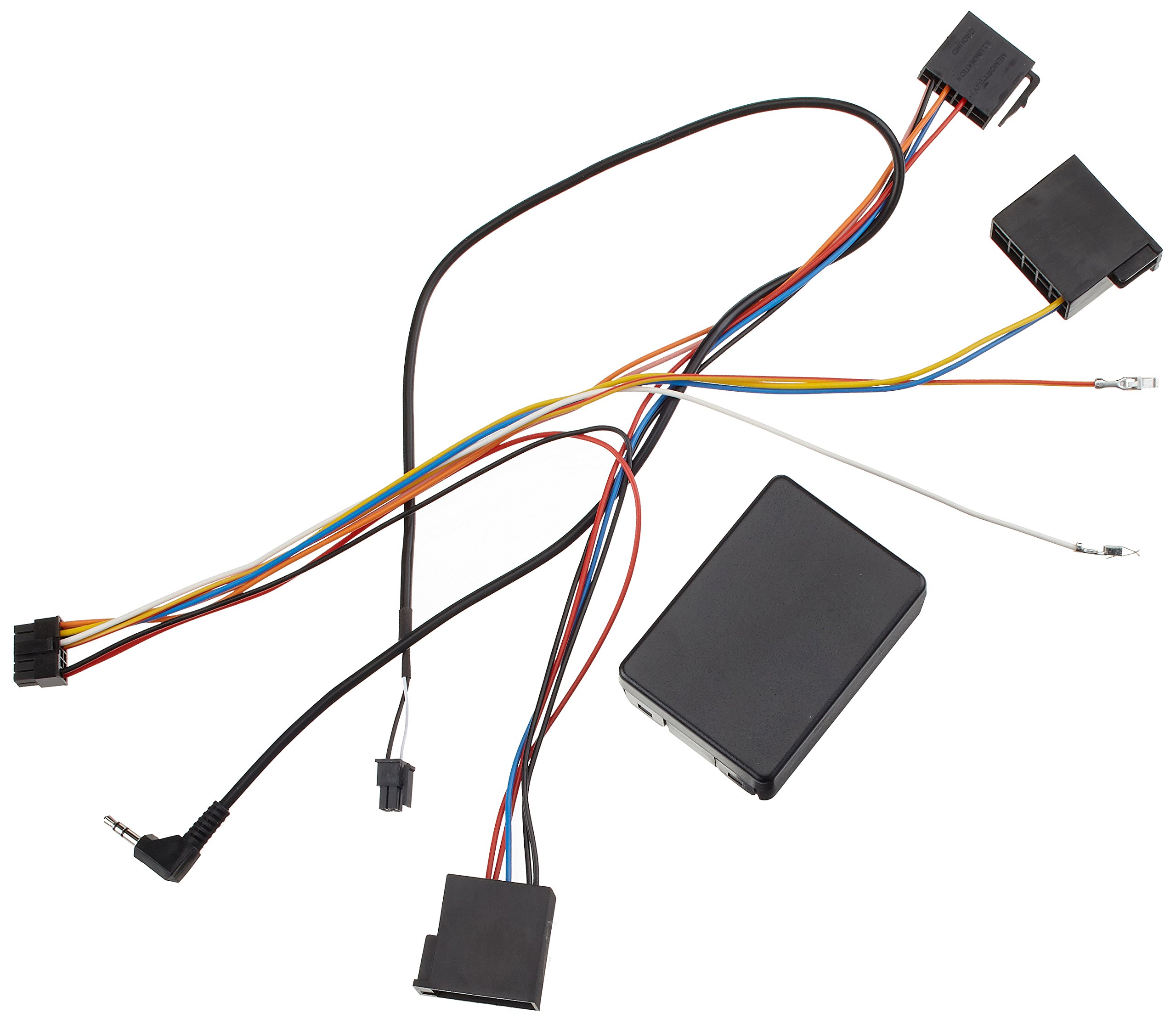
Image: The ACV 42-1190-101 Steering Wheel Control Adapter, showing its compact design and wiring harness connections.
Compatibility
This adapter is compatible with specific Mercedes-Benz models and OEM radios:
- Mercedes C-Class (W203): 2000 – March 2004
- Mercedes CLK-Class (W208): Up to May 2003
- Mercedes CLK-Class (W209): Up to June 2004
- Mercedes E-Class (W210): From 2003 onwards
- Mercedes SL-Class (R230): From July 2004 onwards
Designed for models with an interior CAN-BUS system and compatible with the following OEM radios (featuring a 10-pin ISO connector): Audio 10, Audio 30, and APS (D2B).
Setup
Before Installation
- Ensure your vehicle and aftermarket radio are compatible with this adapter.
- Disconnect the vehicle's negative battery terminal before beginning any electrical work to prevent short circuits or damage.
- Gather all necessary tools, including wire strippers, crimpers, electrical tape, and a trim removal tool.
Installation Steps
- Disconnect Battery: Ensure the vehicle's negative battery terminal is disconnected.
- Remove Original Radio: Carefully remove the existing factory radio from the dashboard using appropriate trim removal tools.
- Disconnect Factory Harness: Disconnect the factory wiring harness and antenna cable from the original radio.
- Connect Adapter to Vehicle: Connect the vehicle-specific connector of the ACV 42-1190-101 adapter to the factory wiring harness in your car. Ensure all connections are secure.
- Connect Adapter to Aftermarket Radio: Connect the other end of the ACV adapter harness to your new aftermarket radio. Follow the wiring diagram provided with your aftermarket radio for specific connections (e.g., power, ground, speaker, steering wheel control input).
- Secure Wiring: Neatly route and secure all wiring to prevent pinching or interference.
- Test Connections: Before fully reassembling, temporarily reconnect the battery and test the basic functions of the aftermarket radio and steering wheel controls.
- Reinstall Radio: Once confirmed working, disconnect the battery again, then carefully slide the aftermarket radio into the dashboard opening and secure it.
- Reconnect Battery: Reconnect the vehicle's negative battery terminal.
- Final Test: Perform a final test of all radio functions and steering wheel controls.
Operating Instructions
The ACV 42-1190-101 adapter is pre-programmed to translate the signals from your Mercedes-Benz steering wheel controls to your aftermarket radio. Once installed correctly, your steering wheel buttons should function as follows:
- Volume Up/Down: Adjusts the audio volume of your aftermarket radio.
- Track Up/Down: Changes to the next or previous track/station.
- Mode/Source: Switches between different audio sources (e.g., radio, CD, USB, Bluetooth).
- Other buttons may have specific functions depending on your vehicle and aftermarket radio model. Refer to your aftermarket radio's manual for detailed button assignments.
Maintenance
The ACV 42-1190-101 Steering Wheel Control Adapter requires minimal maintenance. To ensure optimal performance and longevity:
- Ensure all electrical connections remain secure and free from corrosion.
- Avoid exposing the adapter to excessive moisture or extreme temperatures.
- Do not attempt to open or modify the adapter unit, as this may void any potential warranty and could cause damage.
Troubleshooting
If you encounter issues with your steering wheel control adapter, refer to the following troubleshooting steps:
- Controls Not Responding:
- Verify all connections between the adapter, vehicle harness, and aftermarket radio are firm and correct according to the wiring diagrams.
- Ensure your vehicle and aftermarket radio are listed as compatible models.
- Check the aftermarket radio's settings to ensure the steering wheel control input is enabled and configured correctly.
- Intermittent Functionality:
- Inspect wiring for any loose connections or damaged insulation that could cause intermittent contact.
- Ensure the adapter unit itself is securely mounted and not subject to excessive vibration.
- No Power to Radio After Installation:
- Check the vehicle's fuses related to the radio and accessory power.
- Confirm the power and ground connections from the adapter to the aftermarket radio are correct.
If problems persist after following these steps, contact ACV Electronic support or a qualified car audio technician.
Specifications
| Feature | Detail |
|---|---|
| Model Number | 42-1190-101 |
| Brand | ACV |
| Manufacturer | ACV Electronic |
| Special Feature | Pre-programmed |
| Compatible Devices | Car Audio Systems |
| Connectivity Technology | High Frequency (Hochfrequenz) |
| Package Dimensions | 25.8 x 13.2 x 4.2 cm |
| Item Weight | 120 grams |
Warranty Information
Specific warranty details for the ACV 42-1190-101 Steering Wheel Control Adapter are not provided in this manual. For information regarding warranty coverage, duration, and claims, please refer to the documentation included with your purchase or contact the retailer or ACV Electronic directly.
Support
For further assistance, technical support, or inquiries not covered in this manual, please contact ACV Electronic customer support. You can typically find contact information on the manufacturer's official website or through your product retailer.


