1. Introduction
The Innova 30203 CarScan Code Reader is a diagnostic tool designed to assist in identifying and resolving issues related to your vehicle's On-Board Diagnostics II (OBD2) system. This device is compatible with most 1996 and newer cars, light trucks, SUVs, and minivans, including both domestic and import models, as well as newer OBD2 compliant diesel and hybrid vehicles. It provides essential diagnostic and repair verification information through an intuitive backlit display.
Key features include:
- Compatibility with all 1996 and newer OBD2 compliant vehicles.
- All-in-one backlit display showing over 20 pieces of diagnostic information.
- Links to all OBD2 protocols, including CAN, for decoding "Check Engine" light problems.
- Automatic data refresh every 30 seconds when connected to the vehicle.
- 15 inspection maintenance monitor coverage for repair verification.
- Unique patented all-in-one backlit screen and 3-color LED display for quick State Emissions readiness checks.
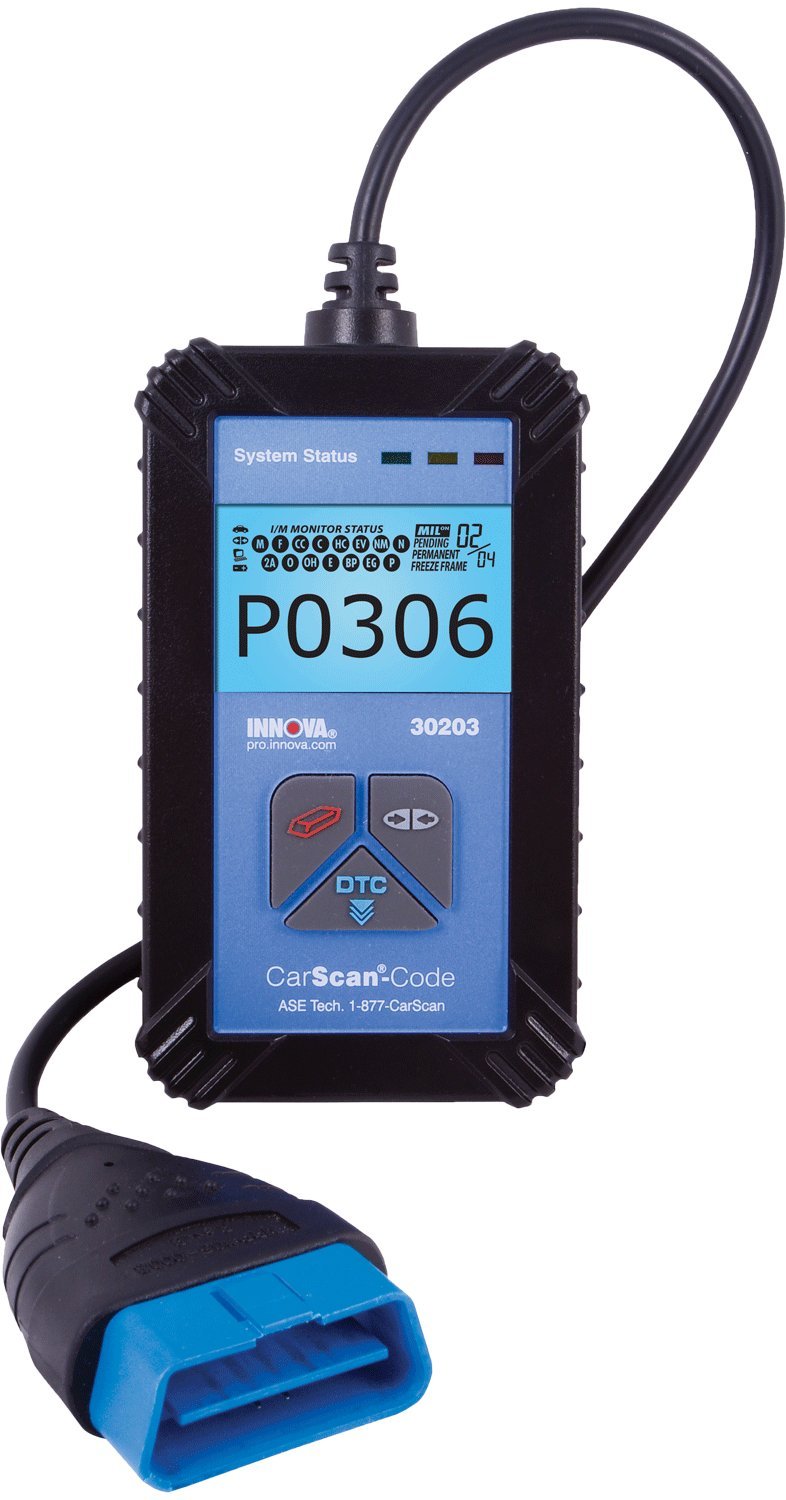
Figure 1: The Innova 30203 CarScan Code Reader, showing its main unit and the OBD2 connector cable.
2. Setup
Before using the Innova 30203 CarScan Code Reader, ensure your vehicle's ignition is turned off. Locate the vehicle's OBD2 diagnostic link connector (DLC). This connector is typically located under the dashboard on the driver's side, though its exact position may vary by vehicle model. Refer to your vehicle's service manual for the precise location if needed.
- Locate the OBD2 Port: Identify the 16-pin OBD2 DLC in your vehicle.
- Connect the Device: Firmly plug the CarScan Code Reader's connector into the vehicle's OBD2 DLC. Ensure a secure connection.
- Power On: Once connected, turn your vehicle's ignition to the "ON" position (do not start the engine). The CarScan Code Reader will automatically power on and begin communicating with the vehicle's computer.

Figure 2: The Innova 30203 CarScan Code Reader packaged with its instruction manual and a USB cable for potential updates.
3. Operating Instructions
After successful connection and power-up, the CarScan Code Reader will display system status and diagnostic information. The device is designed for straightforward operation.
3.1 Reading Diagnostic Trouble Codes (DTCs)
The device automatically scans for Diagnostic Trouble Codes (DTCs) once connected and powered. The backlit display will show any detected codes, such as "P0306" as seen in the product images, indicating a specific vehicle issue.
- Display Interpretation: The all-in-one backlit screen presents over 20 pieces of vital diagnostic information simultaneously. This includes the DTCs, I/M monitor status, and other system parameters.
- "Check Engine" Light: The device links to all OBD2 protocols, including Controller Area Network (CAN), to decode the cause of an illuminated "Check Engine" light. The displayed DTC will correspond to the specific fault.
- Automatic Refresh: Data displayed on the screen automatically refreshes every 30 seconds when the device is connected to the vehicle. This feature allows for monitoring changes and verifying repair completion.
3.2 State Emissions Readiness Check
The CarScan Code Reader features a 3-color LED display that provides a quick indication of your vehicle's State Emissions readiness status. This is useful for pre-checking before official emissions tests.
- Green LED: Indicates all monitors are ready for emissions testing.
- Yellow LED: Indicates some monitors are not ready. Further driving may be required for the vehicle's computer to complete its diagnostic cycles.
- Red LED: Indicates a significant issue or multiple monitors are not ready, suggesting the vehicle will likely fail an emissions test.
3.3 Inspection Maintenance (I/M) Monitor Coverage
The device provides coverage for 15 inspection maintenance monitors. This allows users to verify that repairs have been successfully completed and that the vehicle has run through its complete drive cycle, ensuring all systems are functioning correctly post-repair.

Figure 3: The Innova 30203 CarScan Code Reader being used inside a vehicle, demonstrating its compact size and ease of use while connected to the OBD2 port.
4. Maintenance
To ensure the longevity and proper functioning of your Innova 30203 CarScan Code Reader, follow these maintenance guidelines:
- Cleaning: Use a soft, dry cloth to clean the device. Avoid using abrasive cleaners or solvents, which can damage the screen or casing.
- Storage: Store the device in a clean, dry environment, away from extreme temperatures and direct sunlight. The included storage pouch (if applicable) can help protect it.
- Cable Care: Avoid kinking or sharply bending the diagnostic cable. Always grasp the connector when plugging or unplugging to prevent damage to the cable or pins.
- Software Updates: The device is designed to be upgradeable. Periodically check the manufacturer's website for available software updates to ensure compatibility with the latest vehicle models and diagnostic protocols. Instructions for updates are typically provided with the software download.
5. Troubleshooting
If you encounter issues while using your Innova 30203 CarScan Code Reader, consider the following troubleshooting steps:
- Device Not Powering On:
- Ensure the device is securely connected to the vehicle's OBD2 port.
- Verify the vehicle's ignition is in the "ON" position (engine off).
- Check the vehicle's fuse for the OBD2 port (refer to your vehicle's manual).
- No Communication with Vehicle:
- Confirm the vehicle is OBD2 compliant (generally 1996 and newer).
- Ensure the connection to the OBD2 port is firm and correct.
- Try the device on a different OBD2 compliant vehicle to rule out a vehicle-specific issue.
- Incorrect or Missing Codes:
- Ensure the vehicle's battery is adequately charged. Low voltage can sometimes affect diagnostic communication.
- Perform a software update if available, as this can improve compatibility and diagnostic accuracy.
- "Check Engine" Light Remains On After Repair:
- After a repair, it may be necessary to clear the Diagnostic Trouble Codes (DTCs) using the device. Consult the device's on-screen menu for the "Erase Codes" or "Clear DTCs" function.
- Drive the vehicle through a complete drive cycle to allow all monitors to reset and confirm the repair.
For further assistance, refer to the support information provided in Section 7.
6. Specifications
| Feature | Specification |
|---|---|
| Model Number | 30203 |
| Brand | Innova |
| Manufacturer | INNOVA |
| Product Dimensions (LxWxH) | 23.37 x 13.97 x 3.05 cm (9.2 x 5.5 x 1.2 inches) |
| Item Weight | 907 g (2 lbs) |
| Power Source | Corded Electric (via OBD2 port) |
| Compatibility | 1996 and newer OBD2 compliant vehicles (domestic, import, diesel, hybrid) |
| Display | All-in-one backlit screen, 3-color LED display |
| UPC | 042713030233, 042173030231 |
7. Warranty and Support
For technical support or inquiries regarding your Innova 30203 CarScan Code Reader, please contact Innova customer service. The device itself indicates support from "ASE Tech."
- Technical Support: 1-877-CarScan (as indicated on the device)
- Warranty Information: Specific warranty details are not provided in this manual. Please refer to the documentation included with your product purchase or visit the official Innova website for the most current warranty policy.
Always ensure you are using official support channels for accurate and reliable assistance.


