
1. Introduction
This manual provides essential information for the safe and efficient operation of your RCF HDL-20A Active Line Array Module. Please read this manual thoroughly before installation and use, and retain it for future reference. The RCF HDL-20A is a high-performance active line array module designed for professional sound reinforcement applications, featuring a 1200W peak (600W RMS) 2-way digital amplifier and advanced DSP processing.
2. Safety Information
Always observe the following safety precautions to prevent electric shock, injury, or damage to the equipment:
- Power Supply: Connect the unit only to the specified voltage and frequency. Ensure the power cord is undamaged and properly grounded.
- Ventilation: Do not block ventilation openings. Ensure adequate airflow around the unit to prevent overheating.
- Moisture: Do not expose the unit to rain or moisture. Avoid placing liquids on or near the unit.
- Servicing: Refer all servicing to qualified personnel. Do not attempt to open or repair the unit yourself.
- Mounting: When suspending the unit, ensure all rigging hardware is securely fastened and rated for the weight of the module. Follow all local regulations for overhead rigging.
- Hearing Protection: This product can produce high sound pressure levels. Use hearing protection when operating at high volumes.
3. Package Contents
Verify that all items are present in the package:
- RCF HDL-20A Active Line Array Module (2 units)
- Power Cables
- User Manual (this document)
4. Features
The RCF HDL-20A Active Line Array Module incorporates advanced technology for superior audio performance:
- Powerful Amplification: 1200W peak, 600W RMS 2-way digital amplifier.
- High-Performance Transducers: Two 10-inch woofers with 2.5-inch voice coils for robust bass, and a 3-inch voice coil compression driver (RCF CD850) for clear vocal range and high definition.
- Advanced DSP: Integrated Digital Signal Processing for cluster and HF projection correction, including special presets for indoor and high curving applications.
- Configurable Mechanics: Angles between cabinets are selectable with 2-degree resolution, allowing for true J-shaped or spiral array configurations.
- Durable Cabinet: Molded from a special polypropylene composite material designed to dampen vibrations, ensuring reliability and strength for intensive use.
- High SPL: Stable power output at very high sound pressure levels.
5. Setup
Proper setup is crucial for optimal performance and safety.
5.1 Physical Placement and Rigging
The HDL-20A is designed for line array configurations. Consult a qualified rigging professional for safe suspension. Ensure all rigging points and hardware are rated for the combined weight of the modules.

Figure 5.1: Front view of the RCF HDL-20A module, showing the protective grille and RCF logo.

Figure 5.2: Angled front view of the RCF HDL-20A module, highlighting its compact design.

Figure 5.3: Detail of the robust integrated handle for easy transport and positioning.
5.2 Angle Adjustment
The HDL-20A features a precise angle adjustment system. Use the provided pins to set the desired splay angle between modules in 2-degree increments. This allows for creating various array curvatures, including J-shaped or spiral arrays, to optimize sound coverage for the venue.
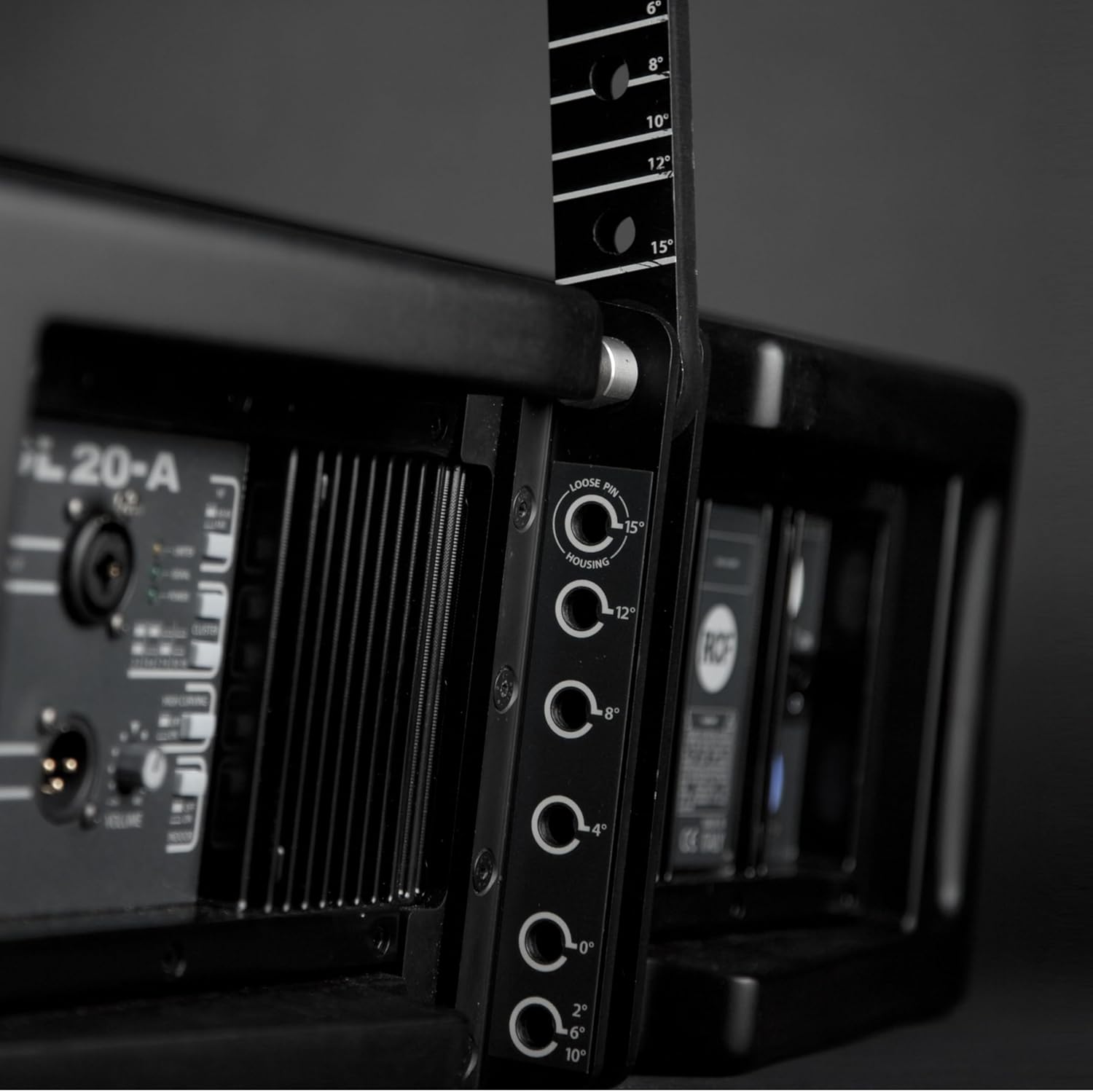
Figure 5.4: Detailed view of the angle adjustment mechanism, showing pin positions for various splay angles (0°, 2°, 4°, 6°, 8°, 10°, 12°, 15°).

Figure 5.5: Rear panel view, illustrating the angle adjustment mechanism on the left side and power input/link on the right.
5.3 Connections
Connect audio and power cables as follows:
- Balanced Input: Use an XLR cable to connect your audio source (mixer, processor) to the "BALANCED INPUT" connector.
- Balanced Link: Use an XLR cable to link the audio signal to additional HDL-20A modules or other audio equipment.
- Power In: Connect the main power cable to the "POWER IN" connector.
- Power Link: Use a power link cable to daisy-chain power to other HDL-20A modules. Ensure the total current draw does not exceed the circuit breaker limits.

Figure 5.6: Detailed view of the rear control panel, showing Balanced Input, Balanced Link, Volume control, DSP presets, Power In, and Power Link connectors.

Figure 5.7: Full rear view of the RCF HDL-20A, showing the integrated handles, heat sinks, and the control/connection panel.
6. Operating
Once connected, follow these steps for operation:
- Power On: Ensure all connections are secure, then switch the "POWER ON" button to the ON position. The "POWER" LED indicator will illuminate.
- Volume Adjustment: Use the "VOLUME" knob on the rear panel to set the output level. Start with a low volume and gradually increase it.
- DSP Presets: The HDL-20A features DSP presets for various applications.
- CLUSTER: Adjusts for different array sizes and configurations.
- HF PROJECTION: Optimizes high-frequency dispersion.
- INDOOR/HIGH CURVING: Specific presets for indoor environments or highly curved array setups. Refer to the indicators on the rear panel to select the appropriate setting.
- Signal Monitoring: Observe the "SIGNAL" and "LIMITER" LEDs. The "SIGNAL" LED indicates audio presence. The "LIMITER" LED illuminates when the internal limiter is active, preventing distortion. If the limiter is constantly active, reduce the input volume.
7. Maintenance
Regular maintenance ensures the longevity and performance of your HDL-20A module.
- Cleaning: Use a soft, dry cloth to clean the exterior. Do not use abrasive cleaners or solvents.
- Inspection: Periodically check all cables and connectors for wear or damage. Ensure all rigging hardware is secure.
- Storage: When not in use, store the module in a dry, dust-free environment, ideally in a protective case.
8. Troubleshooting
If you encounter issues, refer to the following table:
| Problem | Possible Cause | Solution |
|---|---|---|
| No power | Power cable disconnected; Power switch off; Blown fuse; No power from outlet. | Check power cable connection; Ensure power switch is ON; Check fuse (refer to qualified technician); Test outlet with another device. |
| No sound output | Input cable disconnected/faulty; Volume too low; Source device not sending signal; DSP preset incorrect. | Check XLR input cable; Increase volume; Verify audio source is active; Check DSP preset settings. |
| Distorted sound | Input signal too high (clipping); Volume too high; Faulty cable. | Reduce input level from source; Lower the module's volume; Check/replace audio cables. Observe "LIMITER" LED. |
| Overheating | Blocked ventilation; Prolonged operation at high levels in hot environment. | Ensure clear airflow around heat sinks; Reduce operating level; Allow unit to cool down. |
If the problem persists after attempting these solutions, contact RCF customer support or a qualified service technician.
9. Specifications
Key technical specifications for the RCF HDL-20A Active Line Array Module:
| Feature | Detail |
|---|---|
| Model | HDL-20A |
| Speaker Type | Active Line Array Module (Woofer) |
| Amplifier Power | 600 Watts RMS (1200 Watts Peak) |
| Woofer Diameter | Two 10 Inches (2.5" voice coil) |
| Compression Driver | 3 Inches (2" voice coil, RCF CD850) |
| Audio Output Mode | Stereo |
| Connectivity Technology | Wired (XLR, PowerCON) |
| Special Feature | Bass Boost, DSP Processing |
| Recommended Uses | Indoor Sound Reinforcement |
| Control Method | Manual (Volume, DSP Presets) |
| Product Dimensions | 31.1 x 19.69 x 14.76 inches |
| Manufacturer | RCF |
| First Available | November 21, 2012 |
10. Warranty and Support
For warranty information, please refer to the official RCF website or the warranty card included with your product. For technical support, service, or spare parts, please contact RCF customer service directly or your authorized RCF dealer.
RCF S.p.A.
VIA RAFFAELLO SANZIO, 13
42124 REGGIO EMILIA - ITALY


