
1. Product Overview
The ACUMEN RCK-I is an On/Off remote control system designed for gas heating fireplaces. It provides convenient remote operation of your fireplace, allowing you to turn it on and off from a distance. The system consists of a handheld remote control transmitter and a battery-powered receiver unit.

1.1 Package Contents
- Handheld Remote Control Transmitter (Model: 00-002121-00)
- Receiver Unit (Model: 00-002125-00)
- Wall-mounted Switch Plate
- AAA Batteries (for remote)
- AA Batteries (for receiver)
- Lead Wires (for receiver connection)
2. Safety Information
Read all instructions carefully before installation and operation. Failure to follow these instructions may result in property damage, personal injury, or death.
- Ensure the fireplace is turned off and cooled before installation or maintenance.
- Disconnect power to the fireplace before performing any wiring.
- Installation should be performed by a qualified technician if you are unsure about any steps.
- Do not expose the remote or receiver to excessive heat, moisture, or direct sunlight.
- Keep batteries out of reach of children.
- Replace all batteries at the same time with new ones of the same type.
3. Setup and Installation
3.1 Handheld Remote Control Battery Installation
The handheld remote control operates on three (3) 1.5V AAA batteries.
- Open the battery compartment cover on the back of the remote control.
- Insert three AAA batteries, observing the correct polarity (+/-).
- Close the battery compartment cover securely.

3.2 Receiver Unit Battery Installation and Wiring
The receiver unit operates on four (4) AA batteries and connects to your fireplace's millivolt valve.
- Locate the battery compartment on the receiver unit.
- Insert four AA batteries, ensuring correct polarity (+/-).
- Close the battery compartment cover.
- Connect the two lead wires from the receiver to the TH & TH/TP terminals on your fireplace's millivolt valve. Refer to your fireplace manual for specific terminal locations.
- Place the receiver unit inside your fireplace, ensuring it is not exposed to direct flame or excessive heat, and that its antenna is not obstructed.

3.3 Wall-mounted Switch Plate Installation (Optional)
The wall-mounted switch plate provides an alternative manual control for your fireplace.
- Mount the switch plate in a convenient location near your fireplace.
- Connect the switch plate to the fireplace control system as per your fireplace's wiring diagram or a qualified technician's guidance.

4. Operating Instructions
4.1 Basic On/Off Operation
To operate your fireplace using the handheld remote control:

- Press the ON button on the remote to turn the fireplace on.
- Press the OFF button on the remote to turn the fireplace off.
The remote transmits a signal to the receiver, which then controls the fireplace valve.
4.2 Child-Proof Feature
The remote control includes a Child-Proof feature to prevent unintended operation.

- To activate the Child-Proof feature, locate the 'C-P' switch on the back of the remote and slide it to the 'C-P' position. The word "Child-Proof" will appear on the remote's display.
- To deactivate the Child-Proof feature, press the OFF/LOW button on the front of the remote in the following sequence: LONG, SHORT, SHORT, LONG, SHORT.
- Long refers to pressing the button for longer than 1.5 seconds.
- Short refers to pressing the button for shorter than 0.5 seconds.
4.3 6-Hour Timer Function
The receiver unit features a 6-hour timer function.
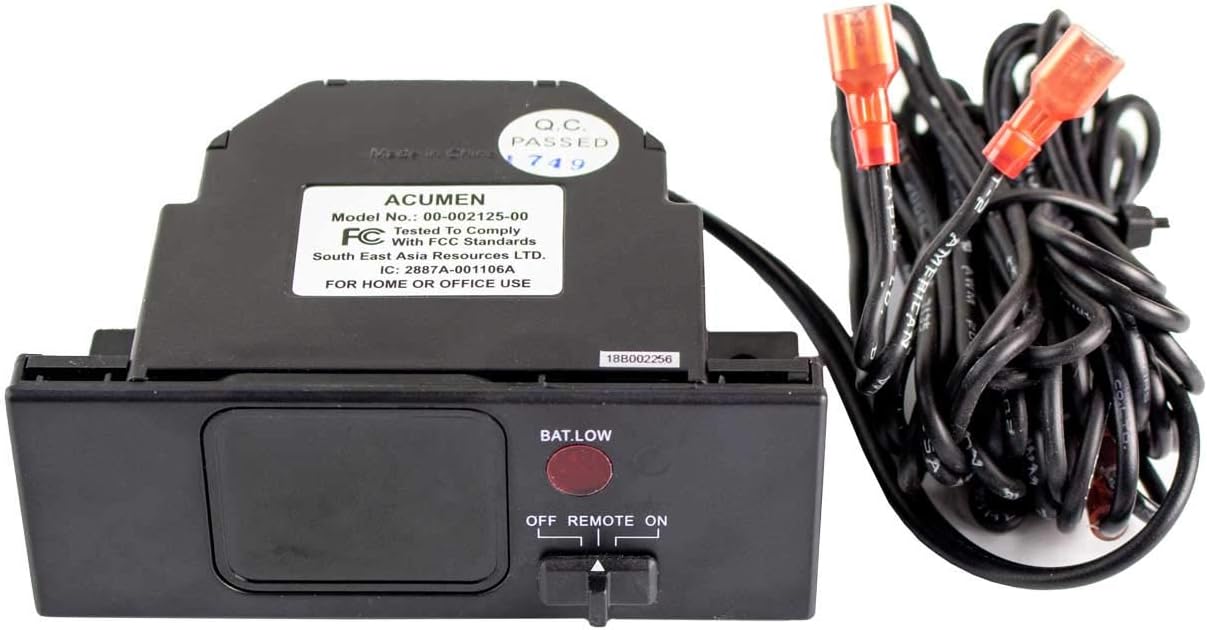
- Locate the switch on the receiver unit.
- Slide the switch to the '6hr TIMER' position to activate the timer. The fireplace will operate for 6 hours and then automatically turn off.
- Slide the switch to 'ON' for continuous operation (controlled by remote).
- Slide the switch to 'OFF' to turn off the fireplace directly from the receiver.
5. Maintenance
5.1 Battery Replacement
Replace batteries in both the remote and receiver when the low battery indicator appears or when the system becomes unresponsive.
- Remote Control: Replace three (3) AAA batteries.
- Receiver Unit: Replace four (4) AA batteries.
- Always replace all batteries at the same time with new ones of the same type.
6. Troubleshooting
| Problem | Possible Cause | Solution |
|---|---|---|
| Remote not responding / Fireplace not turning on/off | Low batteries in remote or receiver. Obstruction between remote and receiver. Receiver switch in 'OFF' position. | Replace all batteries in both units. Ensure clear line of sight. Check receiver switch is in 'ON' or '6hr TIMER' position. |
| Low battery indicator on remote or wall plate | Batteries are low. | Replace all batteries in the affected unit (remote or receiver). |
| Fireplace turns off unexpectedly | 6-hour timer activated. Low batteries in receiver. | Check if the receiver switch is set to '6hr TIMER'. Replace receiver batteries. |
| Child-Proof feature active | Child-Proof switch engaged. | Deactivate Child-Proof feature using the sequence: LONG, SHORT, SHORT, LONG, SHORT. |
7. Specifications
- Product Dimensions: 9 x 7 x 7 inches
- Item Weight: 1.3 pounds
- Remote Model Number: 00-002121-00
- Receiver Model Number: 00-002125-00
- Remote Batteries: 3 x AAA (included)
- Receiver Batteries: 4 x AA (included)
- Connectivity Technology: Infrared
- Max Number of Supported Devices: 1
- Compatible Devices: Fireplace (millivolt valve systems)
- Special Feature: Ergonomic remote design, 6-hour timer on receiver
8. Warranty and Support
For warranty information or technical support, please refer to the product packaging or contact ACUMEN customer service directly. Keep your purchase receipt for warranty claims.