
1. Introduction
The Raycop HERA AP-200 is a UVC anti-allergy and anti-bacteria vacuum cleaner designed to enhance home hygiene. This device effectively eliminates bacteria and dust mites from various household fabrics. It is suitable for cleaning mattresses, sofas, chairs, futons, crib pads, bedding, pillows, and curtains. The HERA AP-200 incorporates a patented three-step cleaning and filtration process to ensure thorough cleaning and allergen removal.
2. Product Overview
The Raycop HERA AP-200 features a lightweight and ergonomic design, making it convenient for use in various areas. It includes a removable handle for reaching difficult spots and utilizes cyclone vacuum technology for powerful suction. Key features include:
- Lightweight construction for ease of use.
- HEPA filtration system to capture fine particles.
- UVC sterilization lamp for bacteria elimination.
- Vibrating pad to dislodge dust mites and allergens.
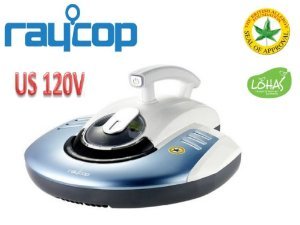
Figure 2.1: Raycop HERA AP-200 unit with its handle and main body.
The three-step cleaning process involves:
- Vibrating Pad: Shakes dust mites and allergens free from fabric surfaces.
- UV-C Sterilization Lamp: Helps eliminate bacteria from the cleaned surface.
- Powerful Vacuum with HEPA Filter: Suctions up dislodged dust and remnants, preventing their escape back into the environment.
3. Setup
Before first use, ensure all packaging materials are removed. The Raycop HERA AP-200 comes with a HEPA filter already installed or included for installation.
- Unpack the Device: Carefully remove the vacuum cleaner and all accessories from the box.
- Inspect for Damage: Check the unit for any visible damage that may have occurred during shipping.
- Handle Attachment: If the handle is not pre-attached, securely connect the removable handle to the main unit. Refer to the diagrams in the quick start guide for proper attachment.
- Power Connection: Connect the power cord to a suitable electrical outlet. This device is not cordless.
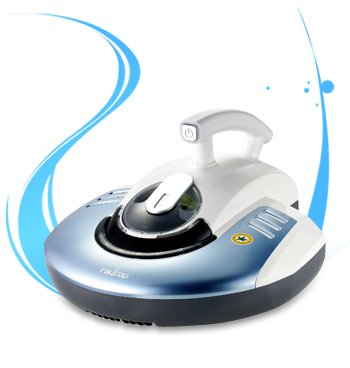
Figure 3.1: Raycop HERA AP-200 showing its design and handle.
4. Operating Instructions
The Raycop HERA AP-200 is operated via a push-button controller. Follow these steps for effective cleaning:
- Power On: Press the power button, typically located on the handle, to turn on the device. The UV-C lamp and vibrating pad will activate, and the vacuum motor will start.
- Cleaning Surface Preparation: Ensure the surface to be cleaned is dry. For best results, remove any large debris manually before using the vacuum.
- Cleaning Technique: Gently glide the vacuum cleaner over the fabric surface. Move the unit slowly to allow the vibrating pad and UV-C lamp sufficient time to act on the surface. Overlap passes slightly to ensure complete coverage.
- Target Areas: Focus on areas prone to dust mites and allergens, such as mattresses, pillows, and upholstered furniture.
- Power Off: Once cleaning is complete, press the power button again to turn off the device.

Figure 4.1: Raycop HERA AP-200 being used on a carpeted surface.
5. Maintenance
Regular maintenance ensures optimal performance and longevity of your Raycop HERA AP-200.
- Dust Box Emptying: Empty the dust box after each use or when it appears full. Follow the instructions in the full manual for safe removal and emptying.
- HEPA Filter Cleaning/Replacement: The HEPA filter should be cleaned regularly according to usage. Tap the filter gently to remove dust or rinse if specified by the manufacturer. Replace the HEPA filter periodically (e.g., every 6 months or as indicated by usage) to maintain filtration efficiency. Only use genuine Raycop replacement filters.
- UV-C Lamp Maintenance: The UV-C lamp has a limited lifespan. If the lamp indicator suggests replacement or if you notice reduced effectiveness, consult the full manual for replacement procedures. Ensure the device is unplugged before attempting any lamp maintenance.
- Exterior Cleaning: Wipe the exterior of the unit with a soft, damp cloth. Do not use harsh chemicals or abrasive cleaners.
6. Troubleshooting
If you encounter issues with your Raycop HERA AP-200, refer to the following common troubleshooting tips:
- Device Not Turning On:
- Ensure the power cord is securely plugged into a working electrical outlet.
- Check for any tripped circuit breakers.
- Reduced Suction Power:
- Empty the dust box. A full dust box can significantly reduce suction.
- Check the HEPA filter for excessive dust buildup and clean or replace it if necessary.
- Inspect the suction inlet for any blockages.
- UV-C Lamp Not Illuminating:
- Ensure the device is powered on and correctly positioned on the surface (some models have safety features that prevent the lamp from activating if not properly placed).
- The lamp may have reached the end of its lifespan and requires replacement.
- Unusual Noises:
- Turn off and unplug the device. Check for any foreign objects caught in the brush roll or suction path.
For persistent issues not resolved by these steps, please contact customer support.
7. Specifications
| Feature | Specification |
|---|---|
| Brand | Raycop |
| Model Number | AP-200 |
| Special Feature | HEPA, Lightweight |
| Filter Type | HEPA Filter |
| Included Components | HEPA Filter |
| Cordless | No |
| Form Factor | Cannister |
| Noise Level | 75 Decibels |
| Controller Type | Push Button |
| Item Weight | 2 kg 700 g |
| Item Dimensions (LxWxH) | 34 x 19.4 x 38 Centimeters |
8. Warranty and Support
The Raycop HERA AP-200 comes with a manufacturer's warranty. Please refer to the warranty card included with your product for specific terms, conditions, and duration. For technical support, replacement parts, or warranty claims, please contact Raycop customer service through their official website or the contact information provided in your product packaging.
For further assistance, visit the Raycop official website.