
1. Introduction
This manual provides instructions for the proper setup, operation, and maintenance of your Technics SL-PD887 5-Disc Rotary CD Player Changer. Please read this manual thoroughly before using the unit to ensure optimal performance and longevity.

This image shows the Technics SL-PD887 CD Player Changer, providing a general overview of the unit's front panel and design.
2. Setup
2.1 Unpacking
Carefully remove the Technics SL-PD887 CD Player from its packaging. Ensure all packing materials are removed. The package should contain the CD Player unit itself.
2.2 Placement
Place the CD player on a stable, level surface away from direct sunlight, heat sources, and excessive dust or vibration. Ensure adequate ventilation around the unit. The unit dimensions are approximately 17 x 16 x 5.5 inches.
2.3 Connections
Connect the audio output of the SL-PD887 to your amplifier or receiver using appropriate cables. The unit supports RCA, Coaxial, and Optical connectivity. Use the 'LINE OUT' RCA jacks for analog audio connection. For digital audio, use either the Coaxial or Optical digital output.
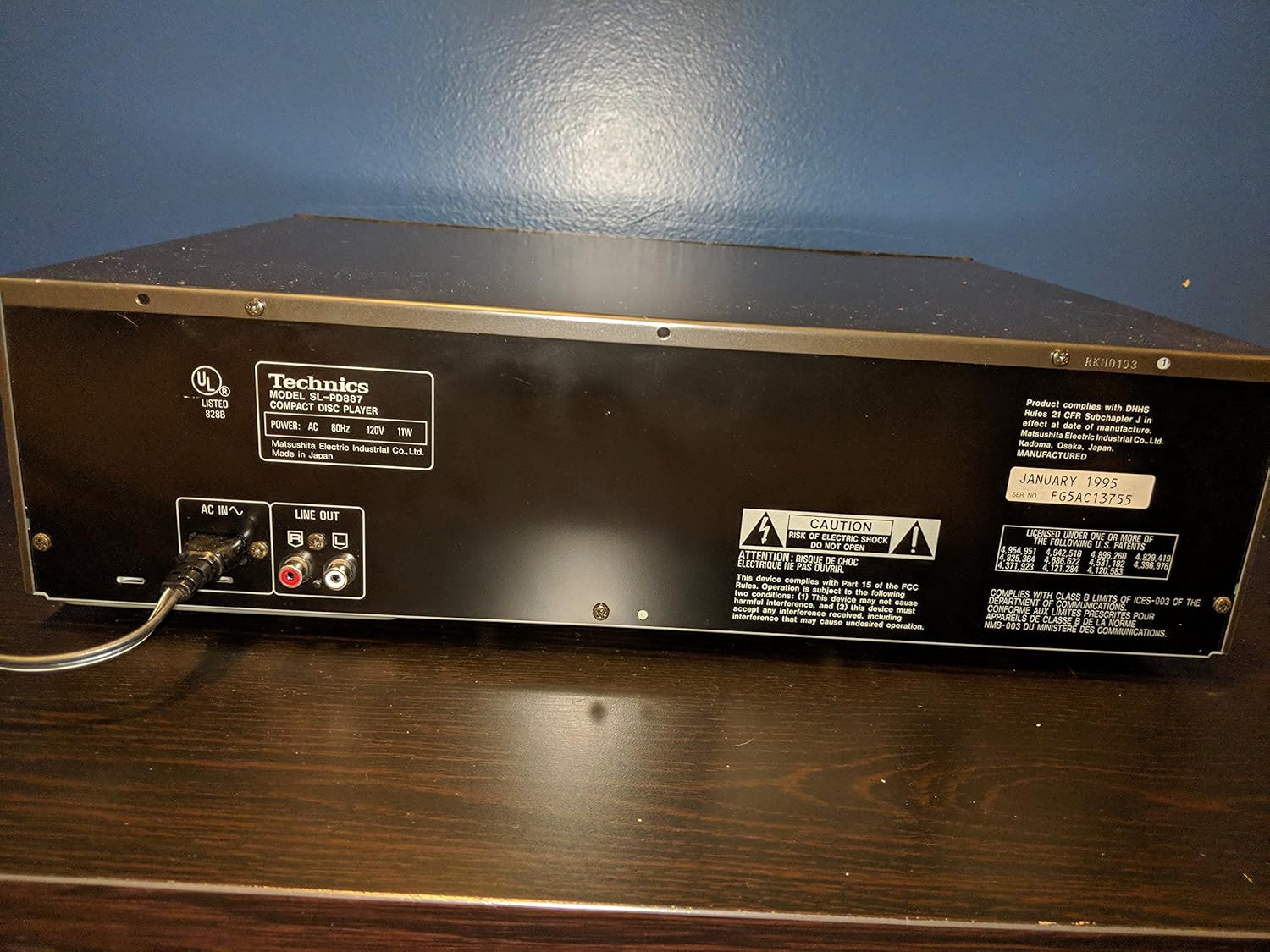
This image displays the rear panel of the Technics SL-PD887 CD Player, highlighting the AC power input, analog RCA audio outputs (LINE OUT), and digital audio output ports (Coaxial and Optical). Ensure correct cable connections to your audio system.
2.4 Power
After all audio connections are made, connect the power cord to the 'AC IN' input on the rear of the unit, then plug it into a standard electrical outlet (AC 60Hz, 120V).
3. Operating Instructions
3.1 Loading Discs
Press the 'OPEN/CLOSE' button on the front panel to open the disc tray. The rotary changer will present the disc slots. Place up to five compact discs into the individual disc trays with the label side facing up. Press 'OPEN/CLOSE' again to close the tray.
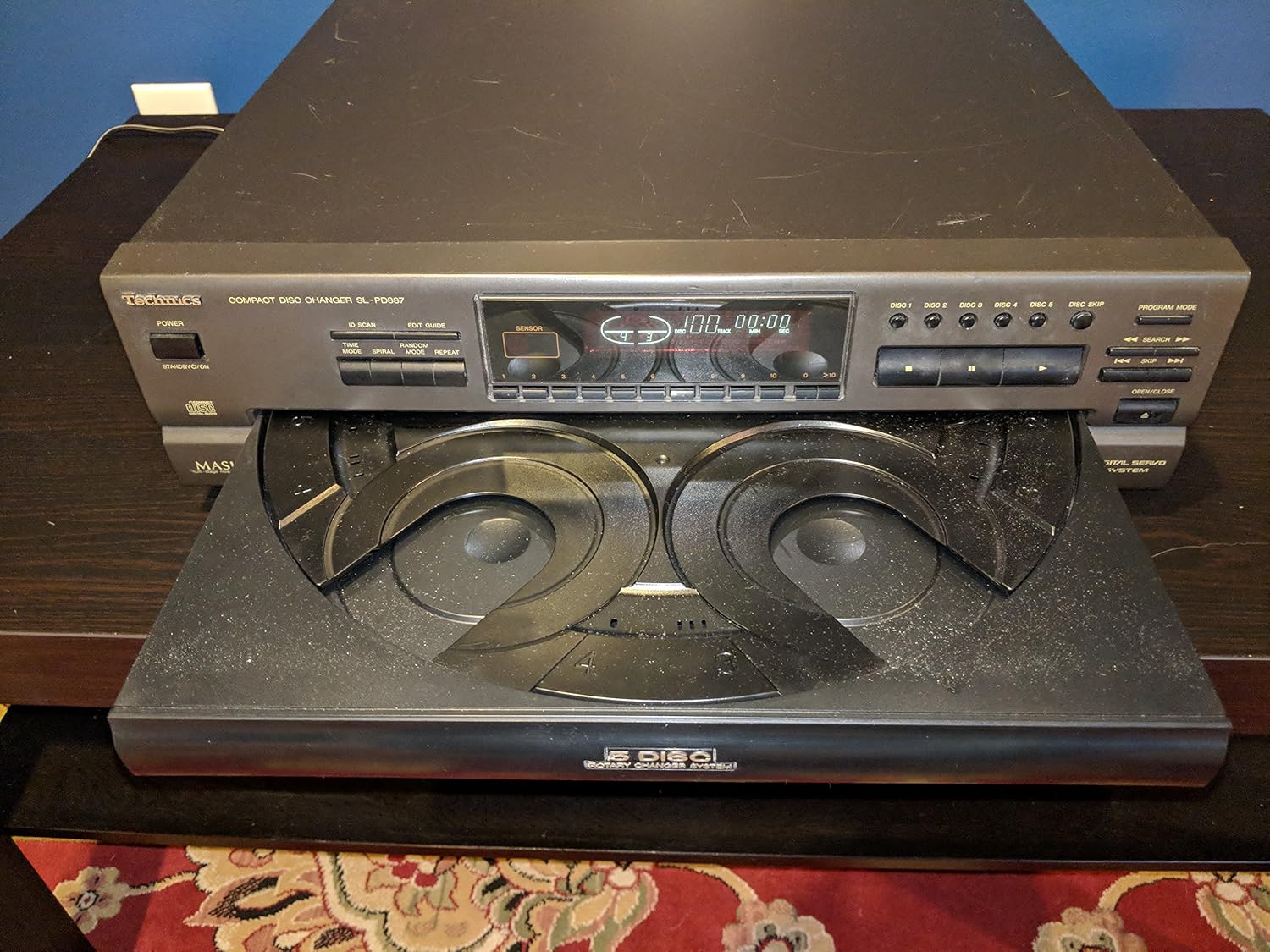
This image shows the front of the Technics SL-PD887 CD Player with its 5-disc rotary changer tray extended. Discs are placed into the individual slots for playback. The control panel with various buttons is visible above the tray.
3.2 Basic Playback
Press the 'POWER' button to turn on the unit. Select a disc using the 'DISC 1-5' buttons. Press the 'PLAY' button to start playback. Use the 'PAUSE' button to temporarily stop playback and 'STOP' to end it. The 'SKIP' buttons allow you to move to the next or previous track.
3.3 Programming Playback
Refer to the front panel controls for advanced features such as program play, random play, and repeat functions. Consult the labels on the buttons for specific operations.
4. Maintenance
4.1 Cleaning the Unit
Wipe the exterior of the unit with a soft, dry cloth. For stubborn dirt, use a slightly damp cloth and then dry thoroughly. Do not use abrasive cleaners, solvents, or chemical sprays, as these can damage the finish.
4.2 Disc Care
Handle discs by their edges. Keep discs clean and free of dust, fingerprints, and scratches. Use a soft, lint-free cloth to wipe discs from the center outwards if cleaning is necessary.
5. Troubleshooting
- No Power: Ensure the power cord is securely connected to both the unit and a working electrical outlet. Verify the power button is pressed.
- No Sound: Check all audio connections between the CD player and your amplifier/receiver. Ensure the amplifier/receiver is set to the correct input source and its volume is adjusted appropriately. Confirm that the CD player is playing a disc.
- Disc Not Playing/Skipping: Ensure the disc is clean and free of scratches or damage. Verify the disc is loaded correctly with the label side up. Try a different disc to determine if the issue is with the disc or the player. Clean the lens if necessary (refer to professional service).
- Disc Tray Not Opening/Closing: Check for any obstructions in the disc tray mechanism. Ensure the unit is powered on.
For persistent issues, contact a qualified service technician.
6. Specifications
| Feature | Specification |
|---|---|
| Model Number | SL-PD887 |
| Package Dimensions | 17 x 16 x 5.5 inches |
| Item Weight | 9.78 pounds |
| Connectivity Technology | RCA, Coaxial, Optical |
| Number Of Discs | 5 |
| Included Components | CD Player |
| Manufacturer | Technics |
| Date First Available | November 26, 2012 |
| Color | Silver |
| Audio Jack | 3.5mm Jack |
7. Warranty Information
Warranty information for the Technics SL-PD887 CD Player Changer is not provided in this manual. Please refer to the original purchase documentation or contact Technics customer support for details regarding warranty coverage.
8. Support
For technical assistance, service, or further inquiries regarding your Technics SL-PD887 CD Player Changer, please contact Technics customer support or the retailer from whom the product was purchased. Keep your model number (SL-PD887) and purchase date available when seeking support.


